


If you’re looking for an AI outreach tool in 2026, you’ve probably noticed one thing.
Almost every sales platform now has an AI feature.
And for good reason.
AI is changing how sales teams find prospects, manage outreach, and move deals forward.
The right tool can help you:
- Automate repetitive tasks
- Discover new leads
- Personalize cold emails
- Prioritize the right opportunities
- Get sharper insight into your sales process
But with so many tools making similar promises, the real question is simple:
Which AI outreach tool actually works best for your sales campaigns?
I tested and reviewed 10 of the best AI sales tools to find the platforms that truly match how modern sales teams operate in 2026.
Let’s dive into the details.
Best AI Outreach Tools – TOC
TL;DR: Best AI Outreach Tools at a Glance
After testing and comparing dozens of AI outreach tools and platforms for 2026. These are the ones that made the cut. Each AI outreach tool earned its spot for doing one thing better than everything else I tried.
| Tool | Best For | Standout AI Capability | Channels | Starting Price |
|---|---|---|---|---|
| Saleshandy Most Recommended | All-in-one prospecting + outreach |
|
Email, Calls, LinkedIn, WhatsApp, Tasks | $25/mo |
| Instantly | High-volume cold email, unlimited accounts |
|
Email, LinkedIn | $37.60/mo |
| Apollo.io | Sales intelligence + outreach with free tier |
|
Email, Calls | $49/seat/mo |
| Reply.io | Autonomous AI SDR |
|
Email, LinkedIn, SMS, WhatsApp | $49/user/mo |
| Smartlead | Agency deliverability at scale |
|
$32/mo | |
| Lemlist | Creative multichannel personalization |
|
Email, LinkedIn, Phone, WhatsApp, SMS | $55/user/mo |
| Outreach | Enterprise sales engagement |
|
Email, Phone, LinkedIn | Custom |
| Klenty | Structured multi-touch cadences |
|
Email, Phone, LinkedIn, SMS | $50/mo |
| Salesloft | Revenue orchestration + forecasting |
|
Email, Phone, LinkedIn, SMS | Custom |
| Lavender | AI email coaching + optimization |
|
Gmail, Outlook | Free; $29/mo |
AI Copilots vs. Autonomous AI Agents: What’s the Difference?
Before comparing these tools, it helps to understand the type of AI you’re using.
Most AI outreach tools fall into two categories: AI copilots and autonomous AI agents. Both automate sales outreach, but they differ in how much control they have.
1. AI Copilots (Assistants)
AI copilots work alongside you in your outreach workflow.
They help you find leads, write emails, create sequence variations, personalize messages, and improve deliverability. However, they don’t make decisions for you.
You define the ICP, build the strategy, and approve what gets sent. The AI simply handles repetitive tasks while you stay in control.
Tools like Saleshandy, Instantly, Apollo, Lemlist, and Klenty follow this approach.
2. Autonomous AI Agents (AI SDRs)
Autonomous AI agents do more than assist—they execute parts of the sales process on their own.
You give them a goal, and they find prospects, analyze signals, build sequences, qualify leads, and even respond to messages with minimal human input.
Reply.io’s Jason AI is a good example, while Salesloft and Outreach are also adding AI agent capabilities.
These agents save more time but require more trust. If the ICP or messaging is wrong, mistakes can happen before you catch them.
For most teams in 2026, AI copilots remain the safer choice because they improve efficiency while keeping humans in control of important sales decisions.
How I Tested These AI Outreach Tools
Here is how I evaluated each AI outreach tool and what I scored it on.
1. My Testing Setup
Every tool went through the same outbound workflow:
- Built two ICP profiles: B2B SaaS companies with 200–500 employees and agencies selling outbound services
- Created prospect lists targeting VP Sales and VP Marketing roles
- Tested the full process: find ICP → enrich contacts → create AI sequences → launch outreach → monitor deliverability → manage replies
- Tested edge cases like missing LinkedIn profiles, outdated job titles, and companies with limited online presence
- Measured how much editing AI-generated content needed before it was ready to send
Here are the areas that mattered most during evaluation.
2. AI Capabilities and Personalization
Every outreach tool claims AI in 2026. I looked at what the AI actually delivers.
- Does it create full sequences or just suggest copy?
- Does it personalize using real prospect data or rely on basic placeholders?
- Could I send the output to a VP after a quick review?
The more usable the first draft, the more time AI for sales emails saves.
3. Data Accuracy, Quality, and Coverage
A database with 852M+ contacts means little if the data is outdated. I evaluated how each platform sources, verifies, and updates contact information, with extra attention to global coverage where data quality often varies.
4. Multi-Channel Outreach Capabilities
Email outreach is important, but modern outreach rarely depends on one channel. I looked at which outreach tools actually automate email, LinkedIn, phone, SMS, and WhatsApp inside a single sequence.
5. CRM Integration
Outreach without CRM sync creates manual work. I evaluated native integrations with Salesforce, HubSpot, Pipedrive, and Zoho. Some ai outreach tools include a built-in CRM.
6. Deliverability and Compliance
Inbox placement is essential for successful outreach. I reviewed deliverability features like warm-up, inbox rotation, bounce detection, and domain protection, along with GDPR compliance and opt-out management.
7. User Ratings and Social Proof
I cross-referenced with G2, Trustpilot, and Reddit. A 4.8 from 4,000 reviews tells a different story than a 4.8 from 50 reviews. I considered both ratings and the quality of user feedback.
10 Best AI Outreach Tools for Sales Teams in 2026
Here is a closer look at each AI outreach tool, what it does well, where it falls short, and who it is built for.
1. Saleshandy
Saleshandy lets you launch multichannel outreach campaigns end-to-end with AI, from finding verified leads and personalizing messages to handling replies and closing deals, all in one place.
Here is how I use Saleshandy’s AI in a typical outbound workflow.
I start by opening AI Lead Finder and describing my ICP in plain language: “VPs of Sales at SaaS companies with 200 to 500 employees.”
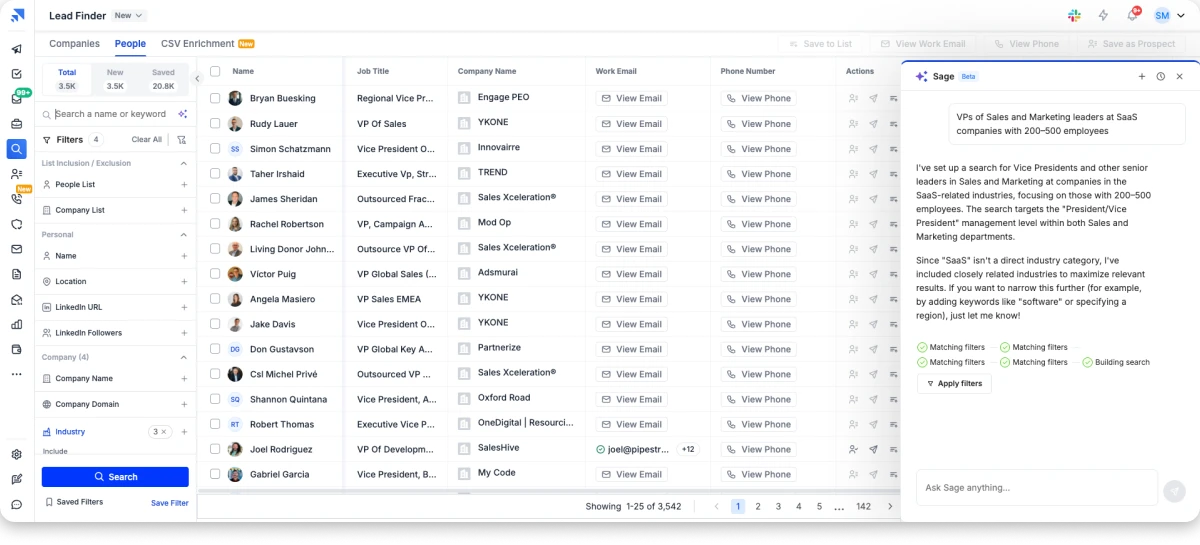
The AI searches across 852M+ verified contacts and returns a ready-to-use prospect list in under a minute.
Next, I add that list to AI Sequence Copilot along with my website URL.
The AI analyzes my offer and builds a complete multichannel sequence, including personalized cold email openers, follow-ups, LinkedIn steps, and call tasks.
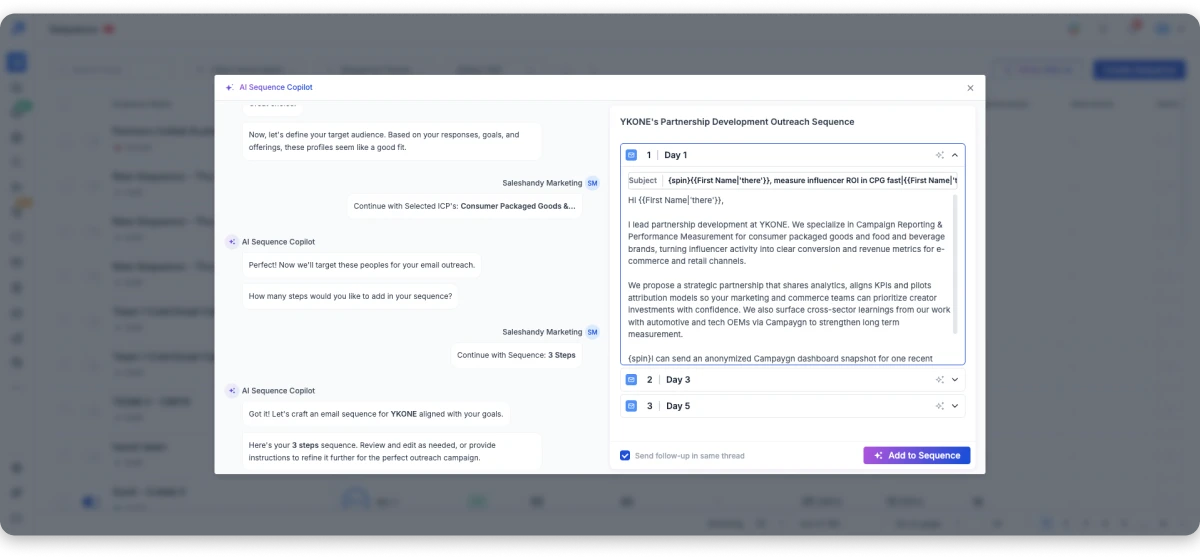
I review and edit around 20% of the copy, while the rest is ready to use.
Before sending, AI Prospect Enrichment adds personalized icebreakers to each outreach email using real data such as recent company news, hiring activity, and technology stack information.

I then connect my sending accounts, and Sender Rotation distributes sending volume across them while TrulyInbox warms them in the background.
Replies from all sending accounts appear in the Unified Inbox.
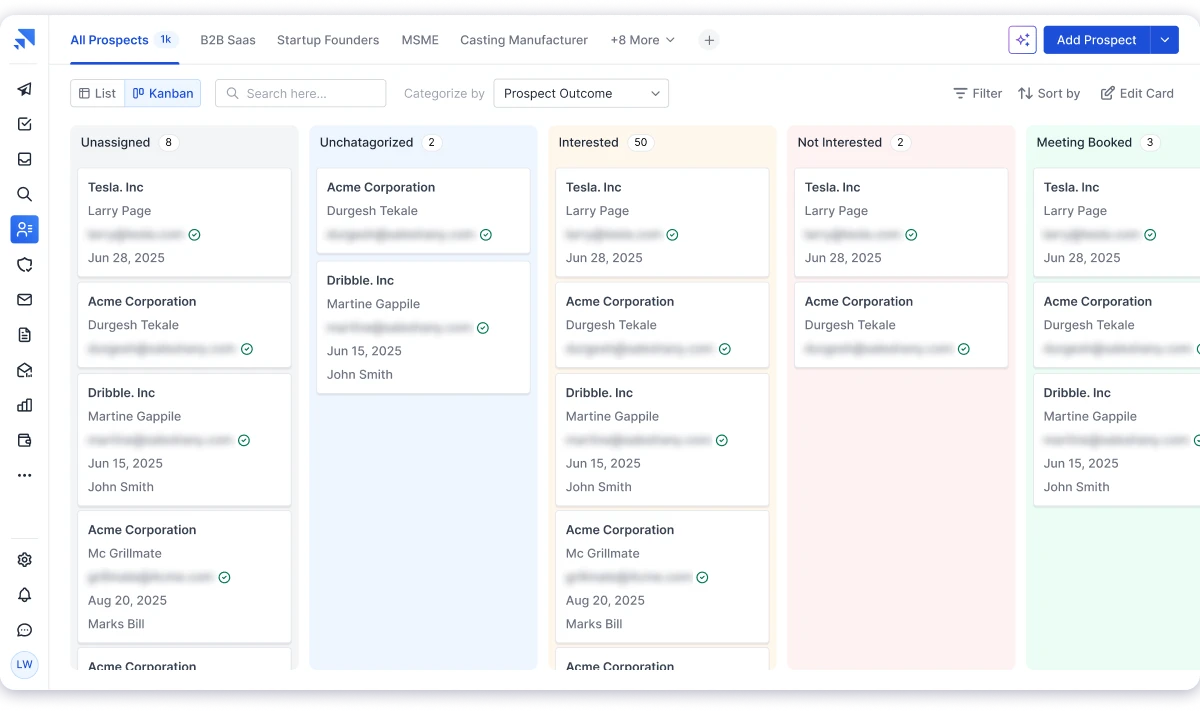
When a prospect shows interest, I move the conversation into Saleshandy’s built-in CRM and track the deal from the first reply to closing.
Where Saleshandy Shines
Here are workflows that take hours in other tools but happen inside one platform on Saleshandy.
AI Lead Finder
852M+ verified contacts across 42M+ companies. Describe your ICP in plain language with AI Prompt-to-List and get a verified prospect list in seconds. Waterfall Enrichment cross-references multiple data sources for higher accuracy.
AI Sequence Copilot
Give it your website URL and a prospect list. It builds a complete multichannel sequence with subject lines, personalized openers, follow-ups, LinkedIn steps, and call tasks. AI Variants creates A/B/C versions for testing automatically.
AI Prospect Enrichment
Adds custom icebreakers to every email outreach message using real prospect data. Company news, hiring activity, tech stack, role changes. One relevant sentence in the opener is often the difference between a 2% and 15% reply rate.
Saleshandy CRM
Built-in CRM inside the AI outreach platform. Replies move from Unified Inbox into deal stages. Notes, email history, and next steps in one place. No HubSpot or Pipedrive needed.
MCP (Model Context Protocol)
MCP lets you use Saleshandy directly from LLMs like Claude, ChatGPT, or any AI assistant. Search leads, launch sequences, check campaign performance, and manage outreach without leaving your AI workspace.
Practical Use-Cases
- Solo founder who needs to book meetings without hiring an SDR.
- Agency that wants to run client campaigns and report results from one dashboard.
- Sales team scaling outreach volume without increasing cost per meeting booked.
Pricing (annual billing):
- Outreach Starter: $25/mo
- Outreach Pro: $69/mo
Bonus read: See a detailed breakdown of all features in this Saleshandy review.
2. Instantly.ai
Instantly.ai is built for cold email automation at scale. Its AI features focus on three things: writing emails faster, improving deliverability, and automating lead routing.
The workflow starts with AI Copilot, which analyzes your website or uploaded files to create context-aware email copy, suggest replies, and recommend campaign improvements.
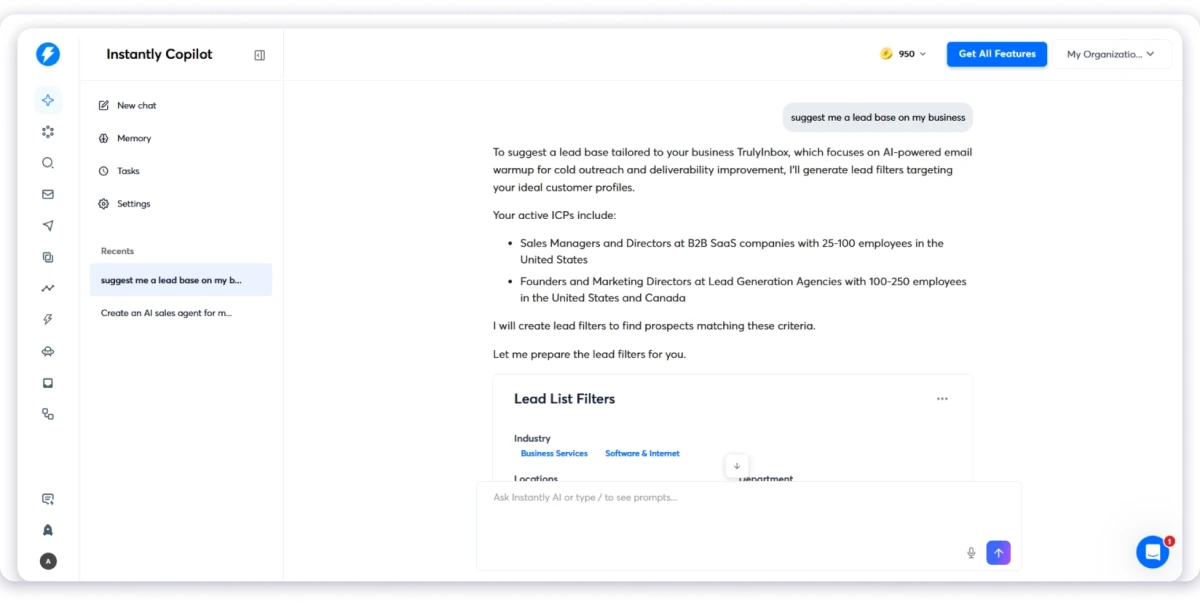
The generated drafts are useful as a starting point, but I still needed to refine the messaging to better match the target audience and brand voice.
Once campaigns are running, AI Workflows help automate what happens next.
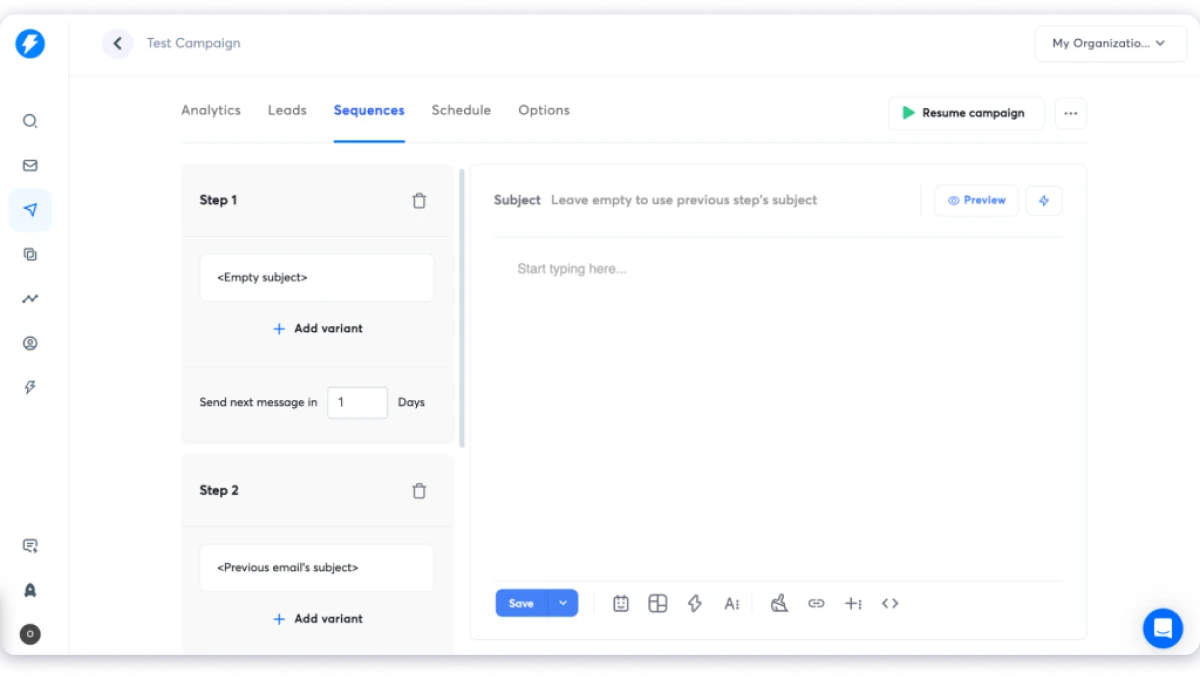
The platform is simple to use. I found campaign setup straightforward, with an easy flow for creating sequences, personalizing emails, and automating follow-ups.
Instead of manually sorting prospects, Workflows can route leads based on actions like email opens, link clicks, or booked meetings.
This keeps prospects moving through the funnel without extra manual effort.
Where Instantly stands out most is deliverability. Its Deliverability AI focuses on protecting inbox placement through features like unlimited email accounts, automated warm-up on every plan, dedicated IP rotation, and DNS configuration.
However, some advanced features require higher-tier plans or add-ons, which can increase the overall cost.
Practical Use-Cases
- Cold email agency sending 50K+ emails/mo at scale
- Growth team testing new market messaging fast
- Solo founder who needs sending infrastructure on a budget
Pros
- Unlimited email accounts and domains on every plan
- Clean, modern interface with fast onboarding
- AI Copilot for context-aware email writing, replies, and campaign optimization
- Built-in lead database and prospecting tools
- Automated warm-up included on all plans
- AI Workflows auto-route leads and trigger follow-ups based on engagement
Cons
- Pricing increases quickly with add-ons and lead data. Real cost stacks past the $37.60/mo entry
- Reporting and analytics are relatively basic compared to enterprise tools
- Lead database, CRM, and outreach are three separate subscriptions
- Primarily email-focused. LinkedIn automation is limited
Pricing
- Growth: $37.60/mo (yearly)
- Hypergrowth: $77.60/mo (yearly)
- Light Speed: $286.30/mo (yearly)
Bonus read: Explore other options in this Instantly alternatives comparison.
3. Apollo.io
Everyone recommends Apollo.io for the database. The AI sales platform with 230M+ contacts and 30M+ companies and a free plan makes it one of the easiest outbound tools to start with.
What fewer people mention is what happens when you run out of credits and need more prospect data.
Apollo is an all-in-one sales intelligence and engagement platform that combines prospecting, email sequences, calling, AI assistance, and CRM features in one workspace.
I evaluated Apollo by creating an ICP list for SaaS companies with 200 to 500 employees and VP Sales prospects.
The database results were strong, and the filters made targeting simple.
The “AI assistant” helps find leads, research companies, personalize messages, and launch campaigns. AI lead scoring also helps prioritize prospects based on buying signals.
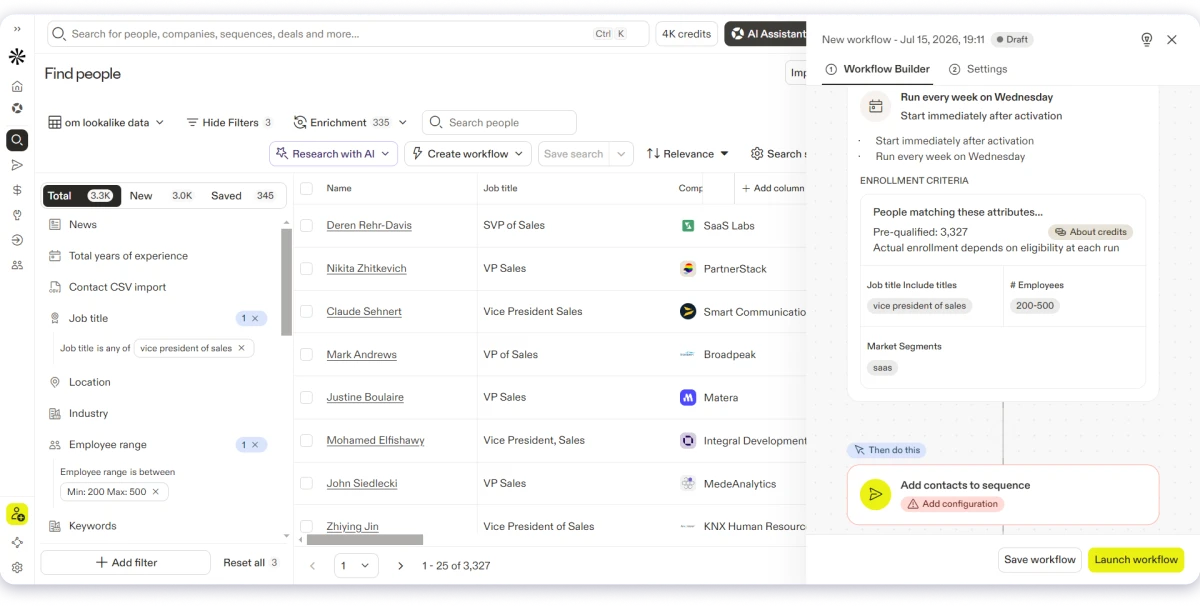
Where Apollo stands out is in convenience. You can find leads, research accounts, write emails, and launch campaigns without connecting multiple tools.
The Chrome extension is also useful. It pulls contact details while browsing LinkedIn, speeding up prospect research.
Where Apollo falls short is at scale. Per-seat pricing adds up. Mailbox limits are capped at 5 to 15 per user with no unlimited option.
And AI-generated messaging still needs manual refinement to feel personalized. Data accuracy is a recurring issue.
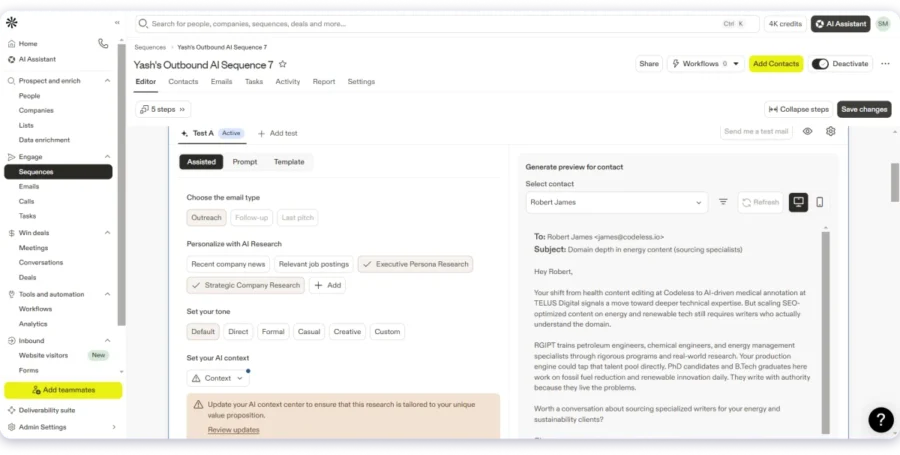
Independent audits report 65-70% email accuracy, so I would add a verification step before sending at volume.
Credit consumption is also aggressive. Enrichment, exports, and mobile numbers all burn credits that do not roll over.
That said, scaling outreach on paid plans is priced per user, and mailbox limits can restrict high-volume sending.
However, I feel Apollo is a prospecting-first tool with outreach bolted on..
But for agencies or teams running large outbound operations, the pricing model and sending limits can become a constraint.
Practical Use-Cases
- SMB starting outbound from scratch with zero budget
- SDR who lives on LinkedIn and needs instant contact data
- Revenue leader who wants prospecting and pipeline in one tab
Pros
- The fastest path from zero leads to running a campaign on this list
- 230M+ contacts and 30M+ companies with prospecting, sequencing, and CRM in one tool
- Free tier with 900 credits per year to test the full workflow
- Chrome extension saves hours of LinkedIn research
- AI lead scoring ranks prospects by buying intent automatically
- Built-in dialer with call recording on the Professional plan
Cons
- Per-seat pricing adds up fast. A 10-person team on Professional pays $790/mo
- AI capability claims often lack sourced metrics or published customer outcomes
- Sequencing analytics lags behind dedicated enterprise platforms at scale
- AI personalization feels templated without strong manual context
- Data accuracy is inconsistent for smaller companies and international markets
Pricing
- Free: $0
- Basic: $49/seat/mo
- Professional: $79/seat/mo
- Organization: $119/seat/mo
Bonus read: Deep dive into capabilities in this Apollo.io review.
4. Reply.io
Reply.io promises something most AI outreach tools don’t. It doesn’t just help you write emails. It aims to replace the work of an SDR with Jason AI.
That sounds great on paper. But it’s also one of the most expensive options. So I tested it to see if the automation is actually worth paying for.
Jason AI works in two modes. Copilot lets me review every action before it goes live. Autopilot takes over prospecting, qualification, sequence building, and meeting booking with very little input.
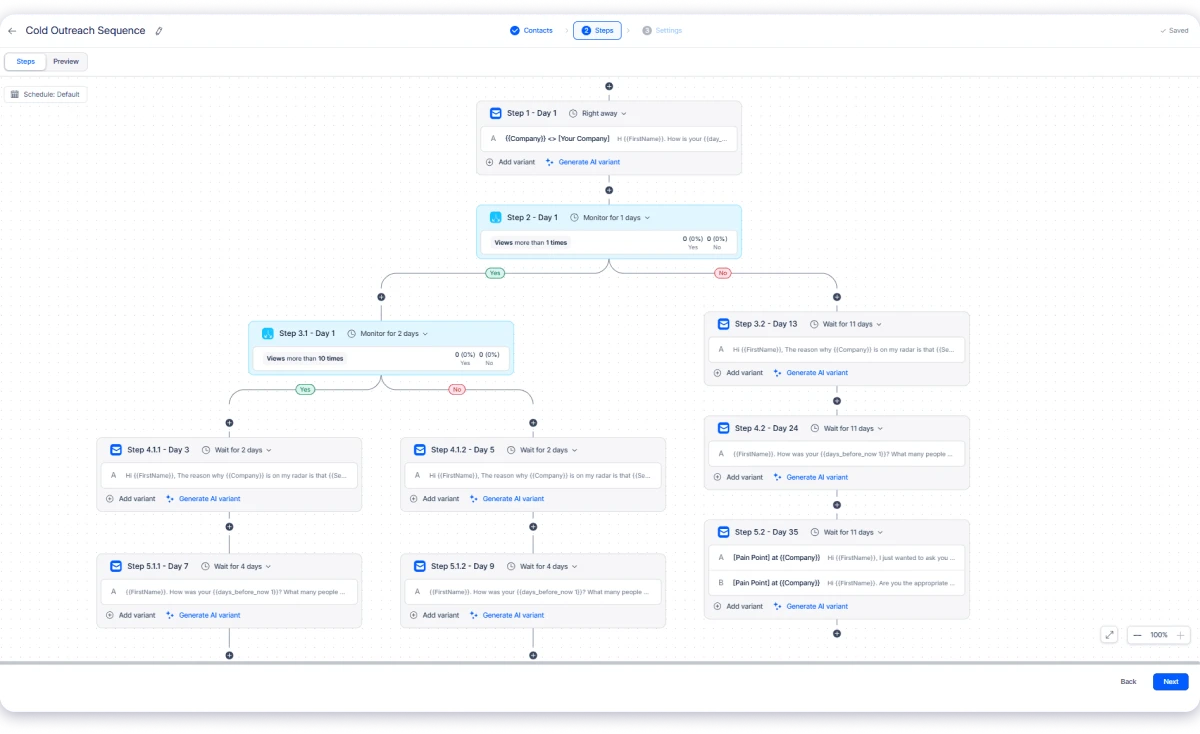
The feature that stood out was conditional sequencing. Jason doesn’t send the same follow-up to every prospect.
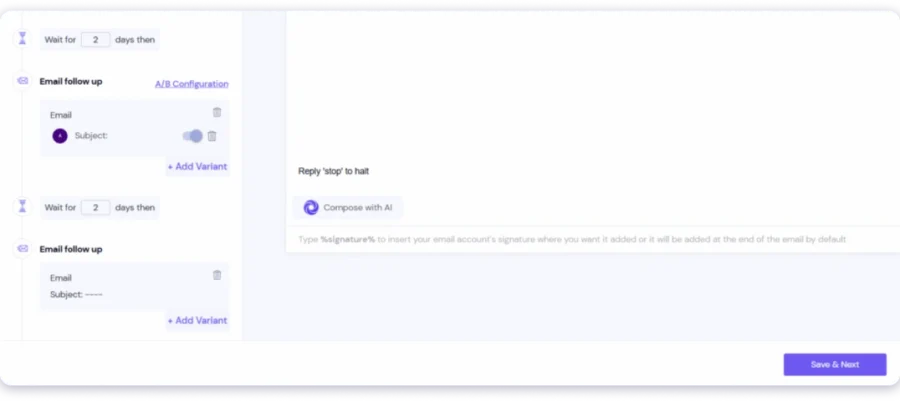
If someone opens an email but doesn’t reply, it switches to LinkedIn.
OR if an email bounces, it can move the conversation to WhatsApp. Every prospect follows a different path based on their actions.
I also liked the personalization. Jason pulls context from LinkedIn, company websites, and public data to write more relevant emails.
It uses details like job role, company news, and hiring activity to tailor each message.
Reply handling is another strength. Jason can categorize replies, answer common questions, handle simple objections, and even book meetings through Google Calendar or Calendly.
I could review every response in Copilot mode or let it run automatically once I was confident in the quality.
The biggest downside is the price. Jason AI starts at around $500/month as a separate add-on, and costs increase as your team grows.
I also found that AI-generated messages still needed editing before they felt genuinely personal.
However, Reply.io is one of the few platforms that comes close to an AI SDR. If your goal is affordable cold email at scale, there are better-value alternatives.
Practical Use-Cases
- More leads than SDR capacity, where Jason AI handles prospecting, qualification, and outreach on autopilot.
- Lean startup that needs meetings booked on autopilot
Pros
- Jason AI SDR handles prospecting, qualification, and meeting booking autonomously
- Multichannel sequences including WhatsApp and SMS
- Unlimited mailboxes with built-in warm-up on paid plans
- The UI is clean, intuitive, and fast to learn
- Built-in safeguards help keep your domain reputation intact
Cons
- No proprietary intent data panel (uses partner-aggregated signals only)
- No conversation intelligence for coaching AI SDR patterns
- Per-seat pricing on the Multichannel plan scales with headcount
- Email quality gets formulaic at scale with fully autonomous output
- Credit-based data access can get expensive at high volume
Pricing
- Email Volume: $159/mo
- Multichannel: $89/user/mo
- Jason AI SDR: ~$500/mo
Bonus read: Compare other options in this Reply.io alternatives guide.
5. Smartlead
Smartlead.ai is an outbound platform built for agencies managing multiple client campaigns simultaneously.
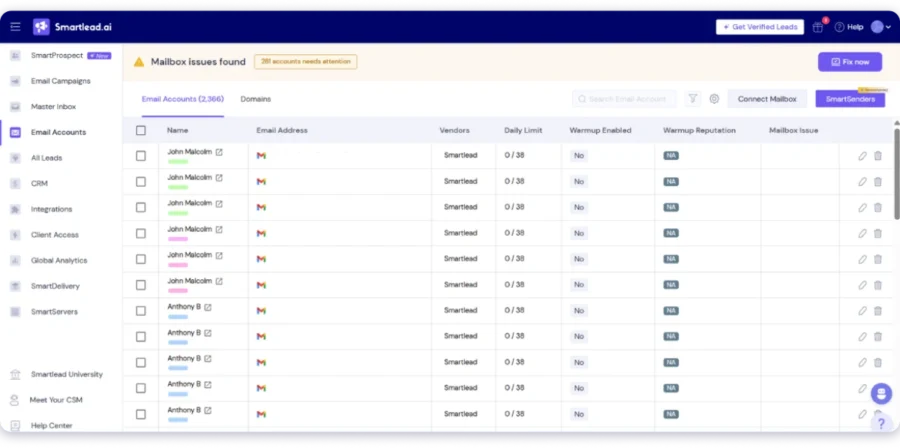
It focuses on deliverability, sender reputation, and multi-sender management with unlimited mailboxes on every plan.
Every plan includes unlimited mailboxes, automated warm-up, and dedicated-tenant infrastructure protecting each client’s sender reputation.
I tested SmartAssistant, described my campaign, and it used my real account data immediately.
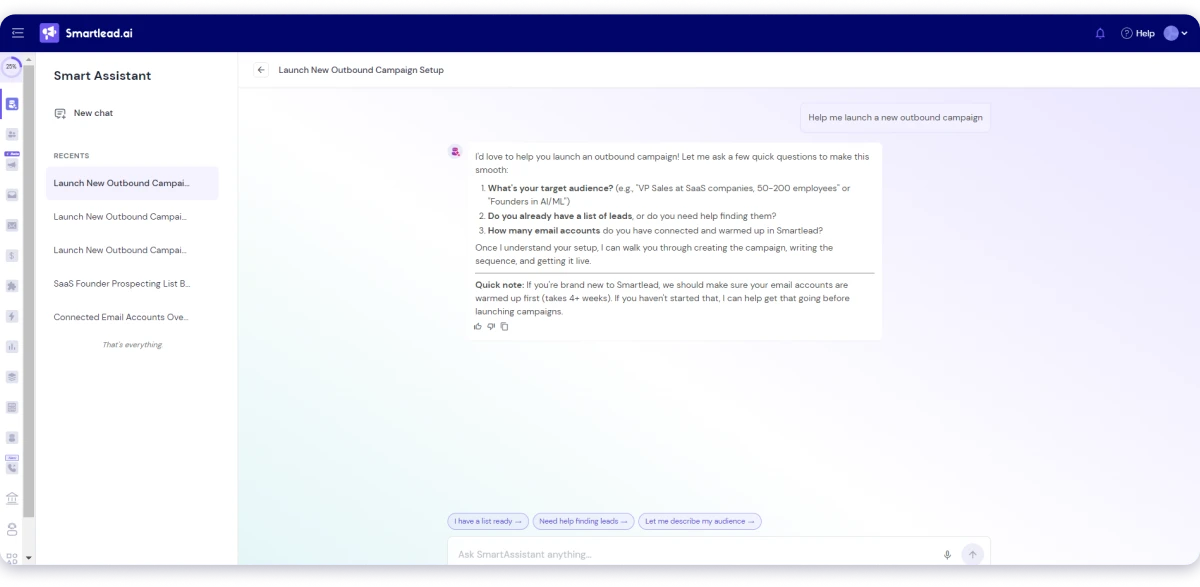
It wrote the outreach sequence, added personalization variables, imported leads, and configured the schedule.
After my approval, it launched the campaign without leaving the conversation.
SmartDelivery was the second feature that really impressed me during testing. It checks inbox placement, scores emails against SpamAssassin, and monitors 400+ blacklists. Agencies managing many client accounts will appreciate that level of deliverability visibility.
The biggest limitation is equally clear after spending time inside the platform. Smartlead is built for email, not multichannel outreach.
There is no LinkedIn automation, calling, or complete prospecting database.
If cold email deliverability matters most, Smartlead is an easy recommendation for agencies. If you want multichannel outreach, another platform will fit your workflow better.
Practical Use-Cases
- Cold email agency managing 20+ client accounts
- High-volume sender scaling past 50 mailboxes
- Operator who wants to automate repetitive outbound workflows
Pros
- Dedicated-tenant infrastructure isolates sender reputation per client
- Unlimited mailboxes with no per-account fees on every plan
- SmartDelivery tests inbox placement, scores content, and monitors 400+ blacklists
- SmartAgents automate outbound with plain language triggers
- Sub-account management built for agencies from the ground up
Cons
- No B2B contact database (SmartProspect is a small earned-credit feed: 2K verified emails on Base, 170K on Prime)
- No intent signals or conversation intelligence
- Agent scope limited to outbound execution (no deal-stage or relationship context)
Pricing
- Base: $32/mo (yearly)
- Pro: $78/mo (yearly)
- Unlimited Smart: $144/mo (yearly)
- Unlimited Prime: $315/mo (yearly)
Bonus read: See how it stacks up in this Smartlead alternatives comparison.
6. Lemlist
Lemlist is a multichannel outreach platform that combines email, LinkedIn, phone, WhatsApp, and SMS in one sequence.
What makes Lemlist different is how its AI handles the entire campaign workflow.
AI agents research leads, generate personalized first lines, clean contact data, and build multichannel sequences from a short brief.

This email outreach platform has a 600M+ contact database, so you can find prospects and launch campaigns without moving data between tools. However, the database is third-party aggregated via waterfall, not first-party verified
Its AI agents help research leads, create personalized opening lines, and clean contact data automatically.
I tested Lemlist by creating a 3-step sequence using AI Sequence Generator from a short campaign brief.
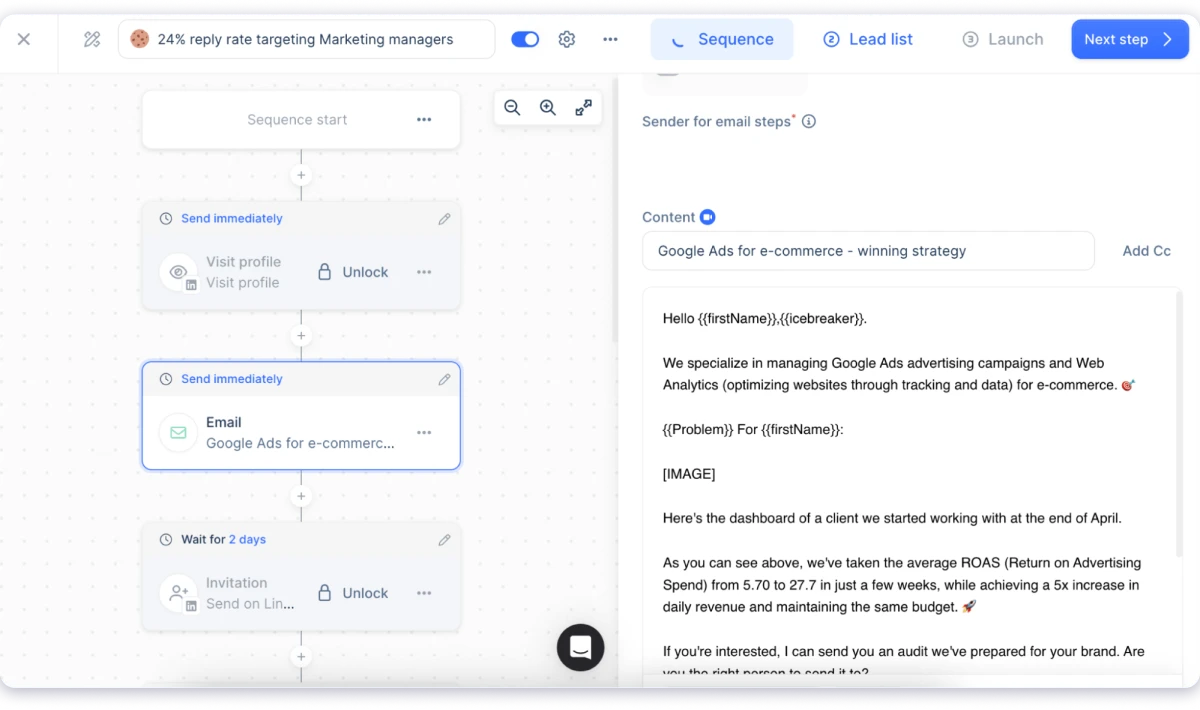
I could use dynamic variables, custom images, landing pages, and AI-generated icebreakers to make messages more relevant.
The visual personalization feature stood out the most. Lemlist can add prospect names, company logos, and custom graphics inside email images, creating a level of personalization that most AI outreach tools do not offer.
Lemwarm also worked smoothly for warming up multiple inboxes and keeping sending health in check.
The limitation is pricing. A 5-person team on Email Pro runs $275/month. It gets expensive as teams grow, and AI credits for enrichment and verification can run out with heavy usage.
Lemlist is best for teams that focus on quality visual personalization, which is also creative but time-consuming to set up for each campaign. It works best for teams that invest in quality over volume.
Practical Use-Cases
- Creative outbound team competing on email personalization
- Multichannel team running email + LinkedIn + phone in one sequence
- Recruiter or consultant prospecting a niche audience
Pros
- 600M+ lead database built directly into the platform
- Visual personalization inserts names and logos into email graphics at scale
- AI Variables write custom icebreakers based on enrichment data
- 5 channels in one sequence: email, LinkedIn, phone, WhatsApp, SMS
- AI Sequence Generator builds campaigns from a brief
- Free plan available for testing
Cons
- Per-seat pricing and credit consumption add up fast with heavy use
- Lead database quality gets mixed feedback for niche and regional markets
- Visual personalization setup is time-consuming per campaign
- No unlimited mailbox option. Inbox scaling limited by plan tier
Pricing
- Email Starter: $55/mo
- Multichannel Expert: $87/user/mo
- Enterprise: Custom
Bonus read: Compare other options in this Lemlist alternatives guide.
7. Outreach.io
Outreach.io is built for enterprise sales teams with 50+ reps managing complex, multi-stakeholder deals.
The platform combines email, phone, and LinkedIn tasks with sequencing, pipeline management, and deal health tracking. Its sequencing engine and Salesforce integration are more advanced than most tools built for smaller teams.
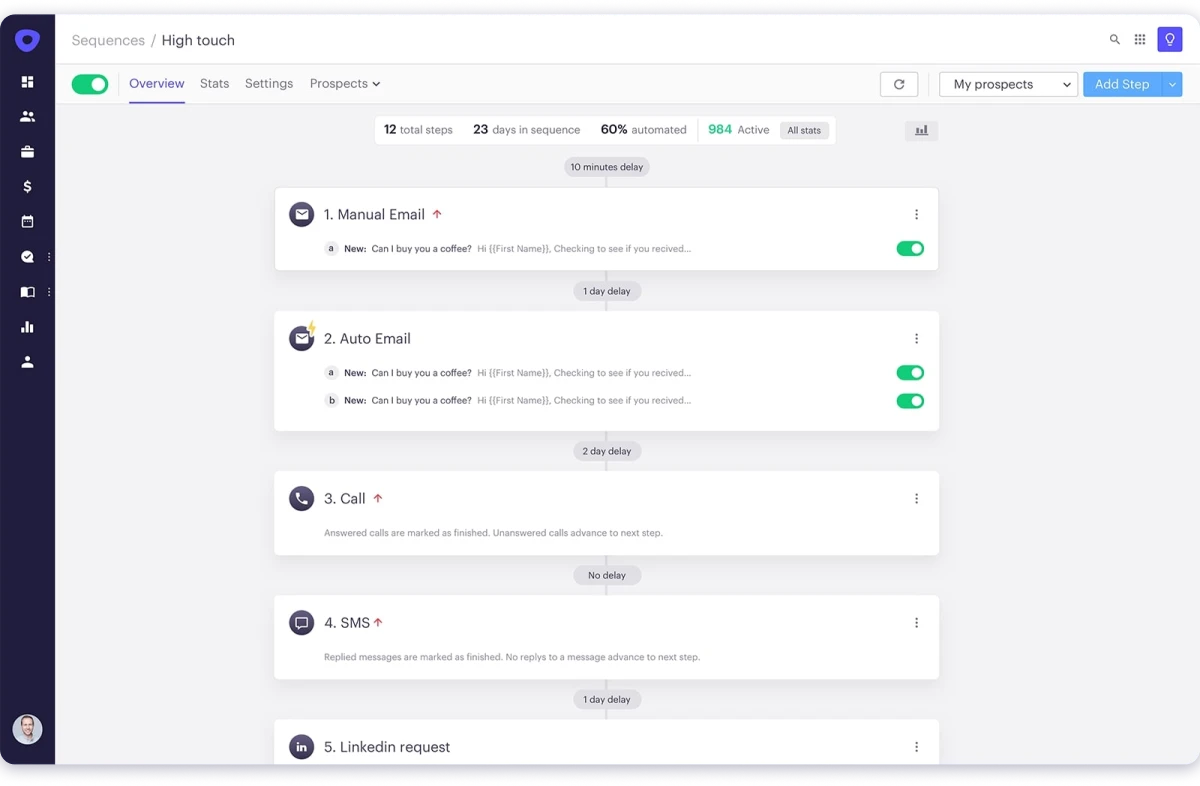
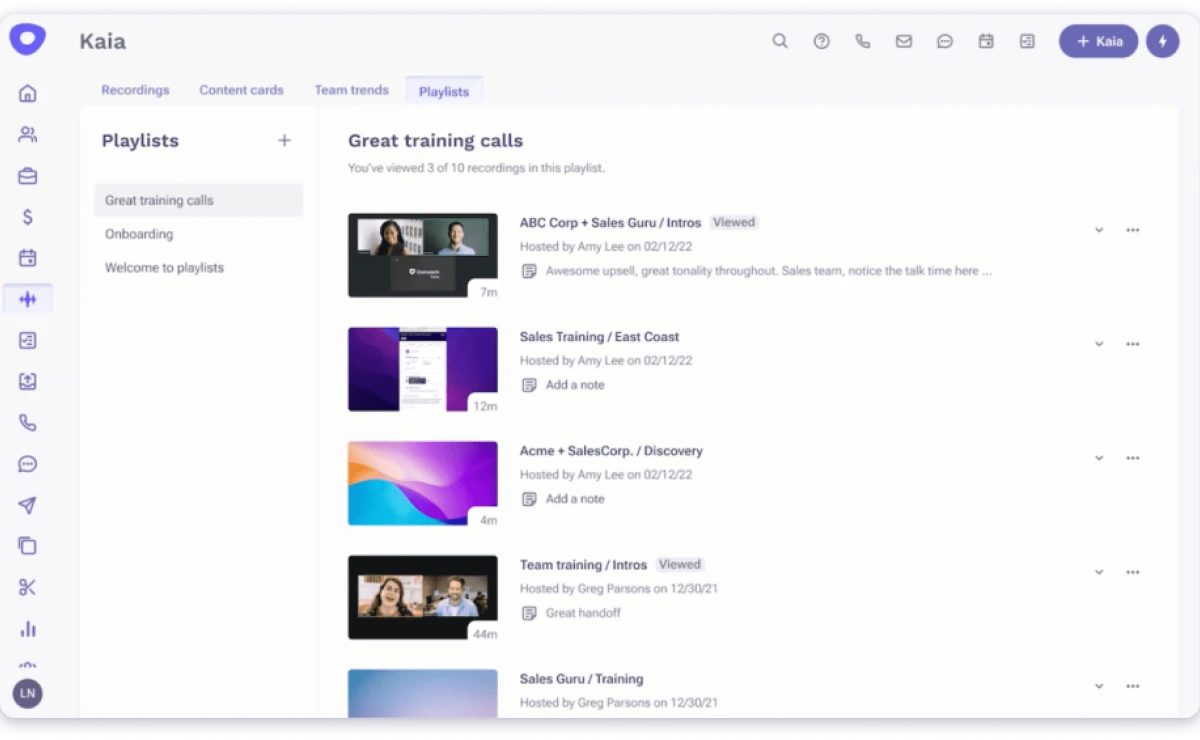
The feature that stood out most is Kaia AI. When I tested it, it felt far beyond basic cold email automation.
I could manage sequences, track accounts, analyze conversations, and monitor deals from one system.
Kaia AI provides real-time call coaching, transcribes meetings, and highlights conversation insights that help reps improve.
AI Agents also support prospect research, personalization, and workflow automation. Instead of only sending messages, Outreach helps manage the full sales cycle from outreach to forecasting.
The main limitation is cost and complexity. Pricing is custom, with estimates usually ranging from $100 to $160+ per user/month. Setup requires RevOps support, and you need a separate data provider because Outreach does not include a built-in contact database.
Outreach is best for larger sales teams that need advanced sales execution, coaching, and pipeline visibility.
Practical Use-Cases
- Enterprise sales org standardizing processes across 50+ reps
- Sales manager coaching SDRs with real-time call data
- RevOps leader managing complex multi-stakeholder deals
Pros
- Most established enterprise sales engagement platform with deep Salesforce integration
- Kaia AI provides real-time coaching during live calls
- Pipeline inspection and deal health scoring across the full funnel
- AI Agents draft outreach from past conversations
- Mutual action plans align sellers and buyers on next steps
- Mature sequencing engine trusted by large sales organizations
Cons
- No built-in B2B contact database. Requires a separate data vendor
- Custom pricing. Most estimates range $100 to $160+/user/mo
- Setup requires RevOps involvement to configure properly
- Not designed for small teams or solo founders
Pricing
Custom pricing (Core, Plus, Pro tiers). No public pricing available.
8. Klenty
Klenty sits between budget cold email tools and enterprise sales platforms. It stands out because it combines multichannel outreach with AI call coaching, a feature most AI outreach tools do not offer.
The platform supports multichannel cadences across email, phone, LinkedIn, and SMS.
When I tested the workflow, campaign setup felt simple, and CRM integrations with Salesforce, HubSpot, and Pipedrive synced smoothly.
The feature that stood out most was AI call coaching. I could see how it helps reps during live conversations by identifying objections, suggesting battlecards, and creating call scorecards.
AI List Builder also helped me create a targeted prospect list for email outreach in minutes.
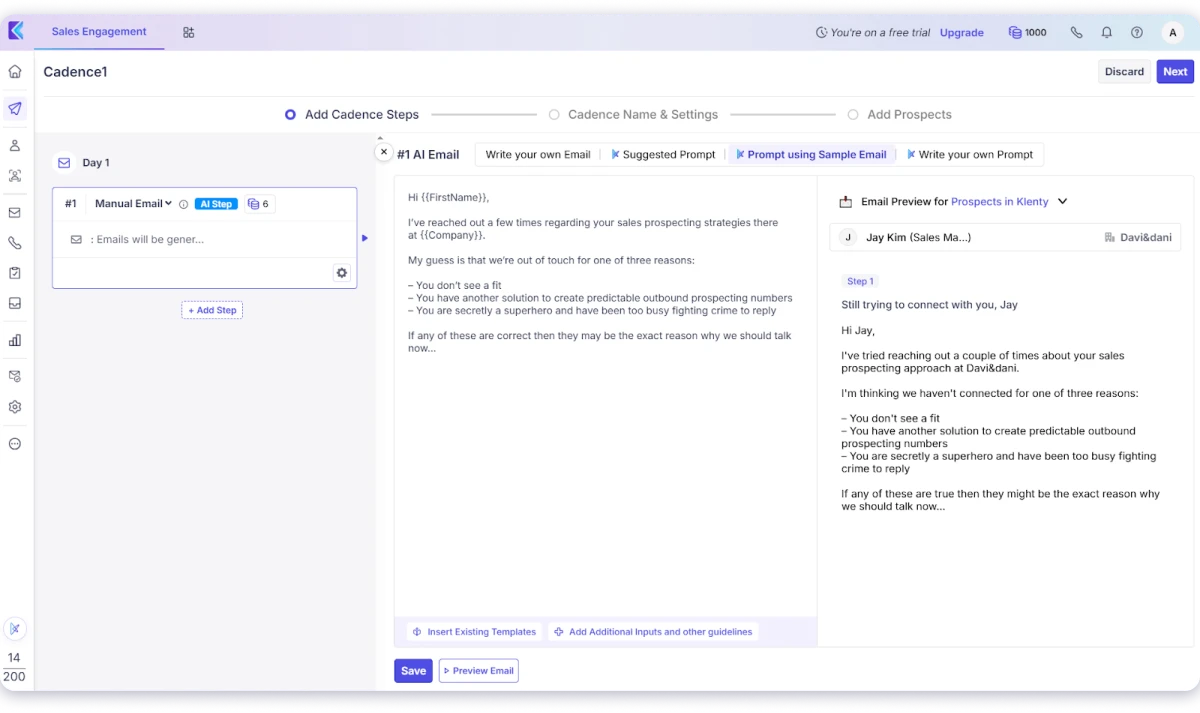
And the agentic cadences let me generate a complete cold email sequence based on my audience, product, and goals without starting from scratch.
The main limitation is pricing. The lower plan starts at $50/month but does not include CRM integration or advanced AI features.
Klenty is a strong automated outreach system for sales teams that want multichannel outreach with AI coaching without moving to a full enterprise platform.
Practical Use-Cases
- Mid-market SDR team running call-heavy outreach
- The sales team needs CRM sync without enterprise pricing
- Team lead who wants to prioritize warm prospects first
Pros
- AI call coaching with live battlecards, objection detection, and call scorecards
- AI List Builder creates targeted prospect lists for email outreach in minutes
- Agentic cadences generate complete cold email sequences based on audience, product, and goals
- Multichannel cadences: email, phone, LinkedIn, and SMS
- Native bidirectional CRM sync with Salesforce, HubSpot, and Pipedrive
- Support from human agents available
Cons
- Cold email AI is less focused on copywriting compared to Saleshandy or Snov.io
- Customization often requires reworking your initial prompt instead of editing generated text
- The UI can feel complex with a steep learning curve for beginners
- Customer support response times can take a few days
Pricing
- Startup: $50/mo
- Growth: $70/user/mo
- Pro: $100/user/mo
9. Salesloft
Salesloft merged with Clari in 2025, which changed what this platform is. It is no longer just a sales engagement tool.
It is a revenue orchestration platform that combines outreach cadences, conversation intelligence, and revenue forecasting in one system.
I tested Salesloft to see how it helps reps prioritize actions, manage deals, and improve execution.
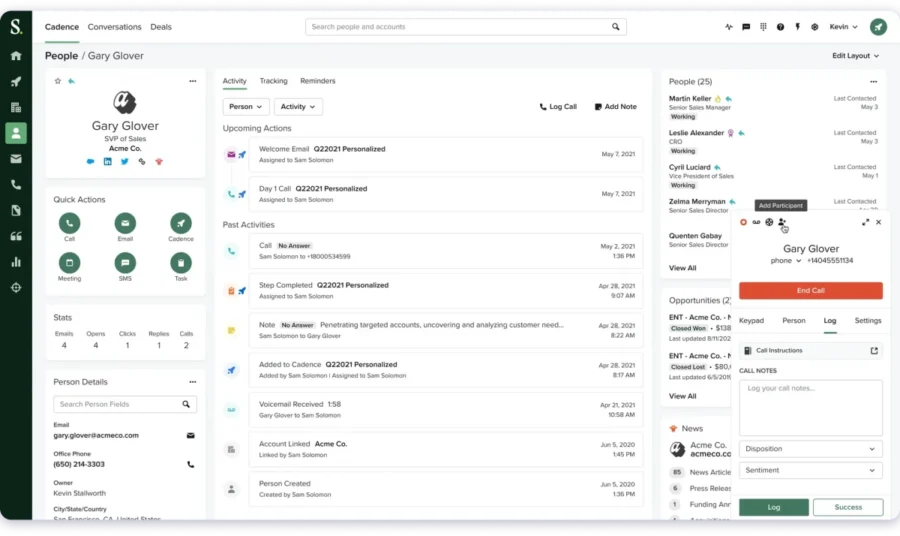
The feature that stood out most was Rhythm AI. Instead of giving reps a long task list, it ranks the next best actions using deal activity and engagement signals.
If a prospect opens a proposal multiple times or key stakeholders become more active, Rhythm AI can suggest the right follow-up timing.
Cadence management handles multichannel sequences across email, LinkedIn, calls, and SMS. I found it useful for keeping outreach organized while still allowing reps to personalize important touchpoints.
Deal intelligence was another strong area. Salesloft tracks stakeholder engagement, highlights deal risks, and gives managers visibility into where deals are slowing down.
But Salesloft does not include a prospect database, so you need another tool for contact discovery and enrichment.
It also lacks the deliverability features found in dedicated outreach platforms, such as inbox warm-up and sender rotation.
The biggest issues are cost and complexity. Pricing is custom, and setup usually requires sales operations support. Smaller teams focused on cold email may find they are paying for enterprise features they do not need.
Salesloft is best for larger sales organizations that want stronger rep execution, coaching, and pipeline visibility.
Practical Use-Cases
- Revenue leader who needs forecasting inside the engagement platform
- Sales manager coaching remote reps with benchmarked dashboards
- Enterprise team that needs daily action prioritization by deal signals
Pros
- AI helps sellers prioritize daily tasks based on deal stage and buyer activity.
- Clari integration adds stronger forecasting and revenue insights.
- Mature enterprise sequencing platform with proven adoption.
Cons
- No built-in B2B contact database; requires a separate data provider.
- Pricing is quote-based with no public plans.
- AI agent features are newer than the core platform.
Pricing
Custom pricing (Advanced and Elite tiers). No public pricing available.
10. Lavender
Lavender does not find leads or send campaigns. It helps you write better cold emails before sending them.
I tested Lavender to see whether the coaching actually improved my emails.
Lavender works as a Gmail and Outlook extension. It scores every email in real time. It checks tone, readability, length, mobile formatting, spam triggers, and personalization.
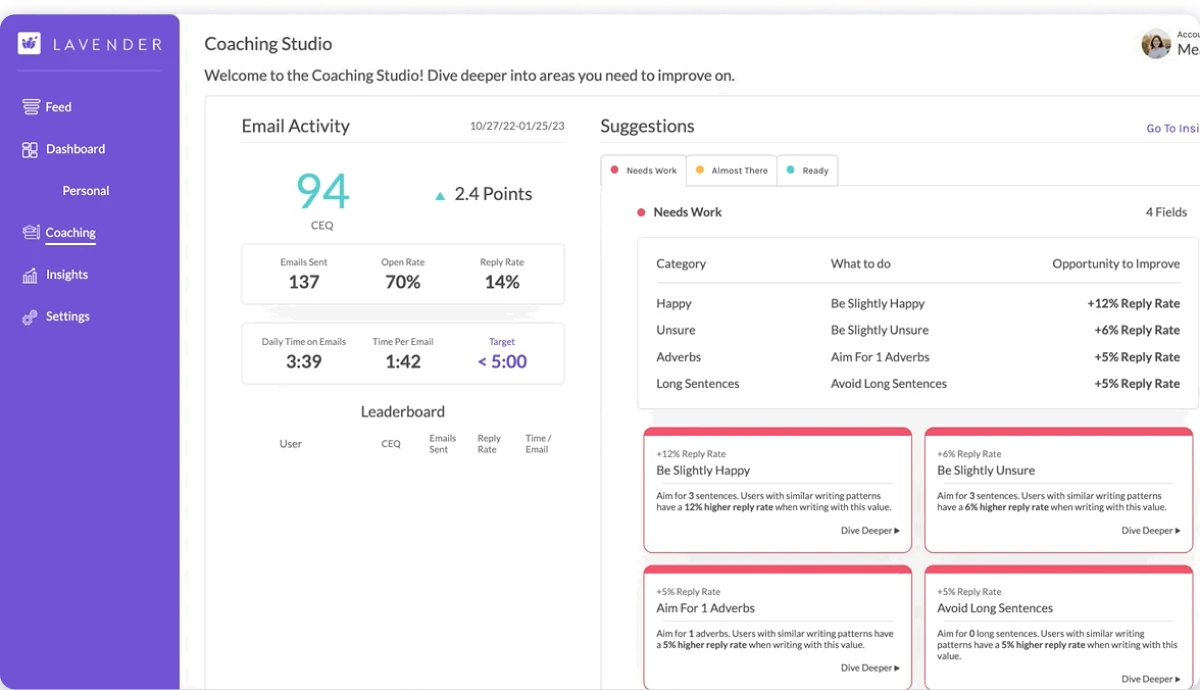
The AI email coach is the standout feature. It flagged weak subject lines, generic openers, and soft CTAs. Every suggestion felt practical instead of generic.
The personalization assistant saved even more time during testing. It pulled prospect details into the compose window automatically. I personalized emails without opening multiple research tabs.
Lavender also includes an AI email generator powered by GPT models. I gave it prospect details, and it produced solid first drafts quickly. It works well for one-off emails, not automated outreach sequences.
The limitations became clear after using Lavender for longer campaigns. It does not handle prospecting, sequencing, LinkedIn outreach, or sales calls. You still need another platform for complete outbound execution.
The AI suggestions can also become predictable over time. One Reddit user said the emails “are starting to sound like every other sales rep using Lavender.” I found the scoring useful, but I still rewrote most suggestions in my own voice.
The Chrome extension also lagged occasionally with several CRM tabs open. Refreshing the page usually fixed the sidebar without much trouble.
If you already have an outreach stack, Lavender adds real value every day. If you need an all-in-one outreach platform, this is not the right tool.
Practical Use-Cases
- Individual SDR who wants to improve reply rates before hitting send
- Team onboarding new reps who need to learn what good emails look like
- Founder who writes their own outreach and wants coaching inside Gmail
Pros
- Real-time email scoring identifies weak emails before sending
- AI suggestions improve personalization using prospect data
- Mobile formatting checks help optimize emails for phone readers
- Works directly inside Gmail and Outlook
- Lightweight tool that improves your existing workflow without replacing your stack
Cons
- Email writing is designed for individual messages, not mass campaigns or automated outreach sequences
- Ora AI agent is $500/agent/month on top of the base plan
- The free plan is limited to 5 emails per month
- Less valuable for teams already using full AI sequence generators like Saleshandy or Reply.io
Pricing
- Free: $0 (5 emails/mo)
- Starter: $29/mo
- Team: Custom
Final Take: Which AI Outreach Tool Delivers the Best Results in 2026?
The right AI outreach tool depends on how you run outreach every day.
Some teams only need to scale cold email volume.
Others want email outreach and LinkedIn working together in the same flow. Some need AI handling the entire prospecting workflow.
If you want to scale multichannel outreach and have no per-seat pricing, Saleshandy handles that better than anything else on this list.
It covers your entire outreach workflow, from finding leads across 852M+ contacts, generating AI-powered sequences to manage replies, and closing deals in the built-in CRM.
There is no single “best” tool. It all depends on your outreach channels, your volume, and how your team actually works.
But when I had to pick one platform for daily outbound, I kept coming back to Saleshandy.
It lets me find leads, generate AI sequences, send across multiple channels, and manage replies in one place without switching tools.
FAQs About AI Outreach Tools
1. What Are AI Outreach Tools?
AI outreach tools are software that uses artificial intelligence to help sales teams find prospects, write personalized emails, and run outreach campaigns across email, LinkedIn, phone, and other channels.
2. Can AI Write and Send Cold Emails Automatically?
Yes. Tools like Saleshandy instantly generate full email sequences with AI and send them automatically on a schedule. Reply.io’s Jason AI goes further and handles prospecting, qualification, and follow-ups without human input. The quality varies. AI-assisted tools give you control over what sends. Fully autonomous tools trade control for volume.
3. How Do I Automate Cold Email Outreach With AI?
Pick a platform with AI sequence generation. Define your ICP. Let the AI draft a multi-step sequence. Connect your sending accounts. Enable warm-up. Set sending limits. Launch and monitor replies. Most tools handle this in under 2 hours.
4. What Is the Best AI-Powered Sales Outreach Platform?
It depends on your use case. Saleshandy covers the full workflow from prospecting to CRM without per-seat pricing. Apollo bundles a free database with outreach. Instantly focuses on deliverability at volume. Outreach and Salesloft serve enterprise teams with forecasting and coaching.
5. Which AI Tools Generate Leads and Write Outreach Messages?
Saleshandy (852M+ contacts + AI Sequence Copilot), Apollo (275M+ contacts + AI email drafts), and Lemlist (600M+ contacts + AI Variables) all combine lead sourcing with AI-generated outreach in one platform.
6. What Is the Difference Between an AI Copilot and an AI SDR?
AI copilots draft sequences and personalize at scale, but you control what sends. AI SDRs like Reply.io’s Jason AI handle prospecting, qualification, and meeting booking autonomously. Copilots give you higher quality with more control. AI SDRs give you higher volume with less oversight.
7. How Do AI Outreach Tools Personalize Emails Without Sounding Robotic?
The best tools pull data from prospect profiles, company news, job changes, and funding events to write context-specific openers. Saleshandy’s AI Prospect Enrichment generates custom icebreakers. One relevant signal per email performs better than stacking multiple generic data points.
8. How Much Do AI Outreach Tools Cost?
Pricing ranges from $25/mo (Saleshandy Starter) to custom enterprise quotes ($500+/mo for Outreach or Salesloft). The biggest variable is per-seat vs flat-rate pricing. Flat-rate tools (Saleshandy, Instantly, Smartlead) cost the same for 1 user or 50. Per-seat tools (Apollo, Reply.io, Lemlist, Klenty) scale with headcount. Always calculate total cost including lead database, warm-up, and add-ons.