

Here’s the reality in 2026: more than 50% of sales tools now claim to have AI built in.
But honestly, most of them don’t live up to the promise.
I’ve been testing and integrating AI sales tools for a while now.
With one simple goal: find platforms that actually help B2B sales teams cut through busywork, scale outreach, and close more deals in real workflows.
And I have found 10 best AI sales tools that actually fit how modern sales teams operate in 2026.
Let’s get into the details!
The Best AI Sales Tools– TOC
TL;DR: Best AI Sales Tools at a Glance (2026)
After testing and comparing dozens of ai sales tools and platforms in 2026.
These are the ones that made the cut.
This is my list of ai sales and marketing tools, that earned their spot for doing one thing better than everything else I tried.
How I Tested These AI Sales Tools (My Evaluation Criteria)
I didn’t just read feature pages and write summaries.
I signed up, connected real email accounts, imported actual prospect lists, and ran campaigns.
For enterprise tools like Gong and Clari, I worked with demo environments and talked to teams using them daily (including sales teams at Saleshandy)
Here is what I looked for in each tool:
- Does the AI actually change the output, or is it just a label on a basic feature?
- Can I plug this into a real sales workflow without adding more complexity?
- What does it cost, and where do the upsells start?
- Who is this built for, and who should skip it?
I gave my honest take on each platform below.
With so many sales ai tools flooding the market, I wanted to cut through the noise and show both the good parts and the parts that need work.
The 10 Best AI Sales Tools in 2026
These are the AI sales tools I trust in 2026.
The ones that are built to help sales teams automate outreach, keep pipeline data accurate, and close deals with less effort.
Here is the full list with what each tool does, why it earned its spot, and who it fits best.
1. Saleshandy
⭐ Best For: Best All-in-One AI Sales Tool for Prospecting, Outreach, Personalization, and Pipeline Management
Saleshandy is the best AI sales tool in 2026.
And for all the good reasons.
It sits at #1 on this list because AI runs through the entire outbound workflow, not just one feature.
As an ai sales platform, it handles everything from finding the right prospects to enriching them with AI to running multichannel outreach to managing every reply in a unified inbox.
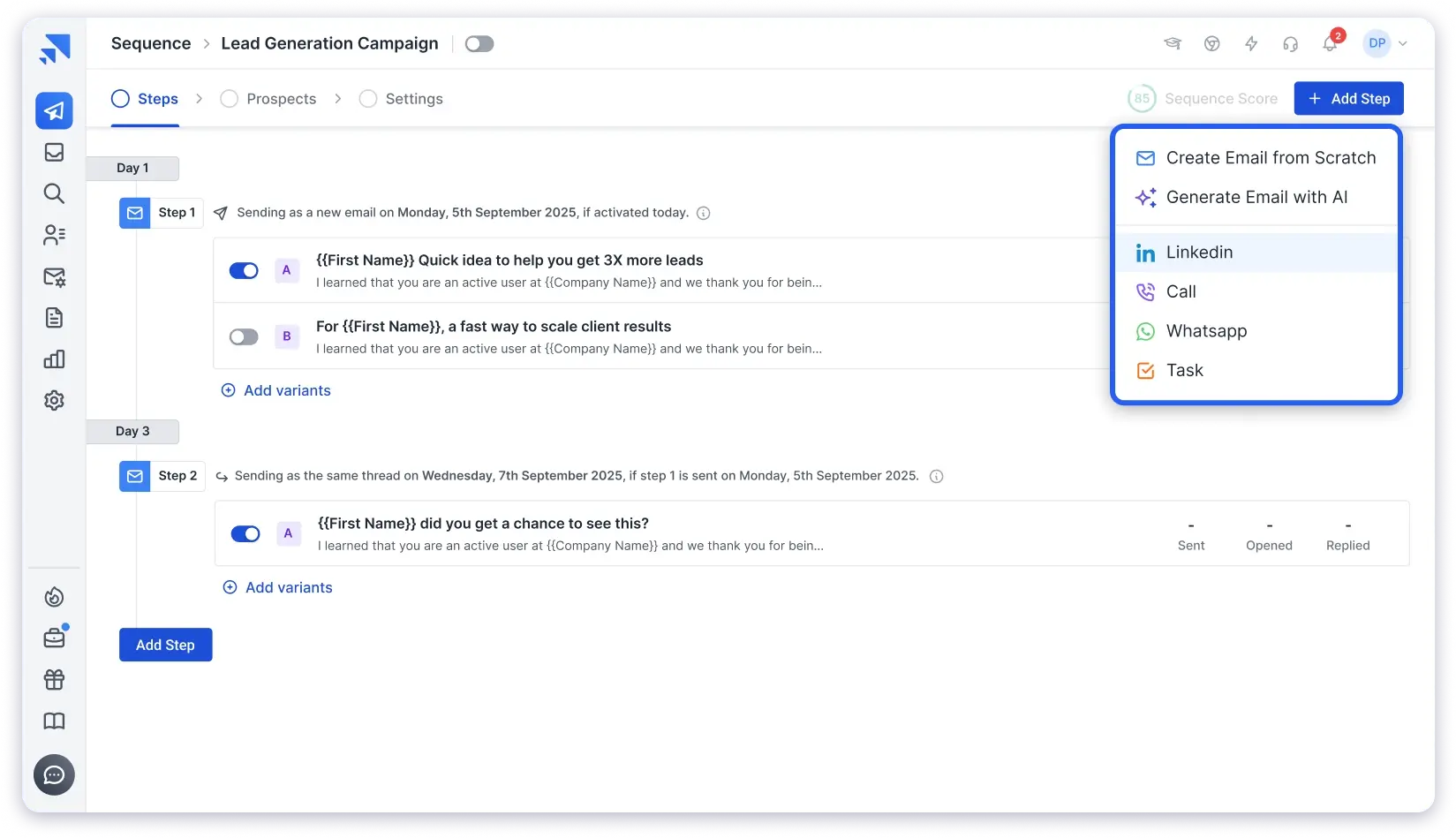
If you are looking for the best ai sales automation software for prospecting, outreach, and pipeline management in one place, this is the tool you should go with.
Here is how my sales team uses it book meetings every month!
1. AI Lead Finder
The workflow starts with finding the right people.
Saleshandy gives you access to an 852M+ verified B2B contact database with 75+ advanced filters.
The AI-powered search is what I found most useful.
You just have to describe your ideal prospect in plain English, something like “SaaS founders in the US with fewer than 50 employees,” and the AI finds and builds a targeted lead list within seconds.
My favioirate thing is that The data is verified in real-time through waterfall enrichment.
2. AI Prospect Enrichment
Once you have your leads, the next step is to use AI prospect enrichment.
This is where Saleshandy goes beyond what most tools offer.
It uses AI models and pulls real context signals like job changes, company updates, and industry shifts.
Then it generates personalized opening lines and icebreakers you can plug directly into your outreach.
I tested it on a list of 200 prospects. The AI-generated openers referenced specific company news and recent role changes.
It felt like someone actually researched each person individually.
That is the difference between personalization that converts and personalization that looks like a mail merge.
3. AI Co-piolt for Multichannel Outreach
With your leads found and enriched, you move into outreach.
Saleshandy lets you set up multichannel campaigns that cover cold email, cold calling, LinkedIn outreach, and WhatsApp from one place.
You are not limited to just email anymore.
The AI Sequence Co-Pilot generates complete multi-step sequences with subject lines, body copy, and follow-ups.
I gave it a brief about my ICP and value proposition, and it produced a full sequence that saved me about 45 minutes compared to writing from scratch.
The A-Z testing feature lets you create up to 26 variants of a single email.
The system tests which versions perform and automatically prioritizes the winners. I haven’t seen that level of variant testing at this price point anywhere else.
4. AI Reply Management
This is where the workflow comes together.
Every reply from every channel lands in one AI-powered unified inbox.
I could see all conversations in one place without switching between email accounts, LinkedIn, or other tools.
The AI helps manage replies by surfacing which conversations need attention and which prospects are showing buying signals.
Instead of scrolling through multiple inboxes, I had a single view of every active conversation across all channels.
5. Saleshandy CRM
The CRM is built around how outbound actually works.
Prospects sit in a Kanban pipeline view, grouped by stages like Not Contacted, Replied, Interested, or custom stages you create.
I could see which prospects replied, who was waiting for a follow-up, and who needed attention.
Every email, reply, open, click, note, and task sits in one timeline per prospect.
Custom fields, deal value tracking, and the ability to send 1:1 emails directly from the CRM made it a proper selling workspace.
4. MCP (Model Context Protocol)
Saleshandy supports MCP, which means you can connect it directly with AI agents from tools like Claude, n8n, Make, and Zapier.
Instead of manually setting up every workflow, I could instruct an AI agent to pull lead data, trigger sequences, or update prospect stages in real time.
This turns Saleshandy into a part of a larger AI-driven sales stack. Lead enrichment, scoring, and CRM updates all connect without manual handoffs between tools.
✅ What I Liked
- The full workflow runs in one platform. I went from finding leads to enriching them with AI to launching multichannel outreach to managing replies in a unified inbox without switching tools.
- AI Prospect Enrichment actually researches each contact using AI before you write a single email. This is not just inserting first name and company name.
- The CRM shows exactly who needs a follow-up, why, and what happened in every prior interaction.
- Unified inbox collects replies from every channel in one view. No more checking 5 different inboxes.
- No charge per email account. I connected unlimited inboxes at no extra cost.
- MCP support makes it future-proof for AI-native sales workflows.
- A-Z testing with up to 26 email variants per step is the deepest variant testing I found at this price.
- SOC 2 Type II and ISO 27001 compliant, which matters if you work with enterprise clients.
❌ What I’d Improve
- The 7-day free trial is short. There is a lot to explore, and I would have liked a longer window.
Pricing:
- Outreach Starter: $25/month
- Outreach Pro: $69/month
- Outreach Scale: $139/month
- Outreach Scale Plus: $209/month
Who should use Saleshandy:
SDR teams, outbound sales teams, lead gen agencies, founders running outreach, and any team that wants AI across prospecting, outreach, personalization, and pipeline management without buying multiple tools.
2. Clay
⭐ Best For: AI Data Enrichment and Hyper-Personalized Outreach Workflows
The next AI sales tool on my list is Clay.
It earned its spot for one reason: no other tool I tried comes close when it comes to data enrichment depth and AI-powered prospect research.
Clay connects to 75+ data providers through waterfall enrichment.
Instead of pulling from one source, it queries multiple providers in sequence until it finds a valid record.
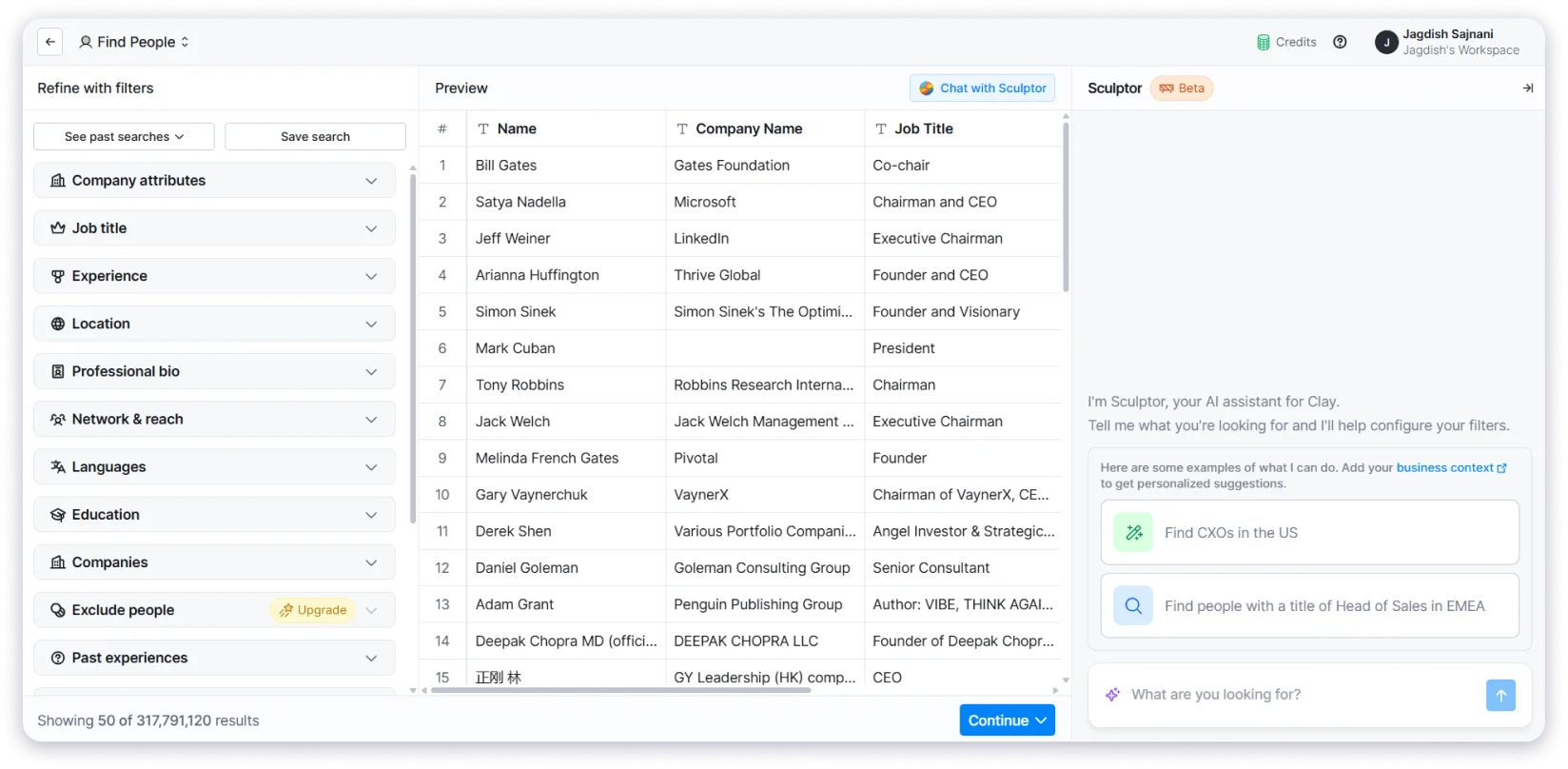
The result is higher data fill rates than any single-source tool I tested.
Claygent is Clay’s AI research agent. I gave it custom questions like “Does this company use HubSpot?” and it went out, investigated each prospect’s website and tech stack, and came back with answers at scale.
I built a workflow that pulled company data from LinkedIn, enriched it with email and phone info through waterfall, then used Claygent to answer custom qualification questions.
The data quality was strong across the board.
Key Features:
- Waterfall enrichment from 75+ data providers for maximum data coverage
- Claygent AI research agent that answers custom qualification questions at scale
- Generative AI that writes personalized emails using enrichment data
- Integrations with CRMs, outreach tools, and automation platforms
- Custom workflow builder for advanced prospecting sequences
✅ What I Liked
- The enrichment depth is unmatched. No other tool pulls from this many data sources in one workflow.
- Claygent answered research questions about individual prospects that would take a human 20 minutes each.
- The generative AI writes emails that feel genuinely personalized because they use real enrichment data.
❌ What I Didn’t Like
- No outreach execution built in. You still need a separate tool to send emails and manage replies.
- The setup is complex. This is built for RevOps teams who are comfortable with technical workflows.
- Credit-based pricing gets expensive fast for high-volume teams.
Pricing:
- Free tier available
- Paid plans start at $149/month (credit-based)
Who should use Clay:
RevOps teams, data-driven outbound operators, and teams that already have a sending tool but need deeper enrichment and AI research at scale.
3. Gong.io
⭐ Best For: AI-Driven Sales Call Analysis, Deal Coaching, and Conversation Intelligence
Another AI tool for sales that I keep coming back to is Gong.
If your team runs discovery calls or demos, this is the standard for conversation intelligence, and it has earned that reputation.
Gong records your sales calls, creates accurate transcripts, and then analyzes them for patterns.
I used it to compare call behavior across a team of 4 reps.
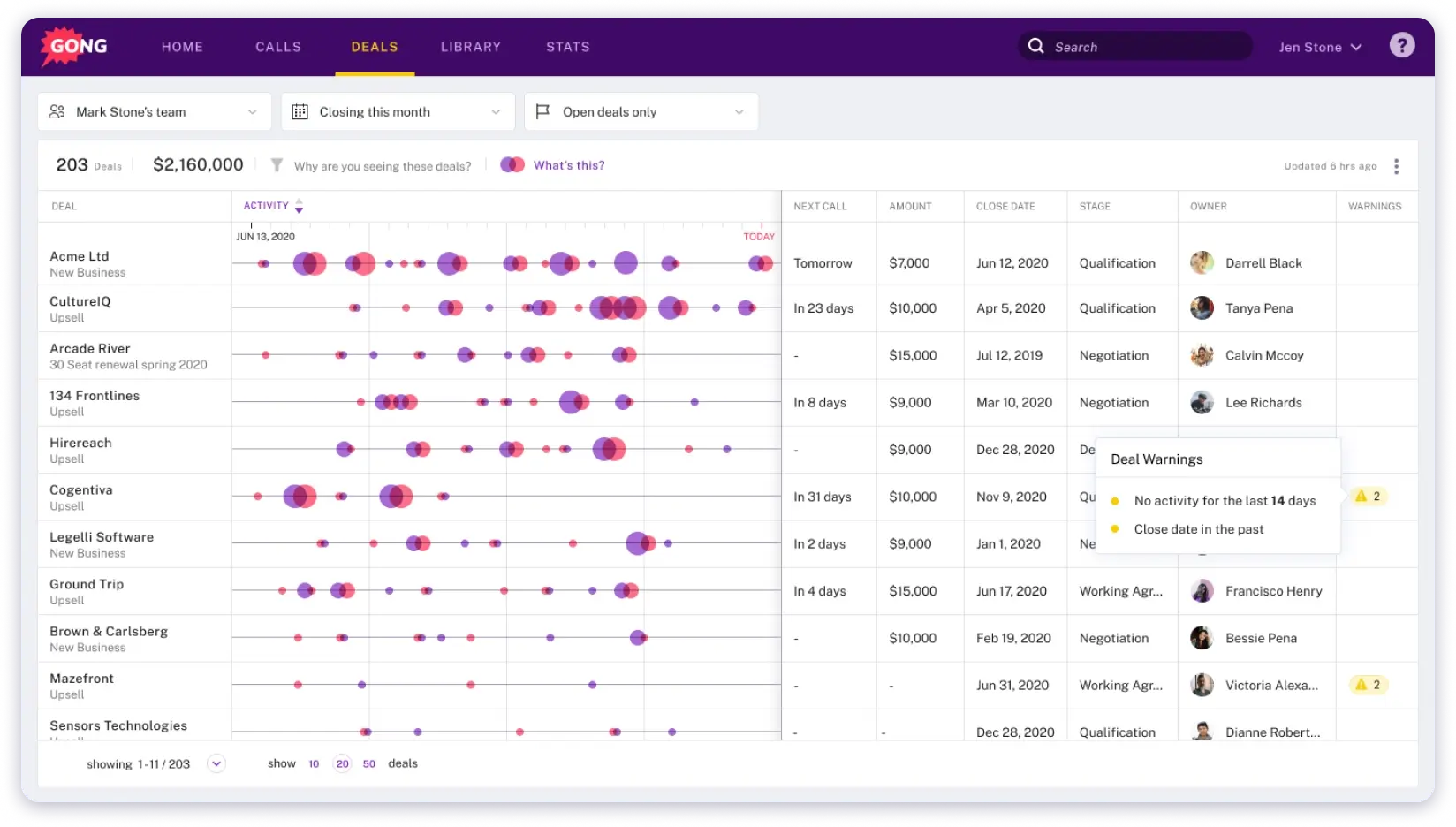
The AI surfaced which reps asked better qualifying questions, where prospects raised objections, and which conversations had the highest close probability.
The AI coaching insights compared each rep’s calls to top performers and pointed out specific moments where the approach differed.
That level of granularity is hard to get from just reviewing recordings manually.
Key Features:
- Conversation intelligence that records, transcribes, and analyzes every sales call
- Deal and pipeline analytics that track deal movement and flag at-risk revenue
- Revenue AI Agents that handle follow-ups and pipeline updates in the background
- AI coaching insights that compare reps to top performers with actionable recommendations
- Smart forecasting based on real pipeline data and conversation signals
✅ What I Liked
- The AI identifies winning patterns from top-performing reps and shows others exactly what to change.
- Deal analytics flag at-risk revenue before it slips, not after.
- Revenue AI Agents automate follow-ups and CRM updates so reps stay in the conversation.
❌ What I Didn’t Like
- Pricing is not published. You have to talk to their sales team, which usually signals enterprise-level cost.
- This is built for call-heavy sales teams. If your motion is outbound email-first, Gong won’t add much.
Pricing:
- Custom pricing. Contact Gong’s sales team for a quote.
Who should use Gong:
Sales teams running regular calls and demos, managers who need coaching data, and revenue leaders who want AI-driven deal intelligence.
4. Fireflies.ai
⭐ Best For: AI Meeting Transcription, Summaries, and Searchable Sales Notes
The next AI sales tool worth looking at is Fireflies.ai.
It does one thing and does it really well: it joins your meetings, records everything, transcribes it, and gives you searchable notes with action items.
My team uses it across Zoom and Google Meet calls for sales calls.
The AI automatically joins and within minutes after each call, I had a full transcript with key points highlighted.
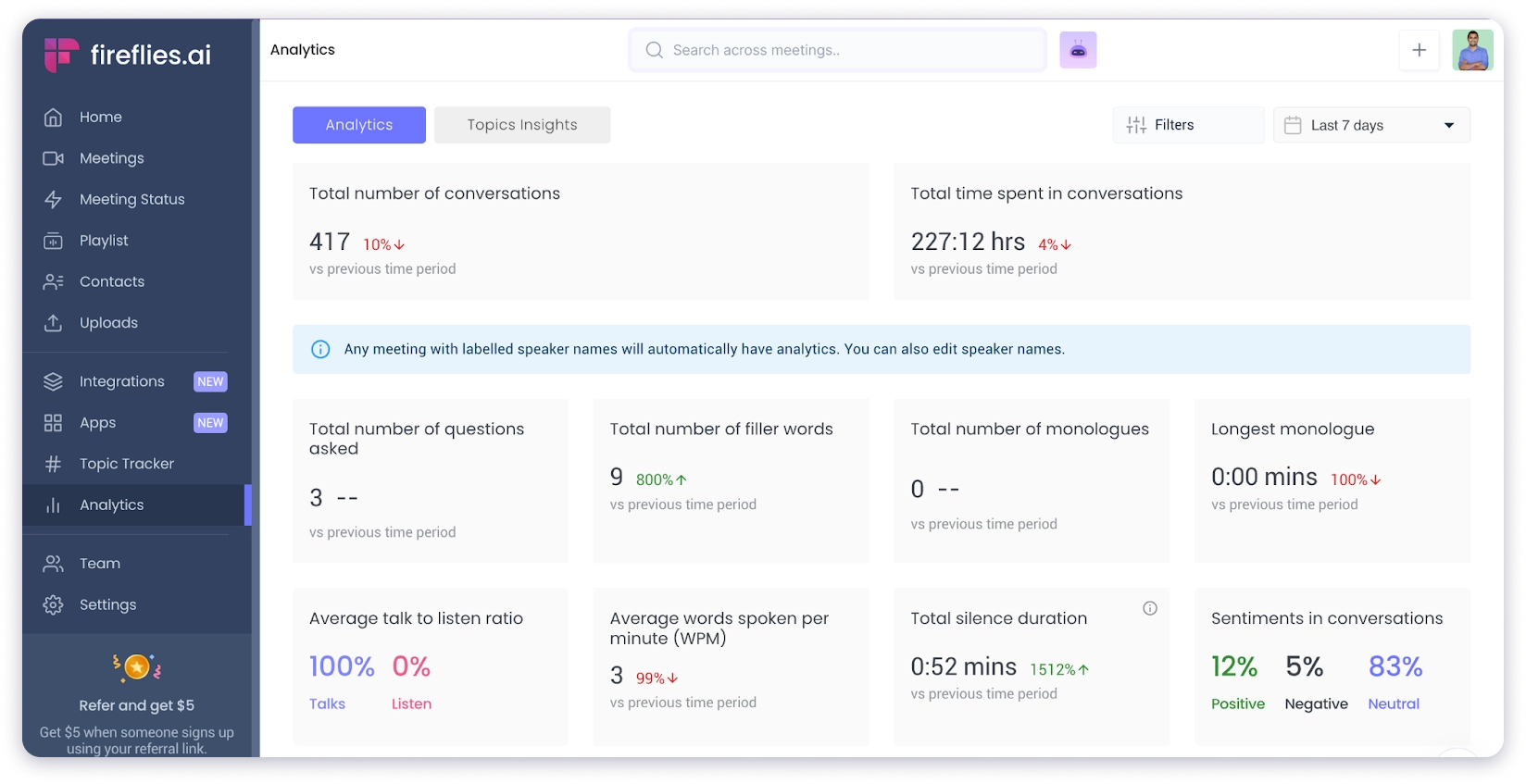
Pricing discussions, next steps, and objections were all tagged and searchable.
The standout feature is “Ask Fred.”
It is powered by GPT and lets you ask any question about a specific meeting.
I asked “What pricing concerns did the prospect raise?” and got a direct answer pulled from the transcript.
It integrates directly with Salesforce and HubSpot, automatically logging call notes and action items into the pipeline.
That saved me from manual CRM updates after every meeting.
Key Features:
- AI-powered call recording and transcription with automatic summaries
- Ask Fred AI that answers any question about a specific meeting
- Smart note-taking that captures key moments, decisions, and action items
- Sales coaching tools with conversation analysis and performance metrics
- Direct CRM integrations with Salesforce and HubSpot for automatic logging
✅ What I Liked
- Ask Fred is genuinely useful. Instead of re-listening to an entire call, I could ask specific questions and get answers instantly.
- Searchable transcripts mean I can go back to any conversation and find exactly what was said.
- The CRM integration eliminated manual note entry after calls.
❌ What I Didn’t Like
- AI credits are limited on all plans. If you run a lot of meetings, you will burn through credits fast.
- It handles transcription and notes, but it doesn’t find leads, send emails, or manage a pipeline.
Pricing:
- Pro: $10/user/mo
- Business: $19/user/mo
- Enterprise: $39/user/mo
Who should use Fireflies.ai:
Sales teams running frequent calls and demos who want to stop taking notes manually and start pulling insights from conversations.
5. Salesforce Einstein
⭐ Best For: AI-Powered Lead Scoring, Forecasting, and Deal Management Inside Salesforce CRM
If your team already lives inside Salesforce, Einstein is the AI layer that makes the CRM actually useful for daily selling.
Einstein learns from your CRM data, scores leads based on historical conversion patterns, and suggests which deals need attention.
I explored it through a demo environment and spoke with two sales teams actively using it.

Einstein Lead Scoring analyzed historical deal data and assigned scores to new leads based on how closely they matched past successful conversions.
The more data it processed, the smarter the suggestions became.
Activity Capture logged emails and calendar events automatically.
That eliminated the manual CRM update grind that every sales rep hates.
Key Features:
- Einstein Lead Scoring that predicts conversion likelihood based on historical data
- AI Forecasting that projects revenue outcomes from pipeline signals
- Conversation Insights that identify trends, objections, and action items in sales calls
- Activity Capture that logs emails and meetings automatically into CRM records
- Automated Data Entry that updates CRM records from emails, calls, and meetings
✅ What I Liked
- It works inside Salesforce. No separate login, no new tool. The AI sits in the workflow your team already uses.
- Lead scoring improves over time as it processes more data from your own deals.
- Forecasting gives revenue predictions based on real pipeline activity, not guesses.
❌ What I Didn’t Like
- Accuracy depends heavily on CRM data quality. If your Salesforce data is messy, Einstein’s suggestions will be too.
- Pricing starts at $50/user/month on top of your existing Salesforce license.
- This is not built for small teams or startups.
Pricing:
- Einstein Conversation Insights: $50/user/month
- Einstein Conversation Insights + Sales Engagement: $50/user/month
- Einstein Conversation Insights + Enablement: $100/user/month
Who should use Salesforce Einstein:
Enterprise sales teams on Salesforce who want AI-powered lead scoring, forecasting, and activity automation without leaving their CRM.
6. Gamma.app
⭐ Best For: Creating AI-Powered Sales Presentations, Pitch Decks, and Proposals in Minutes
Another AI sales tool I didn’t expect to use as much is Gamma.app.
It is not a traditional sales tool.
But if your process involves pitch decks, one-pagers, or proposals, it is surprisingly useful.
I gave it a two-line prompt about a product demo presentation.
Within 60 seconds, I had a full slide deck with layout, images, colors, and fonts applied.
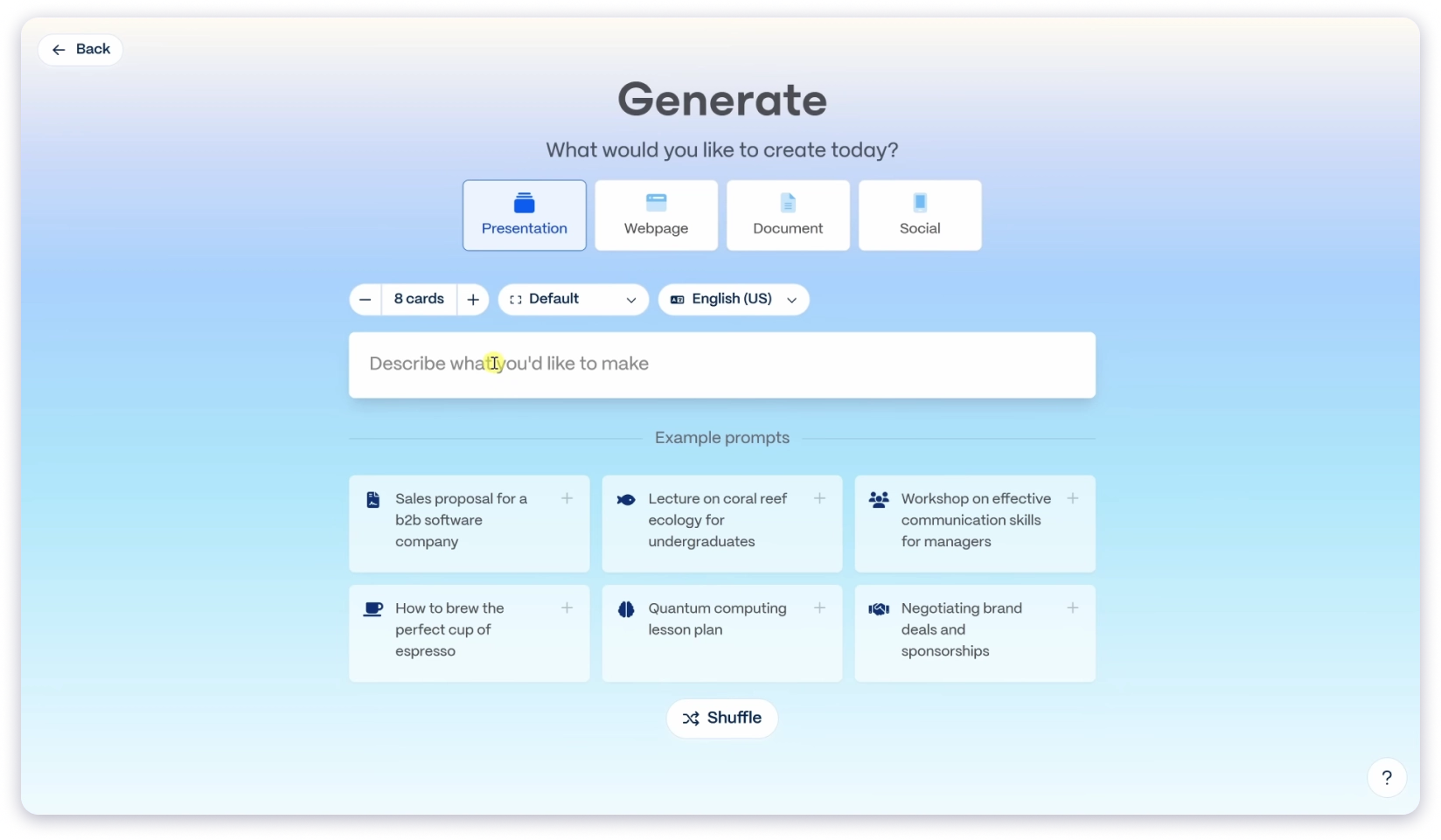
The AI structured the content logically and picked relevant visuals without any design input from me.
The engagement tracking is what makes this relevant for sales specifically.
After sending a deck, Gamma told me who opened it and which slides they spent the most time on.
I used that data to tailor follow-up conversations.
Key Features:
- Instant deck generator that turns a short prompt into a full slide presentation
- Smart layouts with 100+ themes and easy brand import
- Built-in image maker that generates or reworks visuals without leaving the editor
- Multi-format export to PowerPoint, PDF, Google Slides, or shareable link
- Engagement tracking that shows who opened the deck and where they spent time
✅ What I Liked
- Speed. I went from a two-line prompt to a finished presentation in under a minute.
- Engagement analytics told me exactly which slides prospects cared about.
- Export flexibility made it easy to share in whatever format the prospect preferred.
❌ What I Didn’t Like
- The AI output can feel generic without heavy editing. For high-stakes pitches, I still rewrote most of the copy.
- This solves the “I need a deck fast” problem. It won’t find leads or manage a pipeline.
Pricing:
- Plus: $9/seat/mo
- Pro: $18/seat/mo
Who should use Gamma.app:
AEs and founders who frequently create pitch decks and proposals and want to cut creation time from hours to minutes.
7. Lavender
⭐ Best For: AI Email Coaching That Helps Sales Reps Write Cold Emails That Actually Get Replies
The next AI tool for sales I want to highlight is Lavender.
It is an AI email assistant that scores each email in real time and tells you exactly what to fix.
I installed the Chrome extension and used it while drafting outreach in Gmail.
Every time I wrote an email, Lavender showed a score and pointed out weak spots. Opener too generic? It flagged it. Email too long? It suggested where to cut.

Sometimes the fix was a single word change. Other times, it rewrote the whole sentence.
The prospect research sidebar shows key facts like job title, recent LinkedIn posts, and location when you open a lead.
Lavender shows how to use these details in the opener so each email feels personal, not canned.
Key Features:
- Real-time email scoring with specific suggestions to improve tone, clarity, and structure
- Prospect research sidebar that surfaces key details for personalization
- Campaign generation that builds outreach sequences from a goal description
- Bulk personalization that adapts each message for every prospect on a list
- Email analytics that track opens, clicks, and replies
✅ What I Liked
- The real-time scoring became addictive. I found myself rewriting every email until the score hit 90+.
- The prospect sidebar made personalization fast. I didn’t need to open LinkedIn in a separate tab.
- It works inside Gmail, Outlook, and HubSpot with no complex setup.
❌ What I Didn’t Like
- Lavender does email coaching only. It doesn’t find prospects, send sequences, or manage a pipeline.
- Very limited reviews on Capterra, which makes long-term reliability harder to gauge.
Pricing:
- Starter: $27/month
- Individual Pro: $45/month
- Teams: $89/seat/month
Who should use Lavender:
Individual SDRs and AEs who want to improve their email writing with instant AI feedback on every draft they send.
8. HeyGen
⭐ Best For: Creating Personalized AI Sales Videos at Scale for Outreach and Demos
If you want to stand out in a crowded inbox, HeyGen lets you do it with AI-generated video. I tested it for both sales outreach and internal training content.
I typed a short script, picked an AI avatar, and HeyGen produced a full HD video in about 3 minutes.
The avatar looked natural, the voice sounded real, and I could customize the background, accent, and language.
Voice cloning across 70+ languages is the standout feature.

I recorded a short consent video and got a digital clone of myself. Prospects in different regions received a video in their language with lip-synced dubbing.
Key Features:
- Text-to-video creator that turns a script into a full HD or 4K video with an AI avatar
- Voice cloning and lip-sync dubbing across 70+ languages
- 500+ stock avatars or custom clone from a single photo
- Audio-to-video tool that turns a voice recording into a talking-avatar video
- Video translation that re-voices existing videos for new markets
✅ What I Liked
- Script to finished video in under 5 minutes. The speed makes personalized video outreach practical at scale.
- Multilingual support means I could reach prospects in their native language without recording separate videos.
- The avatars looked and sounded natural enough that most recipients didn’t realize it was AI.
❌ What I Didn’t Like
- Longer videos consume credits quickly. A 5-minute video used significantly more credits than a 60-second clip.
- Creating a personal avatar requires a consent video recording, which adds an extra step.
- This is a video creation tool. It doesn’t find prospects, send emails, or manage a pipeline.
Pricing:
- Creator: $24/month
- Business: $108/month
- Enterprise: Custom pricing
Who should use HeyGen:
Sales teams using video in their outreach, marketing teams creating product demos, and anyone who wants personalized video at scale without a production team.
9. Clari
⭐ Best For: AI Revenue Forecasting, Pipeline Inspection, and Deal Risk Detection for Sales Leaders
Another AI sales tool I genuinely liked using is Clari.
It gives full visibility into the sales pipeline, and the AI-driven forecasting is the most reliable I have used.
Clari pulls data from across the sales team and shows exactly where things stand.
The AI captures activity automatically and turns it into forecasts, risk alerts, and actionable insights. No manual data entry.
The forecasting feature gives revenue predictions based on real pipeline data.
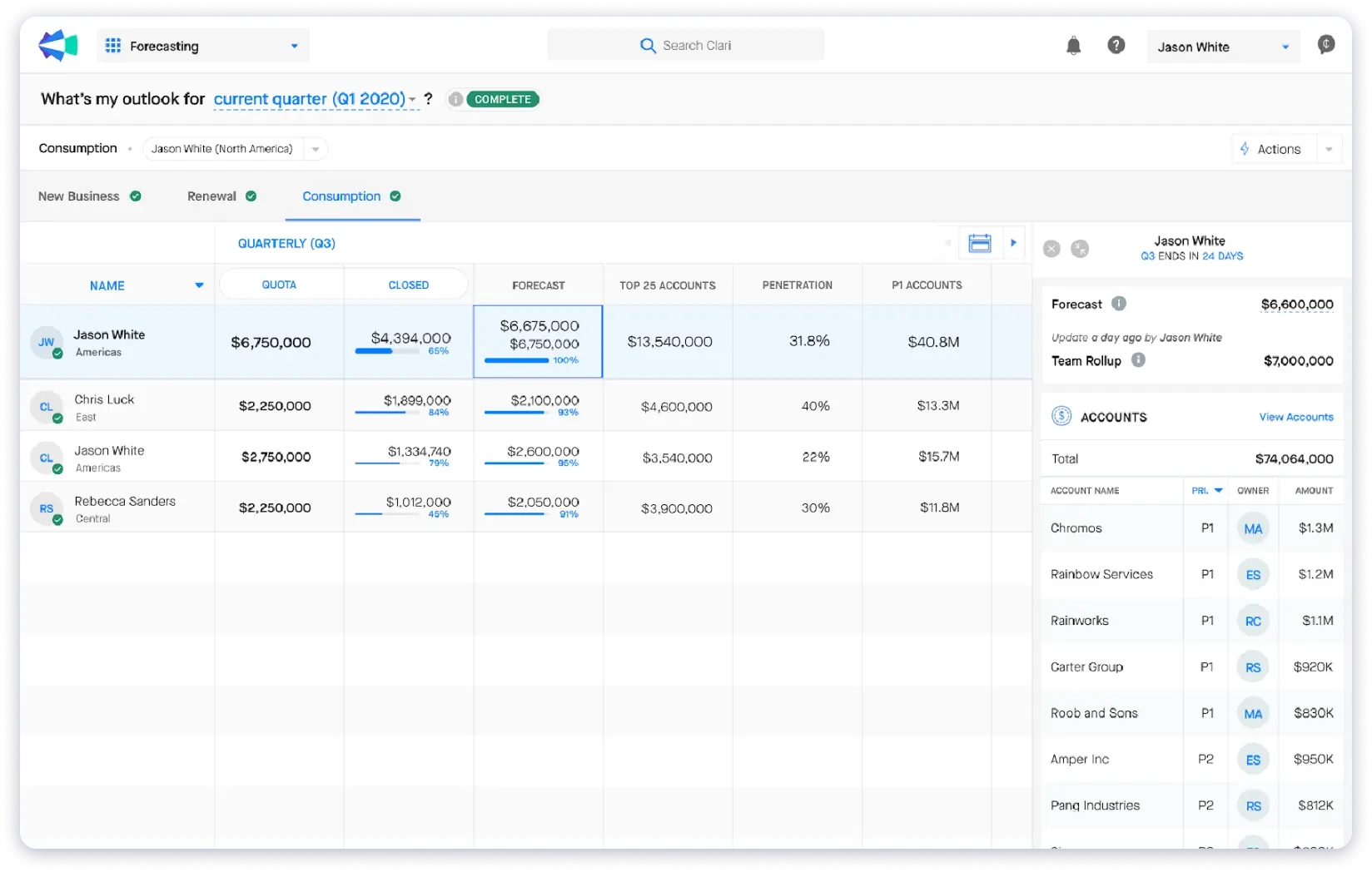
I could see which deals were on track, which were slipping, and the AI flagged at-risk deals before they became problems.
Pipeline inspection watches deal activity day by day.
When momentum slowed on a deal, Clari raised a flag.
Sales, marketing, and RevOps all see the same data, which solved a lot of internal alignment issues I’ve seen on other teams.
Key Features:
- AI revenue forecasting that gives clear, data-backed predictions
- Risk detection that spots at-risk deals early and raises flags before revenue slips
- Pipeline inspection that monitors deal activity daily and surfaces stalled momentum
- Activity automation that pulls emails and calendar events into the system automatically
- Team alignment across sales, marketing, and RevOps with shared data views
✅ What I Liked
- Forecasting based on real activity data, not gut feeling. The predictions were surprisingly accurate.
- Risk alerts caught deals that were losing momentum before anyone on the team noticed.
- Everyone sees the same pipeline data. That alone reduced internal back-and-forth.
❌ What I Didn’t Like
- Pricing is not published. This is enterprise-level, and the initial setup takes time.
- Not built for small teams or early-stage startups. It is designed for sales leaders managing complex pipelines.
Pricing:
- Custom pricing. Contact Clari’s team for a quote.
Who should use Clari:
Sales leaders, account executives, and RevOps teams who need data-backed forecasting and pipeline visibility at scale.
10. Amplemarket
⭐ Best For: AI-First Sales Engagement With Multichannel Outreach Across Email, LinkedIn, WhatsApp, and AI Voice
The last AI sales tool on my list is Amplemarket.
It is a newer player, but it caught my attention because it is built as AI-native from the ground up.
What sets Amplemarket apart is the Duo system.
It deploys three AI agents that work together: Signal detects buying intent, Research gathers prospect context, and Sequence writes and sends personalized outreach.

I tested the workflow and it felt like having a mini sales team running in the background.
The multichannel coverage is the widest I tested.
Amplemarket supports email, LinkedIn, WhatsApp, and AI voice calls in one workflow. Most tools handle one or two channels. Amplemarket covers all of them.
Intent signals are strong.
Signal AI detected when target accounts were actively researching solutions and pushed those prospects to the top of the queue automatically.
Key Features:
- Duo system with three AI agents: Signal (intent detection), Research (prospect context), Sequence (personalized outreach)
- True multichannel coverage across email, LinkedIn, WhatsApp, and AI voice calls
- Intent signals that detect when target accounts are actively in-market
- AI agents that handle prospecting through sequencing without manual setup
- Built-in deliverability tools and sender management
✅ What I Liked
- The AI agents handle the prospecting-to-sequencing pipeline end to end. The automation goes deeper than basic trigger rules.
- Multichannel coverage in one platform eliminated the need for separate LinkedIn and email tools.
- Intent signals surfaced high-priority accounts that were actively researching, not just sitting in a static list.
❌ What I Didn’t Like
- Pricing is custom only with no self-serve signup. That positions it for mid-market teams and up.
- Not ideal for solo founders or very small teams. The platform is built for teams with a defined outbound motion.
Pricing:
- Custom pricing. Contact Amplemarket’s team.
Who should use Amplemarket:
Mid-market and enterprise sales teams that want to consolidate multiple outbound tools into one AI-driven platform with true multichannel coverage.
How To Choose AI Sales Tools for Your Needs
When I choose AI sales tools, I don’t get distracted by flashy dashboards or big feature lists.
I focus on what actually moves the needle for my team.
- Does it save time?
- Does it improve the quality of outreach?
- Does it help close deals faster?
Most ai sales systems I tested fall into one of two categories.
They either handle ai assisted sales workflows like prospecting and sequencing, or they focus on analytics and forecasting.
The best ones do both. And if you need ai tools for marketing and sales working together, make sure the tool connects to both sides of your GTM stack.
1. Automation That Removes Repetitive Steps
If I’m still manually doing something the AI should handle, the tool isn’t doing its job. I want prospecting, sequencing, and follow-ups to run without me touching every step.
2. Real-Time CRM Integrations
The tool needs to talk to my CRM, whether that’s Salesforce, HubSpot, or a built-in pipeline like Saleshandy CRM. If the data doesn’t sync, my team ends up with two sources of truth and neither one is accurate.
3. AI-Powered Enrichment That Gives Reps Real Context
Basic merge tags are not enough anymore. I want AI that researches each prospect and gives my reps something meaningful to say in the first line of an email.
4. Forecasting and Analytics That Drive Decisions
Vanity metrics like open rates are fine, but I need tools that show me which deals are at risk, which sequences are converting, and where the pipeline is stalling.
5. Flexibility To Connect With Other Tools
MCP support, Zapier, Make, n8n, or native integrations. If a tool doesn’t connect to the rest of my GTM stack, it creates silos instead of solving them.
The best AI sales tool is not the one with the longest feature list.
It is the one that fits your sales process and helps your team close deals with less manual work.
That is why I compare tools on how easily they plug into the way my team already sells, not just on what they can do in isolation.
How To Build Your AI Sales Stack in 2026
You don’t need all 10 tools on this list.
You need the right two or three based on how your team actually sells.
The biggest mistake I see?
Teams buying five tools and using none of them properly.
Here is how I’d set up a stack for each team type.
1. SDR or Outbound Team
Start with Saleshandy. It covers prospecting, outreach, personalization, and pipeline management in one platform.
If your team also runs discovery calls, add Gong for conversation intelligence. Two tools. Full outbound cycle covered.
2. Enterprise AE Team
Your CRM is already the center of everything. Salesforce Einstein adds AI lead scoring and forecasting on top of it.
Add Gong for call coaching. Add Clari for pipeline forecasting. If your reps send a lot of individual emails, Lavender helps them write better ones.
3. Solo Founder or Startup
Budget and simplicity matter the most here. Saleshandy handles the full outbound motion at a price that makes sense.
AI Lead Finder builds your prospect list. AI Sequence Co-Pilot writes your outreach. The built-in CRM manages replies. Sign up with 100 free AI credits, run your first campaign, and scale from there.
The rule is the same for every team size. Start with the tool that covers the most ground. Measure what works. Only add more when you hit a gap the first tool doesn’t address.
FAQs on AI Sales Tools
1. What Are the Best AI Tools for Sales Teams in 2026?
It depends on what part of the sales process you need help with.
If you want one tool for the full outbound workflow, Saleshandy covers prospecting, sequencing, personalization, and pipeline management.
For call analysis, Gong is hard to beat. For data enrichment, Clay goes deeper than anything else I tested.
And if you need revenue forecasting, Clari is the one I’d pick.
2. What Is the Best AI Sales Assistant for CRM?
If your team is on Salesforce, Einstein sits right inside the CRM and handles lead scoring, forecasting, and activity capture without adding a new tool.
If you run outbound and don’t want a separate CRM at all, Saleshandy has a built-in CRM with a Kanban pipeline, prospect timelines, and 1:1 email.
It does the job without the overhead of a traditional CRM.
3. What Is the Most Reliable AI Sales Automation Tool?
I’d say Saleshandy. Out of all the best ai sales automation tools I tested, it had the most reliable deliverability.
I ran campaigns across 5 inboxes for two weeks and didn’t have a single email land in spam.
The deliverability suite handles warm-up, bounce detection, inbox placement testing, and sender rotation automatically. That combination kept campaigns running clean without me babysitting anything.
4. Which AI Sales Chatbot Is Best?
That’s a different category from what this list covers.
This list focuses on outbound sales tools. For inbound chatbots on your website, Drift and Qualified are worth looking at.
They handle live visitor conversations and lead routing, which is a different problem than prospecting and outreach.
5. What Is the Top AI Sales App for Increasing Leads?
Saleshandy Lead Finder. It has an 800M+ verified contact database with 75+ filters, and the AI-powered search lets you describe your ideal prospect in plain English.
I typed in what I was looking for and had a targeted lead list in seconds. That speed is hard to match with manual prospecting.
6. How Can I Use AI in a Field Sales Business?
Start with the area where your team wastes the most time.
- If it’s finding the right people to contact, use an AI prospecting tool like Saleshandy.
- If it’s writing outreach, AI sequence generators save hours per week.
- If your team runs a lot of calls, Gong analyzes every conversation and shows what’s working.
And if pipeline visibility is the issue, Clari gives you AI-powered forecasting.
8. What Are the Most Effective AI Sales Agents?
Amplemarket’s Duo system impressed me the most.
It runs three AI agents together: one detects buying intent, one gathers prospect context, and one writes and sends personalized outreach.
Saleshandy’s AI Prospect Enrichment works similarly by researching each contact with AI and generating personalized openers automatically. Both go well beyond basic if-then rules.
9. Which AI Sales Tool Is Best for Small Teams on a Budget?
Saleshandy is the clear pick here. Outreach plans start at $25/month, you get unlimited email accounts, and there are 100 free AI credits on signup. No credit card needed for the free trial.
If you also need meeting transcription, Fireflies.ai has a free plan. For email writing feedback, Lavender has a free tier with 5 emails per month.