


I’ve watched teams spend weeks perfecting their targeting and copy, then realize their emails never had a fair shot. The infrastructure underneath was holding them back the whole time.
That’s why cold email infrastructure has become one of the biggest factors behind outbound success.
Your sending domains, mailboxes, DNS setup, and warm-up strategy either build sender reputation or quietly destroy it. And you usually find out which one weeks later, through burned domains and wasted spend.
The tricky part? Dozens of providers now claim to solve this, but they’re not built the same way. Some prioritize affordability, others focus on control, and a few handle the entire setup for you.
So after researching the space and speaking with teams running outbound at scale, I compared 9 cold email infrastructure providers on setup, deliverability, pricing, and real customer feedback.
Here are the ones worth considering in 2026.
Cold Email Infrastructure Providers- TOC
- TL;DR: Which Is the Best Cold Email Infrastructure Provider in 2026?
- What Is Cold Email Infrastructure?
- In-Depth Review of the Top 9 Cold Email Infrastructure Providers
- 5 Core Components of Cold Email Infrastructure
- How to Choose the Right Cold Email Infrastructure Provider?
- Final Verdict: Which Cold Email Infrastructure Provider Should You Pick?
- FAQs About Cold Email Infrastructure
TL;DR: Which Is the Best Cold Email Infrastructure Provider in 2026?
- Saleshandy: Best for teams that want a complete cold email infrastructure setup with built-in deliverability and outreach workflows.
- InboxKit: Best for agencies managing multiple clients with Google, Microsoft, and Azure mailboxes from one dashboard.
- Maildoso: Best for teams looking for affordable infrastructure with SMTP mailboxes, IP rotation, and mailbox management features.
All 9 Cold Email Infrastructure Providers Compared
Here’s how the best cold email infra tools compare on warm-up, monitoring, deliverability insights, and starting price.
| Provider | Best For | Key Strength | Starting Price |
|---|---|---|---|
| Saleshandy | Teams scaling cold outreach | Managed infrastructure with built-in deliverability and outreach workflows | $2.99/mailbox/mo |
| Primeforge | Teams needing Google & Microsoft mailboxes | ESP-matched mailboxes with dedicated infrastructure options | $4.50/mailbox/mo |
| Maildoso | Budget-focused high-volume senders | Affordable SMTP mailboxes with IP rotation options | $2.50/mailbox/mo |
| InboxKit | Agencies managing multiple clients | Multi-provider mailbox management from one dashboard | $2.50/mailbox/mo |
| Icemail.ai | Flexible mailbox buyers | Pay-as-you-go mailbox setup options | $2.50/mailbox/mo |
| Zapmail | Teams needing quick mailbox setup | Pre-warmed mailboxes ready for outreach | $39/mo |
| Mailreef | High-volume infrastructure needs | Dedicated servers and IP infrastructure | $240/mo |
| Inframail | Teams wanting flat pricing | Unlimited inboxes under one plan | $147/mo |
| Sendkit.ai | Teams wanting outreach + infrastructure | Sequencing with dedicated IP options | $99/mo |
What Is Cold Email Infrastructure?
Cold email infrastructure is the technical foundation behind your outreach campaigns. It determines whether your emails reach the inbox or get filtered into spam.
It includes everything working behind the scenes: the domains you send from, mailbox setup, authentication protocols like SPF, DKIM, and DMARC, IP reputation, and warm-up processes that build sender trust.
Many teams focus on copy and targeting, but those only matter if your emails actually get delivered. A strong campaign can still fail if Gmail or Outlook doesn’t trust your sending setup.
With stricter sender requirements from email providers, infrastructure has become a critical part of cold email success. Getting the technical foundation right is the first step toward consistent deliverability.
In-Depth Review of the Top 9 Cold Email Infrastructure Providers
Here are the 9 cold email infrastructure tools that made my final list.
1. Saleshandy
Saleshandy is the cold email infrastructure provider I kept coming back to while comparing tools for this list.
Not because it’s the cheapest on every metric, but because it covers the whole setup without making you stitch tools together.
You get Google Workspace, Microsoft 365, and Azure mailboxes, automatic DNS setup, built-in warm-up, and a full sending platform, all in one account.
Most providers on this list stop at mailboxes, so you still pay for a separate warm-up tool and a sequencer on top.
What I like most is how little technical work it needs. You pick your domains, configure mailboxes, and Saleshandy handles SPF, DKIM, DMARC, and tracking for you.
Your mailboxes then connect to warm-up automatically, so they start building reputation right away instead of waiting on another tool.

Why Have I Kept Saleshandy as #1 on My List of Cold Email Infrastructure Providers?
- Supports Multiple Mailbox Providers: You can buy Google Workspace, Microsoft 365, and Azure mailboxes in one place.
- Handles DNS Setup Automatically: SPF, DKIM, DMARC, and MX records are configured for you.
- Built-In Mailbox Warm-Up: New mailboxes start warming up automatically before campaigns begin.
- Dedicated IP Infrastructure: Emails are sent through dedicated US-based IPs to maintain better sender reputation.
- Domain Forwarding: Your outreach domains redirect to your main website.
- Sender Rotation: Sending volume spreads across mailboxes to reduce spam risk.
Limitations
- Email Infrastructure is an add-on to Email Outreach plans and can’t be bought separately.
- Annual Flexi requires a minimum of 25 mailboxes
Pricing Plans (Billed Annually)
- Annual Fixed: $2.99/mailbox/mo
- Annual Flexi: $3.49/mailbox/mo (includes free mailbox replacement)
- Quarterly: $3.99/mailbox/mo (billed every 3 months)
What Saleshandy’s Users Have to Say?
“The email infrastructure, setup scores, and deliverability information are especially useful when preparing a campaign.” — Vadim
2. Primeforge
If you only want real Google Workspace and Microsoft 365 mailboxes for cold outreach, Primeforge is worth a look.
It’s built by the Salesforge team and focuses on one idea: send from the same email provider your prospect uses. It sits in the Forge stack alongside Mailforge (shared SMTP infrastructure) and Infraforge (private infrastructure with dedicated IPs), which are sold as separate subscriptions.
So if your prospect is on Gmail, you send from a Google mailbox. If they’re on Outlook, you send from Microsoft 365.
Setup is automated and takes around 30 minutes, with SPF, DKIM, DMARC, and a custom tracking domain handled for you.
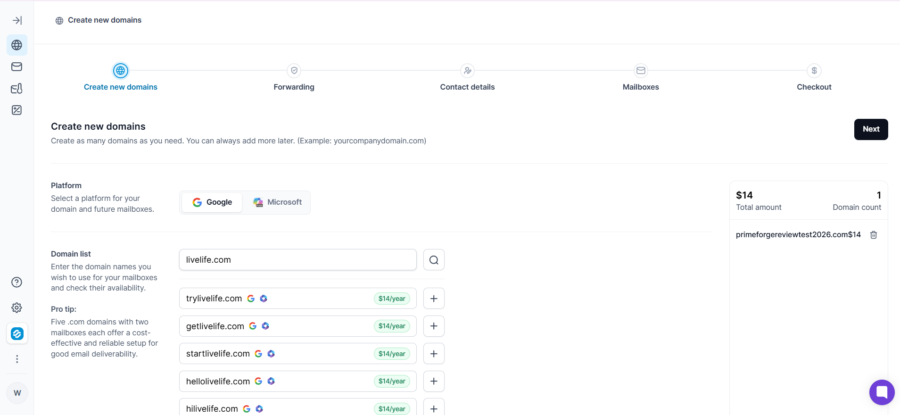
However, what disappointed me most is the billing model. You pay for mailbox slots rather than active mailboxes, so unused slots still cost you money. On top of that, warm-up and sending both need separate subscriptions.
That said, if you’re considering Primeforge, be prepared for slow support on account changes. Several recent reviewers on G2 and Trustpilot said removing a mailbox meant contacting support, sometimes more than once.
Why Have I Kept Primeforge as #2 on My List of Cold Email Infrastructure Providers?
- Google and Microsoft Accounts: Every mailbox is an official account, not an EDU workaround or a reseller panel.
- ESP Matching: You send to Gmail prospects from Google mailboxes and to Outlook prospects from Microsoft ones.
- Automated DNS Setup: SPF, DKIM, DMARC, and a custom tracking domain are configured at purchase.
- One Workspace per Domain: Each domain gets Super Admin access and stays isolated from the rest.
- Reusable Mailbox Slots: Delete a mailbox and create another in the same slot at no extra cost.
- Mailbox Analytics: Track reply rates, bounces, recipient providers, and blacklist status per IP.
Limitations
- Warm-up isn’t included and needs a separate Warmforge subscription
- Minimum of 10 slots, and you pay for unused slots
- Connecting your own domain wipes its existing DNS records
- Mailboxes stop working if you cancel and can’t be moved to direct Google billing
- No free trial, and cancellation goes through live chat at least 7 days before renewal
Pricing Plans (Billed Annually)
- 1–100 slots: $45/slot/year (about $3.75/mo)
- 1,001+ slots: $35/slot/year (about $2.92/mo)
- Monthly billing: $4.50/mailbox/mo
- Pre-warmed mailboxes: $90/mailbox/year (minimum 12 mailboxes across 4 domains)
What Primeforge’s Users Have to Say?
“Real Google Workspace and MS365 mailboxes with US-based IPs, no EDU tricks, no reseller panels, no sketchy setups. The automated DNS configuration handles SPF, DKIM, and DMARC without touching a single setting manually.” — Jessica K.
“Horrible customer service: 4 times in 3 days I have asked to fix something simple (remove mailbox or provide me with an extra credit so I create a new mailbox) since their system wasn’t working well Everytime I got a response like ‘We asked the technical team and get back to you’.” — Rudy
3. Maildoso
If you want to send cold email at high volume without paying Google Workspace prices, Maildoso is your go-to option.
Unlike most providers on this list, it runs its own SMTP servers, with rotating IPs and “self-healing” mailboxes. When a mailbox burns, it’s paused for 14 days and then put back into rotation.
That setup makes it the cheapest provider here at scale. Mailboxes drop to around $0.50 each on the 1,000-mailbox plan, or closer to $0.70 once you add the domains you’ll need.
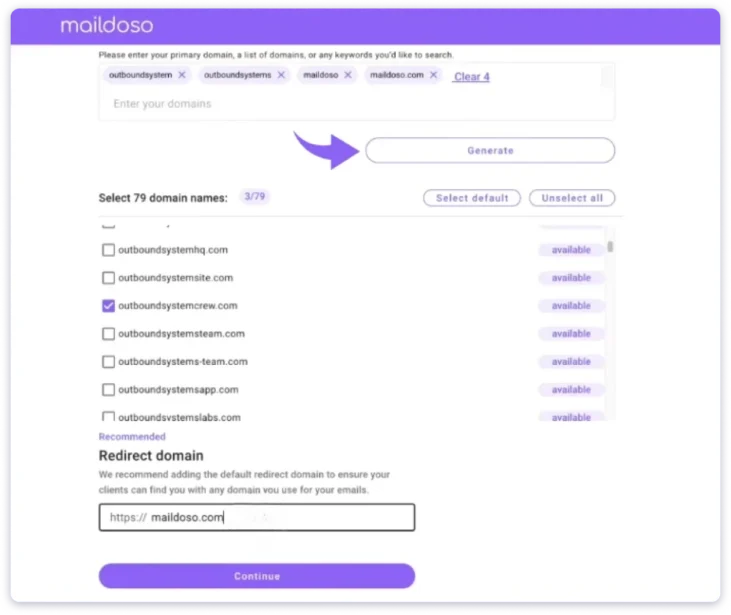
That said, you give up a lot for that price. Google Workspace is paused for new buyers, and Microsoft 365 isn’t offered, so you only get Maildoso’s own SMTP mailboxes.
Each mailbox is also capped at 15 cold emails a day, and there’s no built-in warm-up. As a result, you’ll need more mailboxes and a separate warm-up tool to match other providers’ volume.
However, what concerned me most were the recent reviews. Two G2 reviewers in 2026 said their domains were already blacklisted before they sent a single email. These reports are the main reason people start searching for Maildoso alternatives.
Why Have I Kept Maildoso as #3 on My List of Cold Email Infrastructure Providers?
- IP Rotation: Poorly performing IPs are swapped automatically for clean ones.
- Self-Healing Mailboxes: Burned mailboxes are paused and recovered automatically.
- Automated DNS Setup: SPF, DKIM, DMARC, and link tracking are configured for every domain.
- CAPTCHA Domain Protection: Your main domain stays hidden from scanners behind a CAPTCHA.
- Reputation Scores: Each mailbox gets a Google and Microsoft score, so you can spot weak ones.
- API and MCP Access: You can create and export mailboxes through the API or an AI assistant.
Limitations
- SMTP mailboxes only, with no Microsoft 365 option
- No built-in warm-up or dedicated IPs
- 15 cold emails per mailbox per day
- You can’t add your own DNS records, since Maildoso controls the nameservers
- One shared login, with no team seats or roles
Pricing Plans (Billed Monthly)
Maildoso doesn’t offer annual billing.
- 30 mailboxes: $75/mo ($2.50 per mailbox)
- 300 mailboxes: $225/mo ($0.75 per mailbox)
- 1,000 mailboxes: $499/mo (about $0.50 per mailbox)
Domains cost $12/year each on monthly plans and are billed upfront.
What Maildoso’s Users Have to Say?
“The IP rotation is the main tech advantage for us. Mailboxes aren’t tied to one permanent IP, and poorly performing IPs can be replaced.” — Arvid K.
“Every domain I received was already on the SURBL ABUSE blacklist — I checked 6 of 6, including one that had never sent a single email, which means it was blacklisted before I ever used it. The result: mail-tester scored 8.2/10 with a URIBL_ABUSE_SURBL penalty, and my emails went straight to spam — regardless of warmup or domain age.” — Olga D.
4. InboxKit
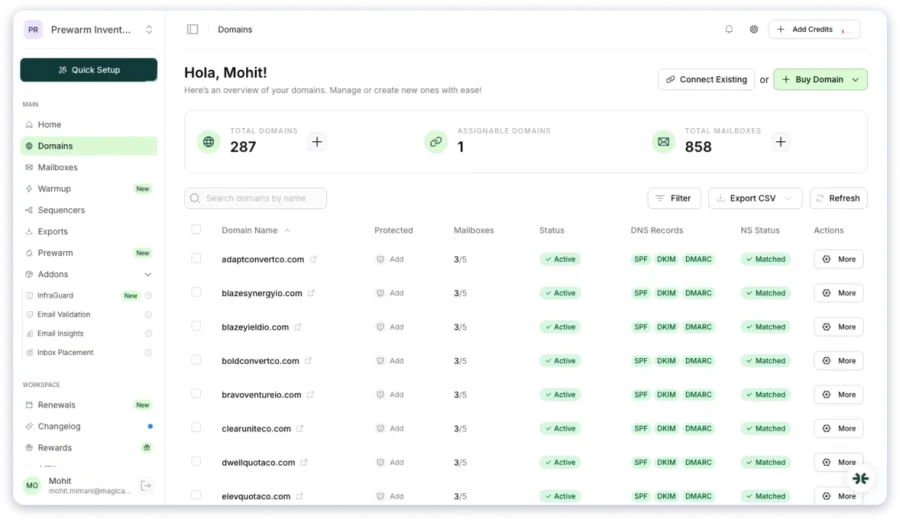
InboxKit is one of the few providers on this list offering Google Workspace, Microsoft 365, and Azure mailboxes from a single dashboard.
That makes it easy to spread your sending across different email providers without juggling several accounts.
What stood out while comparing providers is its domain isolation. Every domain gets its own admin panel with 2FA, which InboxKit says keeps one flagged domain from affecting the others.
The Azure option is especially useful at scale. One Azure tenant costs $30 a month and holds up to 100 mailboxes, although each Azure mailbox sends far fewer emails.
Moreover, I should mention that warm-up isn’t included in the headline price. InboxKit charges $3 per mailbox per month for it, which more than doubles your real cost.
Hence, a $2.50 mailbox actually costs you around $5.50 a month once warm-up is added. InfraGuard monitoring is also free for only the first month.
Why Have I Kept InboxKit as #4 on My List of Cold Email Infrastructure Providers?
- Google, Microsoft, and Azure Support: You can buy Google Workspace, Microsoft 365, and Azure mailboxes from one account.
- One Admin Panel per Domain: Each domain gets its own admin panel with 2FA.
- Automated DNS Setup: SPF, DKIM, DMARC, and MX records are configured automatically.
- Unlimited Team Members and Workspaces: Agencies can separate clients without paying per seat.
- Bulk Mailbox Setup: You can create mailboxes in bulk with CSV import or AI-generated names.
- Sequencer Integrations: You can export mailboxes to Instantly, Smartlead, and more in one click.
Limitations
- Warm-up costs an extra $3/mailbox/month
- InfraGuard monitoring is paid after the first month, and its price isn’t published
- Wallet top-ups are non-refundable
- No free trial
- Its acceptable use policy says Google Workspace mailboxes are intended for India-based customers
Pricing Plans (Billed Annually)
- Google Workspace: $2.50/mailbox/mo
- Microsoft 365: $2.50/mailbox/mo
- Azure: $30/tenant/mo (up to 100 mailboxes)
- Warm-up add-on: $3/mailbox/mo
Monthly billing is $3.00 per mailbox. Domains cost about $12/year per .com.
What InboxKit’s Users Have to Say?
“I like Inboxkit’s fast inbox setup and the out-of-the-box deliverability. It allows me to get sending accounts live in minutes with SPF, DKIM, and DMARC handled, so my emails land in primary instead of spam.” — Shrikant W.
“We paid a $500 wallet top-up on April 23, 2026 for 200 additional mailboxes at $2.50 per mailbox. After waiting through the warm-up period, InboxKit’s own app showed ‘200 Mailboxes Failed Renewal’ across 60 domains with a ‘Recovery cost: $500.00 credits.'” — Verified User
5. Icemail.ai
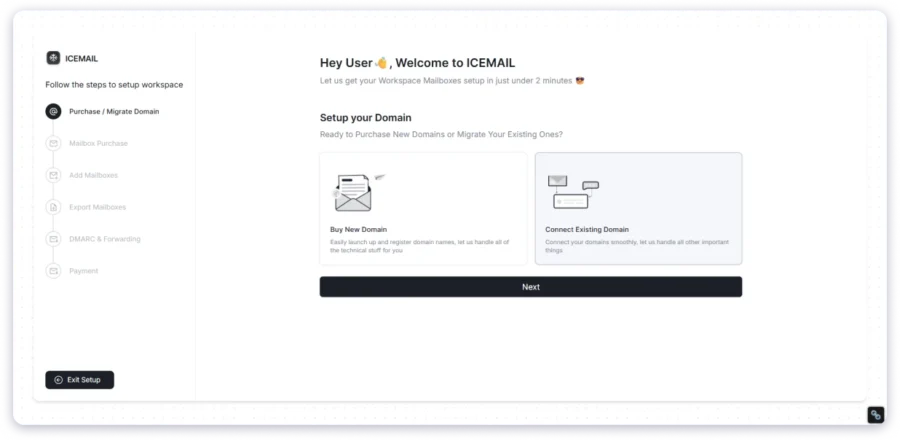
Icemail is the most flexible pay-as-you-go cold email infrastructure provider on this list. Period.
It offers Google Workspace, Microsoft 365, Azure, and IMAP/SMTP mailboxes, all from one account and without fixed plan tiers.
While comparing providers, I found its pricing the easiest to start with. Google and Microsoft mailboxes are listed at $2.50 each, and pre-warmed mailboxes start at $5 if you want to send from day one.
Moreover, Icemail includes a unified inbox at no extra cost, so replies from every mailbox land in one place. Agencies also get separate client workspaces and a white-label option.
However, the “no subscription” message needs context. Its terms still describe auto-renewing subscriptions, charges before renewal, and a seven-day cancellation notice.
Overall, Icemail is a flexible, low-cost option, but blacklist monitoring and inbox placement tests are paid extras on top of that $2.50 price.
Why Have I Kept Icemail as #5 on My List of Cold Email Infrastructure Providers?
- Google, Microsoft, Azure and SMTP Mailboxes: You can buy Google Workspace, Microsoft 365, Azure, or SMTP mailboxes.
- Automated DNS Setup: SPF, DKIM, DMARC, and MX records are configured through Cloudflare.
- Unified Inbox: Replies from all your mailboxes land in one inbox.
- Pre-Warmed Mailboxes: You can start sending from day one without waiting for warm-up.
- Client Workspaces and White Label: Agencies can separate clients or resell under their own brand.
- API and MCP Server: You can manage domains and mailboxes through code or an AI assistant.
Limitations
- Warm-up isn’t clearly included for standard mailboxes
- Blacklist monitoring and inbox placement tests cost extra
- Only 15 cold emails per mailbox per day on Google and Microsoft
- Pre-warmed mailboxes last 12 months, can’t be renewed, and can’t use your own domain
- “Free mailbox replacements” are advertised, but there’s no written policy
Pricing Plans (Billed Monthly)
Annual prices aren’t published.
- Google Workspace: $2.50/mailbox/mo (limited deal, listed at $3.50)
- Microsoft 365: $2.50/mailbox/mo
- Azure: $29/domain/mo (up to 100 mailboxes)
- IMAP/SMTP: from $49/mo (includes 2 domains and 20 mailboxes)
- Pre-warmed mailboxes: from $5/mailbox/mo
Domain prices are shown only inside the app.
What Icemail’s Users Have to Say?
“I’ve been using Icemail for domains and email accounts for quite a while now and have had a great experience overall. Service has been reliable, setup is usually quick, and their support team has been excellent anytime I’ve needed help.” — Matt McCray
“I tried the SMTP and the Google ones. Im using REach Inboxes. First thing first, they took 7 days to setup the SMTP to my Reach Inboxes. After that, every 2 days, the mailboxes discnnected cuz ESP Error. YOu think the google one are better ? After 3 weeks they lost their MX, DMARC and SPF Record, cutting my campaigns.” — Bakipy
6. Zapmail
The next cold email infrastructure provider on my list is Zapmail.
It sells Google Workspace and Microsoft 365 mailboxes for cold outreach, and handles domain setup, DNS, and mailbox creation for you in bulk.
While comparing providers, what stood out was how much it adds beyond mailboxes. You get a free unified inbox (ZapBox), domain health scores, aged domains, and pre-warmed mailboxes you can send from right away.
Each domain also sits in its own workspace, which Zapmail says limits the damage if one domain gets flagged. It’s owned by Outbox Labs, the same company behind ReachInbox.
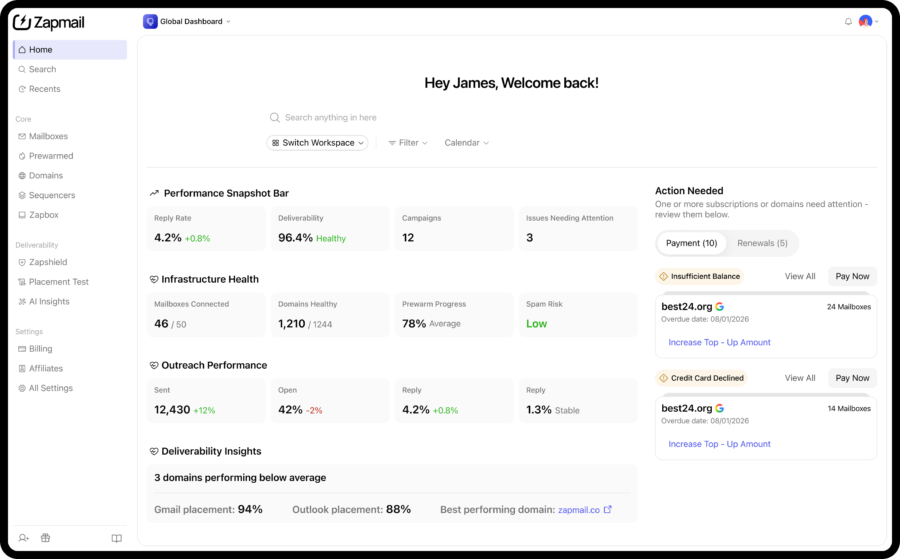
That said, unlike some providers on my list, Zapmail doesn’t include warm-up for standard mailboxes. You either run warm-up in your sequencer or pay extra for pre-warmed accounts.
The bigger catch is renewal pricing. According to its help centre, prices move to higher standard rates after 12 months, and the Pro plan rises from $299 to $499 a month, plus a per-mailbox charge.
Why Have I Kept Zapmail as #6 on My List of Cold Email Infrastructure Providers?
- Google Workspace and Microsoft 365 Mailboxes: You can buy both mailbox types at the same price.
- One Domain per Workspace: Each domain gets its own workspace to keep domains separated.
- Automated DNS Setup: SPF, DKIM, DMARC, MX, and tracking domains are configured automatically.
- Pre-Warmed Mailboxes: You can send from day one without waiting for warm-up.
- Free Unified Inbox (ZapBox): You can read and reply to all your mailboxes in one place.
- Wide Sequencer Support: You can export mailboxes to Instantly, Smartlead, ReachInbox, and more.
Limitations
- No warm-up on standard mailboxes
- Blacklist monitoring (ZapShield) costs $3/domain/month
- API access only on the $299 Pro plan
- Prices rise after 12 months, and all purchases are non-refundable
- Nameservers must stay with Zapmail, mailboxes must be added within 24 hours of creating a workspace, and exports only work with paid accounts on your sending tool
Bonus Read: If Zapmail’s no-refund policy doesn’t suit you, here are 9 Zapmail alternatives with built-in warm-up.
Pricing Plans (Billed Monthly)
- Starter: $39/mo (10 mailboxes)
- Growth: $99/mo (30 mailboxes)
- Pro: $299/mo (100 mailboxes)
What Zapmail’s Users Have to Say?
“I’ve been using Zapmail for cold email accounts (Google/Outlook setup) and honestly, the account quality has been solid no issues with deliverability so far. But what really stood out was their support response time.” — Abdul Rafay
“Their mailboxes work okay but the way they handle domains is terrible – and you have to connect your domains to use their service. They regularly disconnect the domains from our webhost where our website lives and then we are sending mails with broken links because the website is down.” — Henry André Fendt
7. Mailreef
Mailreef is built around one idea: every customer gets their own dedicated mail server and IP address.
You then create as many mailboxes as you need on top of that server, without sharing your sending reputation with any other customer.
For experienced senders who want full control, that isolation is the main appeal. Another customer’s bad sending can never drag your deliverability down.
Moreover, setup is fast once you’re approved. You can buy domains in one click and create mailboxes in bulk, and SPF, DKIM, and DMARC are configured automatically for domains you buy through Mailreef.
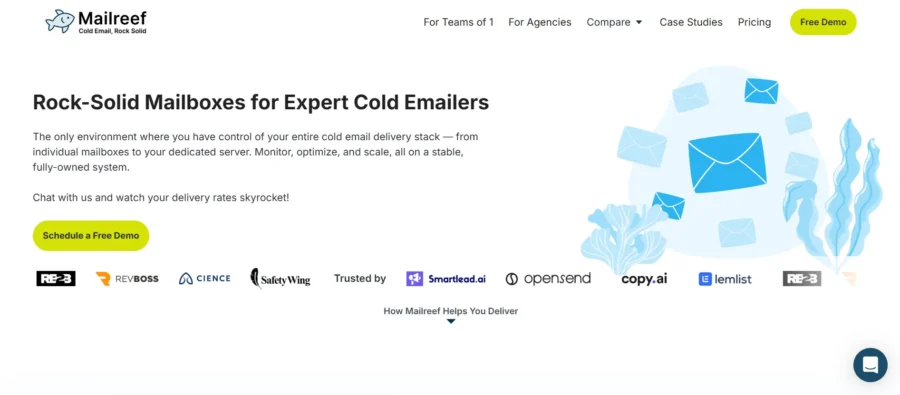
That said, Mailreef only sells its own SMTP mailboxes. If you want Google Workspace or Microsoft 365 accounts, you’ll need a different provider.
However, what concerned me most was a line in its help centre. It says Mailreef mailboxes don’t deliver to free email addresses, so confirm this with them first if your list includes Gmail or Outlook.com users.
Why Have I Kept Mailreef as #7 on My List of Cold Email Infrastructure Providers?
- Dedicated Mail Server and IP: Every plan includes your own mail server and IP.
- 150+ Mailboxes per Server: You can create around 150 mailboxes on each server.
- Automated DNS Setup: SPF, DKIM, and DMARC are created for domains you buy through Mailreef.
- Pre-Warmed Setup: Your server, domains, and mailboxes come pre-warmed.
- Server Insights: You can track blacklist status and sending health from one dashboard.
- Live Delivery Support: Every customer gets live access to deliverability experts.
Limitations
- Own SMTP mailboxes only, with no Google Workspace or Microsoft 365 option
- No ongoing warm-up beyond the initial pre-warm, and no built-in inbox placement testing
- $0.001 fee on every email sent
- No free trial, every customer is screened before approval, and payments are non-refundable
- A 120-day lock on scaling back up after you downgrade servers or IPs
Pricing Plans (Billed Annually)
- Agency: $240/mo with a 12-month commitment, plus $0.001 per email sent
- Agency Flex: $249/mo, month-to-month, plus $0.001 per email sent
- Enterprise: Custom pricing
Pro Tip
At Mailreef’s recommended 100,000 sends a month per server, your total comes to about $340–$349 a month. Domain prices aren’t published on the site.
What Mailreef’s Users Have to Say?
Mailreef has no listing on G2, Trustpilot, or Capterra, so there are no independent user reviews to quote. The only “reviews” online are written by competing providers, so I haven’t relied on them. If you’re considering Mailreef, ask their team for customer references before committing to an annual plan.
8. Inframail
If you’re running high volume and want one flat monthly price instead of paying per mailbox, Inframail offers flat-fee cold email infrastructure that’s worth a look.
It lets you create unlimited inboxes on a flat plan. Your real limit is how many inboxes your dedicated IP can safely handle.
The Unlimited plan includes one dedicated US IP, while the Agency Pack includes three. Inframail recommends roughly 300–400 inboxes per IP.
Moreover, setup is quick. SPF, DKIM, DMARC, and domain redirects are handled automatically, and both main plans include a one-on-one deliverability consultant.
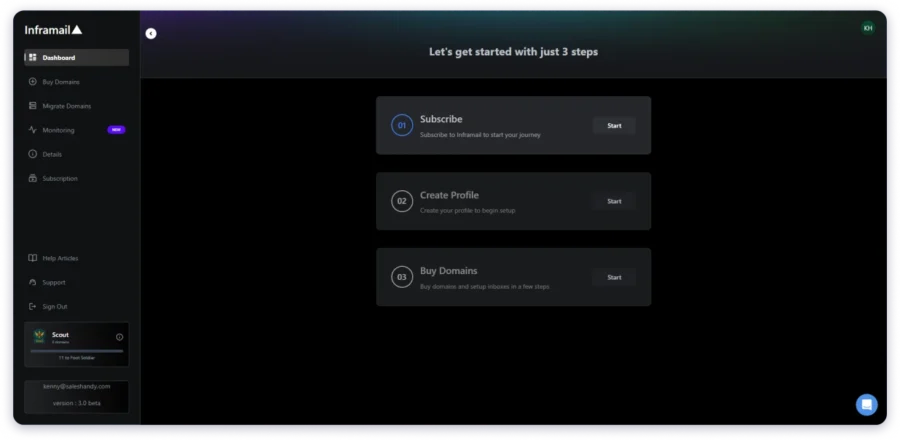
That said, the mailbox type needs clarifying. Inframail markets “Microsoft” inboxes, but its help centre describes self-hosted mailboxes run through its own control panel, not Microsoft 365 accounts.
However, warm-up isn’t included, so it has to run through your sending tool. According to the help centre, IP and domain monitoring is also a paid add-on. These gaps are usually why people start looking at Inframail alternatives.
Why Have I Kept Inframail as #8 on My List of Cold Email Infrastructure Providers?
- Unlimited Inboxes: You can create as many inboxes as you need for one flat price.
- Dedicated US IPs: You get one dedicated IP on the Unlimited plan and three on the Agency Pack.
- Automated DNS Setup: SPF, DKIM, and DMARC are configured automatically.
- Domain Redirects: Your outreach domains can redirect to your main website.
- Deliverability Consultant: Both main plans include one-on-one deliverability support.
- Sequencer Exports: You can export mailboxes by CSV to Instantly, Smartlead, Saleshandy, and more.
Limitations
- Mailboxes appear to be self-hosted, not Microsoft 365 accounts
- No built-in warm-up or inbox placement testing
- IP and domain monitoring costs $12.41/month extra (billed annually)
- You can buy only 5 new domains every 24 hours
- Monthly plans bill every 28 days (13 invoices a year), and cancellation goes through support
Pricing Plans (Billed Monthly)
- Unlimited Plan: $147/mo (1 dedicated IP)
- Agency Pack: $387/mo (3 dedicated IPs)
What Inframail’s Users Have to Say?
“I send 4,000 emails a day, sometimes 7 days a week. All my domains are .info which aren’t the best for deliverability and even then I’m still hitting ~99% deliverability across the board.” — Milos Rogic
“All accounts were blacklisted. Inframail said they would fix it. They did not.” — Keith Baldwin
9. Sendkit.ai
The last provider on my list is Sendkit, and it works differently from the other eight.
It doesn’t sell mailboxes or domains. Instead, it’s a cold email sending platform with infrastructure features built into it.
You connect your own Google, Microsoft, or SMTP mailboxes. Sendkit says every account then gets its own dedicated IP and a sending environment kept separate from other customers.
Moreover, everything else sits inside the same tool: warm-up, inbox placement tests, blacklist monitoring, a unified inbox, and ESP matching. It can also import mailboxes directly from InboxKit, Zapmail, Maildoso, and Icemail.
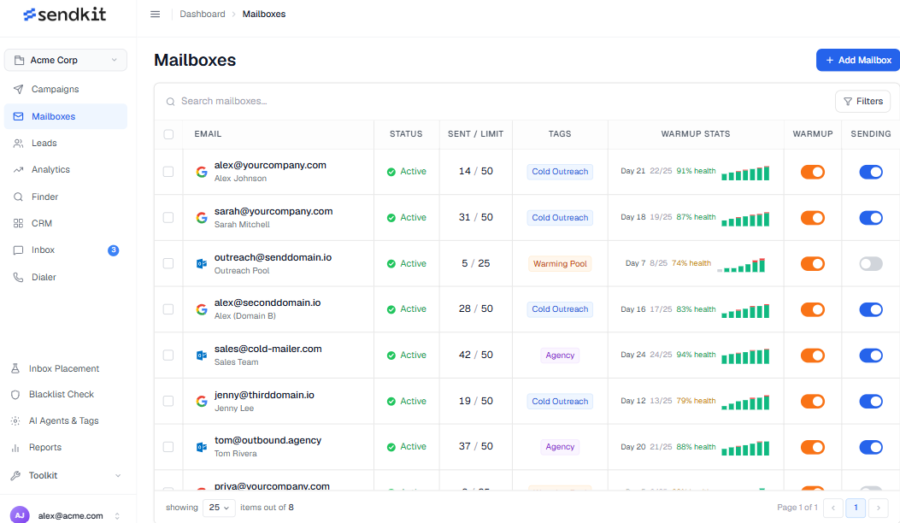
That said, you still need a separate mailbox provider. So your real cost is the Sendkit plan plus whatever you pay for mailboxes and domains elsewhere.
However, “unlimited” comes with limits here. Sendkit’s fair usage policy caps connected mailboxes, placement tests, and leads by plan. It’s also a sister product of InboxKit (#4 on this list).
Why Have I Kept Sendkit as #9 on My List of Cold Email Infrastructure Providers?
- Dedicated IPs on Every Plan: Sendkit says every account gets its own dedicated IP.
- Built-in Warm-Up: Warm-up is included on every plan.
- Inbox Placement Testing: You can run seed tests to check inbox versus spam placement.
- Blacklist Monitoring: Your IPs and domains are checked continuously for blacklists.
- ESP Matching and Mailbox Rotation: Emails go out from matching providers and rotate across mailboxes.
- One-Click Mailbox Imports: You can import mailboxes from InboxKit, Zapmail, Maildoso, or Icemail.
Limitations
- Doesn’t sell mailboxes or domains, or set up your DNS
- $99/month minimum, even if you only want the infrastructure features
- “Unlimited” features are capped by a fair usage policy
- Doesn’t automatically pause unhealthy mailboxes
- Refunds only for billing errors or outages, and annual prices or trial terms aren’t published
Pricing Plans (Billed Monthly)
Sendkit doesn’t publish annual prices.
- Essential: $99/mo (75,000 emails)
- Plus: $249/mo (250,000 emails)
- Pro: $499/mo (500,000 emails)
- Agency: $899/mo (2.5M emails)
What Sendkit’s Users Have to Say?
“Spintax works the way it should, custom variables pull clean, and deliverability is genuinely good, I’m seeing inbox placement rates I wasn’t getting anywhere else. Support is stupid fast too, like real humans who actually use their own product.” — Miralem A.
“I’m currently having a hard time landing in the primary inbox of personal email addresses. But that’s gonna be a probelm on every platform. And I know SendKit is working very hard to fix that.” — Floris J.
5 Core Components of Cold Email Infrastructure
Before comparing providers, it’s important to understand what good cold email infrastructure looks like. A lot of confusion comes from mixing infrastructure with the tools used to run campaigns, so let’s break down the five core components.
1. Secondary Domains
Secondary domains are domains you buy specifically for outbound campaigns, keeping them separate from the main domain your business relies on.
For example, if your company sends emails from saleshandy.com, you might register a similar domain like trysaleshandy.com or getsaleshandy.com for cold outreach and link it back to your main website.
The key rule is simple: never send cold emails from your primary domain. If that domain gets flagged or blacklisted, it can impact the inbox your customers, invoices, and support conversations depend on. Recovering that reputation can take weeks or even months.
2. Cold Email Mailboxes
Once you have secondary domains, you need mailboxes to send from them.
These can be real Google Workspace or Microsoft 365 accounts, or SMTP-based mailboxes provided by an infrastructure platform. The goal is to distribute your sending volume across multiple accounts instead of pushing too many emails through a single mailbox.
Keeping daily volume lower per mailbox helps protect sender reputation and maintain better deliverability over time.
3. DNS Authentication (SPF, DKIM, and DMARC)
DNS authentication is what tells email providers like Gmail and Outlook that you’re authorized to send from your domain.
This includes SPF, DKIM, and DMARC records, which have become essential for anyone sending cold email at scale. Without them properly configured, even a well-written campaign can struggle to reach the inbox.
Most infrastructure providers handle this setup for you, but it’s still important to understand what’s happening behind the scenes.
4. Warm-Up and Sending Limits
New mailboxes need time to build trust before sending at scale.
Most providers recommend warming up accounts for two to four weeks before launching full campaigns. Even after warm-up, a safe sending volume is usually around 15–30 cold emails per mailbox per day.
Providers with built-in warm-up save time and reduce the need for additional tools just to prepare your inboxes.
The choice between shared and dedicated IPs comes down to control, cost, and risk.
With shared IPs, your reputation is connected to other senders using the same infrastructure. It’s cheaper, but another sender’s poor practices can potentially affect deliverability.
Dedicated IPs give you more control because the reputation belongs only to your sending activity. However, they cost more and require proper warm-up before they perform well. This matters most if you choose SMTP infrastructure for cold email, since those mailboxes send from the provider’s own servers instead of Google or Microsoft.
6. Sending Platform
The sending platform is the software layer that connects your mailboxes, launches sequences, manages follow-ups, rotates sending volume, and tracks replies.
Tools like Saleshandy, Instantly, and Smartlead operate at this layer, although many cold email infrastructure providers don’t include campaign software as part of their offering.
This distinction is where many people get confused: components one through four make up your infrastructure, while component five is the software you use to execute campaigns. Some vendors provide both, but many focus only on the infrastructure side.
How to Choose the Right Cold Email Infrastructure Provider?
Now that you know what goes into a setup, here’s how I’d compare cold email infrastructure tools and services before spending money on them.
These are the best practices for cold email infrastructure I wish I had followed when choosing my first provider.
1. Start With Your Technical Comfort Level
If DNS records aren’t your thing, pick a provider that handles setup end to end. The best cold email infrastructure setup tools configure SPF, DKIM, DMARC, and MX records for you.
Saleshandy, Primeforge, InboxKit, and Zapmail all work this way. You choose the domains, and they do the rest.
If your team is technical, you can trade convenience for control. That means SMTP mailboxes on a cold email sending server from Maildoso, or your own dedicated server from Mailreef.
2. Look Past the Mailboxes
Mailboxes alone won’t protect your deliverability, so check what else comes with the plan.
Start with warm-up. Primeforge, Maildoso, and Inframail all leave it to a separate tool, while built-in warm-up saves you a second subscription.
Then check deliverability monitoring and blacklist alerts, because InboxKit and Zapmail sell both as add-ons.
Finally, ask whether you can actively monitor inbox placement before a campaign goes out. Otherwise you only learn about problems once replies dry up.
3. Price the Whole Setup, Not the Headline
Providers price very differently. Some charge per mailbox, some sell slots, and others use flat monthly fees or per-send charges.
Sending limits change the math too. Most providers recommend a safe sending volume of 15 to 30 cold emails per mailbox per day, and that number decides how many mailboxes you actually need.
Before you pay any email infrastructure provider, watch for these red flags:
- Warm-up or monitoring sold as an add-on
- “Unlimited” plans capped by a fair usage policy
- Nameservers locked to the provider
- Non-refundable payments
- Prices that rise after the first year
Then read recent G2 and Trustpilot reviews to find a top-rated email inbox service for cold emails, paying attention to blacklisting complaints.
4. Decide How Much of the Stack You Want
Some providers sell you mailboxes. Others sell you the whole workflow.
If you want cold email mailboxes, warm-up, and sending in one account, an all-in-one platform like Saleshandy removes the stitching.
For mailboxes only, match the type to your list. Google Workspace suits Gmail-heavy prospects, Microsoft 365 suits Outlook-heavy or enterprise lists, and SMTP or Azure suits high volume at lower cost.
If you choose SMTP infrastructure for cold email, shared IPs are fine for smaller setups. Dedicated IPs start to pay off once you send tens of thousands of emails a month or manage several clients.
5. Check Integrations and Room to Grow
Make sure your mailboxes connect cleanly to your sending tool, whether that’s Saleshandy, Instantly, Smartlead, or something else.
Then look at the ceilings and the floors. Primeforge has a 10-slot minimum, Saleshandy’s Annual Flexi needs 25 mailboxes, and Inframail caps domain purchases at 5 a day.
If you run an agency, check whether clients get separate workspaces before you commit.
Final Verdict: Which Cold Email Infrastructure Provider Should You Pick?
The right cold email infrastructure provider depends on how much control, automation, and scalability your team needs.
If you’re looking for a provider that only supplies mailboxes, you may still need separate tools for warm-up, deliverability monitoring, and campaign execution.
Saleshandy is built for teams that want a complete cold email infrastructure setup without managing multiple platforms.
It combines domain and mailbox setup, authentication, warm-up, deliverability tools, and outreach workflows in one place.
For high-volume senders, this means spending less time managing infrastructure and more time focusing on outbound campaigns.
With support for Google Workspace, Microsoft 365, and Azure mailboxes, teams can build a sending setup that scales with their outreach needs.
Ready to build a scalable cold email infrastructure without the complexity? Start your free trial today and set up your outreach system in minutes.
FAQs About Cold Email Infrastructure
1. How Much Does Cold Email Infrastructure Cost?
Most providers charge around 2.50–4.50 per mailbox monthly, plus domain costs of 12–16.44 a year. Flat-fee providers start around $110+ per month. Always check what warm-up and monitoring cost on top, since those add-ons can double your real price per mailbox.
2. How Many Domains and Mailboxes Do You Need?
A simple rule is to divide your daily sending goal by 20 to estimate how many cold email mailboxes you need. Then spread those mailboxes across multiple secondary domains, about three per domain, to maintain deliverability. If your provider caps sending at 15 a day, you’ll need roughly twice as many.
3. Where Can You Buy Cold Email Inboxes?
You can buy cold email inboxes from infrastructure providers that offer Google Workspace, Microsoft 365, or SMTP mailboxes, like the nine reviewed above. Choose based on your volume and deliverability needs. If you run an agency, compare email infrastructure providers with dedicated support, like InboxKit’s Enterprise Slack channel or the delivery consultants at Mailreef and Inframail.
4. How Do I Set Up Proper Domain Infrastructure for Cold Email Sending?
Buy secondary domains, create mailboxes on them, configure SPF, DKIM, and DMARC, warm up every account for two to four weeks, then set daily sending limits. A cold email infrastructure setup tool like Saleshandy can automate most of this process.
5. What’s the Difference Between an Email Infrastructure Provider and a Cold Email Tool?
An email infrastructure provider supplies domains and mailboxes, while cold email tools manage campaigns, sequences, and tracking. Some platforms, like Saleshandy, act as both an email infrastructure service provider and a sending tool.
6. What Is the Best Cold Email Infrastructure Provider?
The best provider depends on your needs. Saleshandy is best for all-in-one setups, Primeforge and InboxKit for Google or Microsoft mailboxes, and Maildoso for high-volume SMTP infrastructure. If you’re looking for the best cold email inbox provider, or the most reliable cold email inbox provider, check each tool’s warm-up, monitoring, and recent user reviews before you buy.

 Dhruv Patel

 Anil Salvi