


You’ve probably seen Lemlist mentioned in almost every list of the best sales engagement platforms.
It has built a strong reputation among sales teams for personalized cold outreach, multichannel campaigns, and automation features that help businesses scale prospecting.
But choosing an outreach platform is not just about feature lists or ratings.
The real questions come after you start using it:
- How easy is it to launch campaigns?
- Does personalization actually improve replies?
- How does the pricing work when you scale?
- Are the credits, limits, and workflows practical for your team’s needs?
I tested Lemlist for 14 days, built campaigns, explored its features, analyzed its pricing structure, and reviewed 1,735 customer opinions from G2, Reddit, and Trustpilot to understand where it delivers and where it falls short.
In this Lemlist review, I’ll break down what Lemlist does well, its limitations, pricing, ideal use cases, and whether it is the right cold outreach platform for you in 2026.
Let’s get into it.
Lemlist Review 2026 – Table of Contents
- TL;DR: Is Lemlist Worth It in 2026?
- How I Tested Lemlist
- What Real Users Say About Lemlist (G2, Trustpilot, Reddit)
- Lemlist Features: My Hands-On Review
- Lemlist Pricing Plans
- Lemlist Pros and Cons
- Best Lemlist Alternatives Worth Considering
- My Key Takeaways: Is Lemlist Worth It?
- Frequently Asked Questions About Lemlist
TL;DR: Is Lemlist Worth It in 2026?
Need a quick verdict before deciding whether to try Lemlist? Here’s the short version:
My take: Lemlist rewards teams who use multichannel outreach daily and care about personalization depth. It also makes sense if your team runs phone or WhatsApp touches alongside email. But I’d lean toward Lemlist alternatives if per-seat pricing, credit costs, LinkedIn safety, or scaling past a small team matter more to you.
How I Tested Lemlist
I signed up for Lemlist’s 14-day Multichannel trial and spent time testing its core features.
To compare my experience with long-term users, I also analyzed more than 1,735 reviews across G2, Reddit, and Trustpilot.
Here’s what I tested:
- Built a multichannel sequence combining email, LinkedIn, and call steps
- Searched the 650M+ lead database
- Ran the AI sequence generator on a cold email use case to see how usable the output is
- Connected CRM integrations and monitored deliverability scores throughout the trial
- Read G2 and Reddit feedback to spot patterns in what users consistently praise and what frustrates them.
This review combines my hands-on testing with insights from real users who have used Lemlist for months.
What Real Users Say About Lemlist on G2, Trustpilot and Reddit)
Before sharing my own testing results, I wanted to see what the community says.
I went through 1,735+ reviews across G2, Trustpilot, and Reddit. One pattern stood out clearly: small teams love it, growing teams hit friction. The bigger your team gets, the louder the complaints about pricing and complexity.
Here’s what keeps coming up.
✅ What Users Like
1. All-in-One Outbound Stack
Combining email, LinkedIn, calling, and enrichment into one workflow means founders don’t need separate tools for each channel.
🔗 Yohann C., Founder, G2 (7/3/2026)2. Clean, Intuitive UI
Multiple reviewers highlight the fast onboarding experience. New users can get campaigns live without spending days learning the platform.
🔗 Omar S., Founder & Principal, G2 (9/25/2025)3. Strong LinkedIn and HubSpot Integrations
The multichannel sales workflow stays organized when LinkedIn steps and CRM data sync properly.
🔗 Antoine H., Business & Partnership Manager, G2 (5/21/2026)4. Solid Deliverability Tracking
Campaign reporting makes it easy to test lead sources, messaging, and inbox placement in real time.
🔗 Ken Z., CEO, G2 (6/5/2026)5. Fast Customer Support
Support quality is the most repeated positive across both platforms. Reviewers say the team responds within minutes.
🔗 Лілія С., Trustpilot (6/25/2026)❌ Common Complaints
1. Cost Concerns
Per-lead and enrichment cost runs high compared to alternatives, especially once credit top-ups start adding up.
🔗 Mansa L., Founder, G2 (6/12/2026)2. Learning Curve
New users need time to get comfortable with the full feature set. The first few days can feel overwhelming.
🔗 Timothy T., Founder, G2 (6/4/2026)3. Data Quality Gaps
Phone number enrichment sometimes returns outdated or inaccurate numbers, especially for non-US markets.
🔗 Lukas M., Co-Founder & COO, G2 (7/1/2026)4. Confusing Initial Setup
Connecting email and LinkedIn accounts felt overly complicated for some new users before they could launch a first campaign.
🔗 Prashant Singh, Trustpilot (7/2/2026)5. Inconsistent Support and Bugs
A minority report slow responses and UI bugs that contrast with the mostly positive support feedback.
🔗 HSA, Trustpilot (4/15/2026)Lemlist Features: My Hands-On Review
I went through Lemlist feature by feature, following their own four-pillar product layout. Here’s what each one actually looks like in practice.
1. Prospecting Features
Good outreach starts with good data. So the first thing I looked at was how Lemlist handles lead finding.
B2B Lead Database
Lemlist gives you access to a 650M+ contact database, organized into two sections: companies and people.
Company search includes filters like size, industry, location, growth stage, and funding date. People search covers job title, seniority, country, years of experience, and more.
The database works well for the US and EU markets.
I built a few prospect lists targeting SaaS founders, and the filters worked as expected.
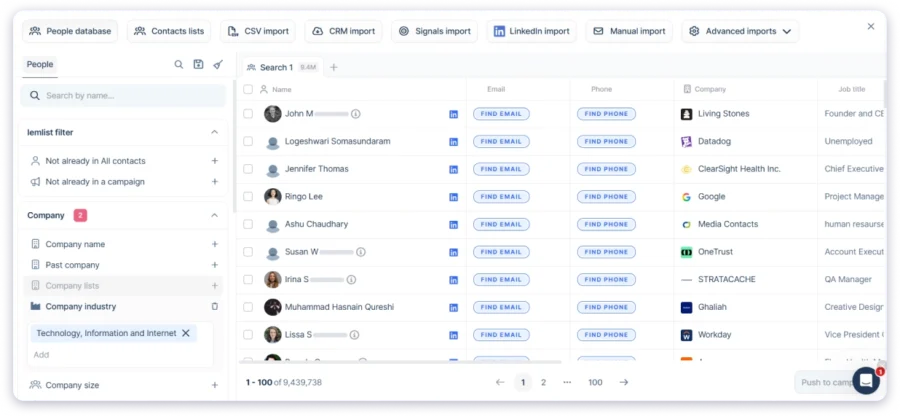
That said, coverage thinned out in regions like Singapore, New Zealand, and the UAE.
If APAC or the Middle East is your core market, I’d verify a sample before going all in.
One G2 reviewer felt the built-in email finder alone was worth the subscription. That tracks for US-focused prospecting.
But Lemlist is not a dedicated data provider, and it shows in some markets.
Email Finder and Verifier
You can find and verify emails directly inside the platform without switching tabs.
Each verified email costs 5 credits (about $0.05), and each phone number costs 20 credits (about $0.20).
Accuracy was a mixed bag. Out of a sample I checked, roughly 70-75% came back valid.
For important lists, I’d still run a second verification pass.
If match rates are your priority, a waterfall-style enrichment that pulls from multiple providers will likely give better results.
Phone Number Finder
Phone enrichment runs at 20 credits per number, which is noticeably more expensive than email.
Useful for teams adding calling steps to their sequences, but the cost adds up fast at volume.
One G2 reviewer named cost-per-lead as the platform’s main downside, and I can see why once you start pulling phone numbers regularly.
Signals (Intent Data)
What is helpful, in my view, is Lemlist’s Signals feature.
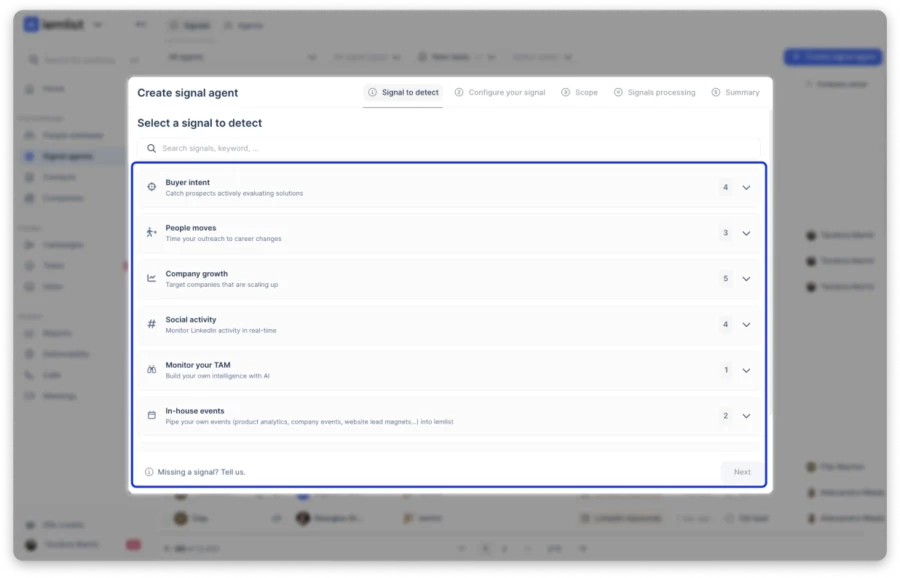
It lets you generate leads based on real buying behavior: website visits, new hires, funding rounds, LinkedIn engagement.
Instead of blasting a static list, you’re reaching out when timing actually matters. That’s a meaningful shift in how you build campaigns.
Credits range from 20 to 400 per signal, depending on the type. I’d stick with the higher-intent ones and watch the burn rate closely.
LinkedIn Extension
Here’s where things get frustrating.
LinkedIn automation runs through a Chrome extension, not cloud infrastructure.
Your laptop has to stay open with Chrome running for LinkedIn and your sequence stops as you close.
The extension integrates with LinkedIn, Gmail, HubSpot, and Salesforce.
You can enroll leads, enrich contacts, and personalize messages from these platforms without switching tabs. That part works well.
The catch is that it only works on those four platforms.
You can’t use it on other websites, company directories, or job boards. That puts real limits on how you source leads outside of LinkedIn.
The extension can be sluggish, and one G2 reviewer noted it “occasionally takes a moment to load.”
I also came across multiple users who report needing to remove and reinstall the extension periodically.
For a platform that charges $109/user/month for multichannel, the Chrome extension approach is the weakest link in the product.
2. Multichannel Outreach
This is the core of what you’re paying for on the Multichannel plan. Here’s how each channel works in practice.
Multichannel Sequences
When I opened the campaign section, Lemlist gave me two options: build a sequence manually or let AI create the structure.
The AI option was a nice starting point. It saved time compared to building everything from scratch.
Setting up a campaign is simple. Add steps, choose channels, set delays, import leads, and schedule your outreach.
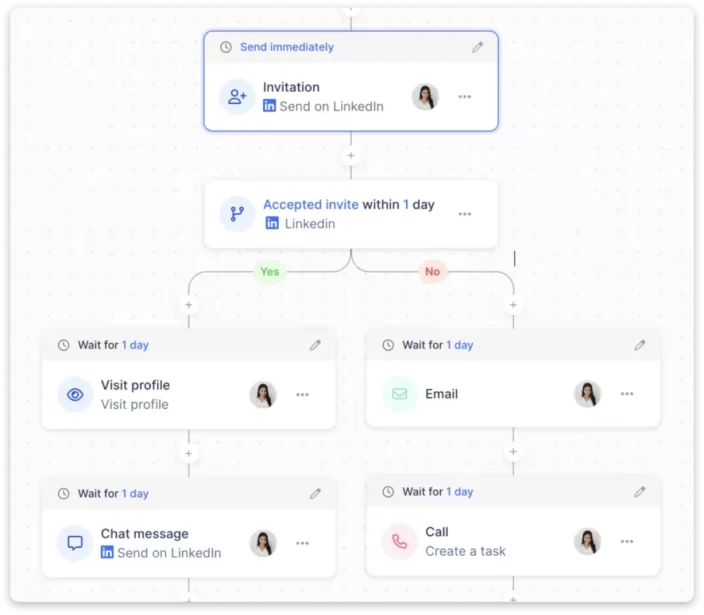
I created a few multichannel sequences, and the workflow felt intuitive. The visual sequence builder makes it easy to see how each step connects.
Adding a new action is straightforward. I could choose the channel, add content, customize the message, set timing, and move on.
The feature I liked most was Advanced Conditions. You can create different paths based on lead actions. For example, send a follow-up only if someone opened your email or accepted your LinkedIn request.
Lemlist also has an AI Campaign Generator, which is currently in beta. You enter your company details, and it creates a campaign structure with leads and personalized messages.

I tested it once, and it created a nearly ready campaign in about 10 minutes. The output still needs editing, but it is a useful starting point.
That said, Lemlist makes multichannel outreach easier, especially if you are new to running complex sequences.
Personalization Tools
I spent a lot of time testing Lemlist’s personalization features, and the depth genuinely surprised me.
Liquid syntax looks complicated at first, but it gives you a lot of control.
You can create one email template that changes based on the prospect’s role, company type, or even the time of day.

One template handles two completely different audiences.
Spin syntax keeps emails unique when multiple people from the same company receive your outreach.
AI variables save the most time by cleaning lead data, fixing formatting issues, and generating personalized icebreakers.
The learning curve is the main drawback. It takes time to understand the logic, but once set up, the personalization is more advanced than most outreach tools.
Advanced Conditions
I spent some time with the conditions feature. It’s split into categories: lead information (has an email address, has a phone number) and lead actions (opened an email, clicked a link, booked a meeting).
If a lead opens your email, send a LinkedIn request. If they click a link, move them to a separate sequence.
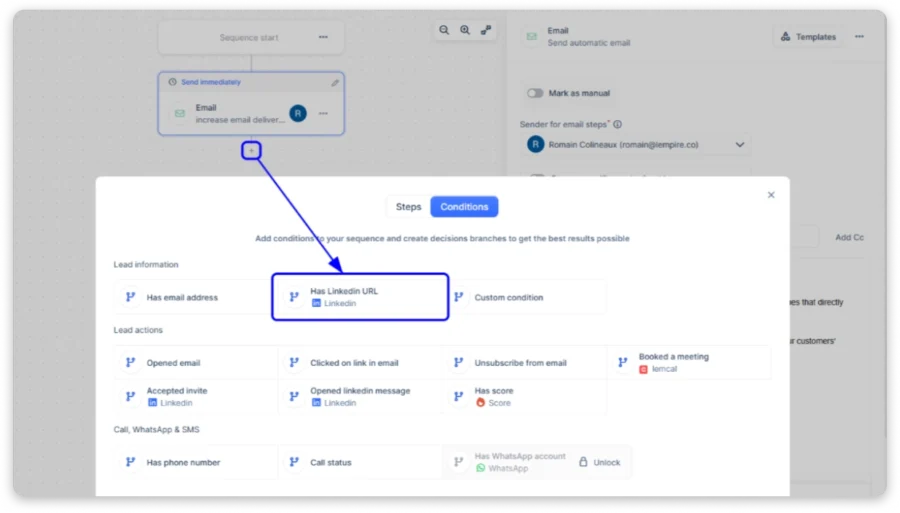
As someone who’s reviewed plenty of outreach tools, frankly, I felt a bit overwhelmed at this point. If you’re used to simple linear sequences, the jump to branching logic takes real effort to get right.
In-App Calling
Calling lives inside the sequence builder. You can log calls, drop voicemails, and track outcomes without switching tools.
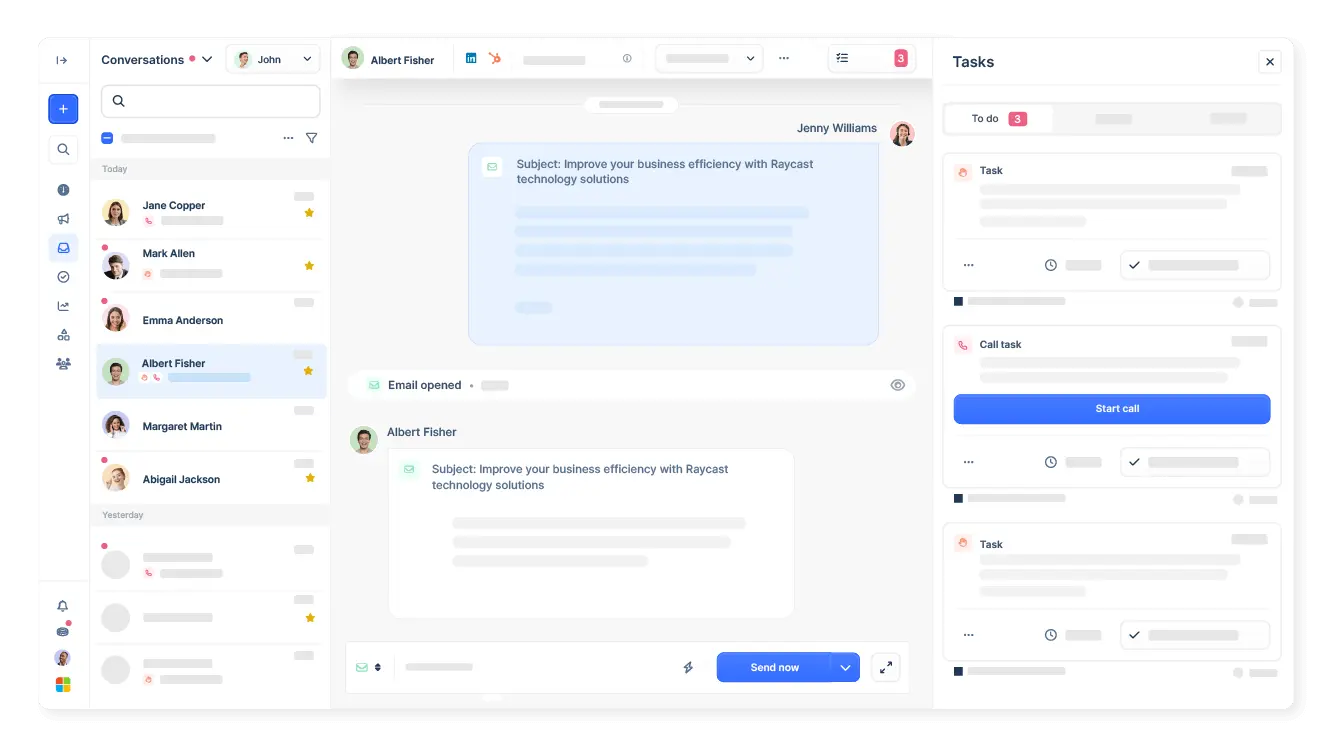
The smartest workflow I came across was from a Reddit user. Only dial after a signal like multiple opens or soft interest. Have the full email history in front of you so the call “stops being cold pretty fast”.
SMS and WhatsApp
SMS is native inside sequences now. WhatsApp is a paid add-on at $20+ per user per month.
Both extend your cadences past email and LinkedIn. But WhatsApp is not included in any base plan. That catches some buyers off guard after they’ve already committed.
Template Library
I came across a template library. Not huge, but decent enough.
You can browse pre-built sequences by use case (cold outreach, follow-up, event invitation) and by language.
I personally find this helpful for getting started. For teams onboarding new SDRs, having a starting point beats handing someone a blank page.
Overall, Lemlist campaigns are rich in features. But you need time to get familiar with all of them before you can create your first effective sequence.
Unified Inbox
All replies from email, LinkedIn, and SMS show up in one view. For teams running multiple sending accounts at volume, this eliminates a lot of tab switching.

One G2 reviewer highlighted that leads auto-pause the moment they reply.
I’d agree that’s a useful detail. No more accidentally following up on someone who already responded.
Analytics and Reporting
Lemlist gives you a clean analytics dashboard to track key metrics like opens, replies, clicks, unsubscribes, and funnel stages.
The filters are useful. You can break results down by sender, campaign, channel, or lead activity to see what is actually working.
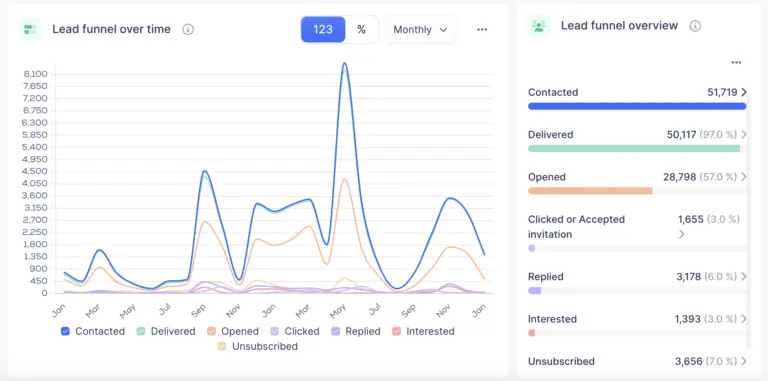
A/B testing is also included. You can test different sequences, not just subject lines, and continue with the better-performing version.
The weakness is reporting depth. Some users want more advanced insights, and I can see why. The data is there, but it is not as detailed as dedicated analytics tools.
Lemlist is improving this area through the Deliverability Hub, which combines campaign metrics, inbox placement, and sending health tracking.
Integrations
Lemlist connects with popular sales tools like HubSpot, Salesforce, Pipedrive, and Zoho.
You can also connect enrichment tools like Clay and Lusha, along with calling tools like Aircall and Ringover.
For most sales teams, the integrations cover the basics. But if you use less common tools, you may find some gaps.
Other useful features include task management and meeting recordings through the Lemlist-Claap integration.
4. Lemlist Deliverability Features
None of this matters if your emails land in spam. Here’s how Lemlist handles inbox placement.
Lemwarm
Built-in warm-up included on every plan. That alone saves $25-50/month compared to buying a standalone warm-up tool.
Lemwarm is one of the better native warm-up tools available. One experienced Reddit user said stable deliverability is “the main reason I’m still on it” (Reddit, r/EmailProspecting). Deliverability is the single most praised area across reviews.
What I found really useful is a Deliverability Boost feature built right into campaigns. It lets you optimize your email copy, check your spam rate, and test inbox placement in real time while building sequences.
Inbox Monitoring
The dashboard tracks domain health, warm-up status, and inbox placement with alerts on sending patterns.
But it only monitors what happens inside Lemlist. It won’t track blacklists, DNS drift, or domain reputation across your full sending infrastructure. If you need that level of visibility, that’s a gap worth noting.
5. Lemlist AI Features (New in 2026)
Lemlist has added a full AI layer this year. Most of these are brand new, and none of the other Lemlist reviews I found cover them yet.
lemAgent (New)
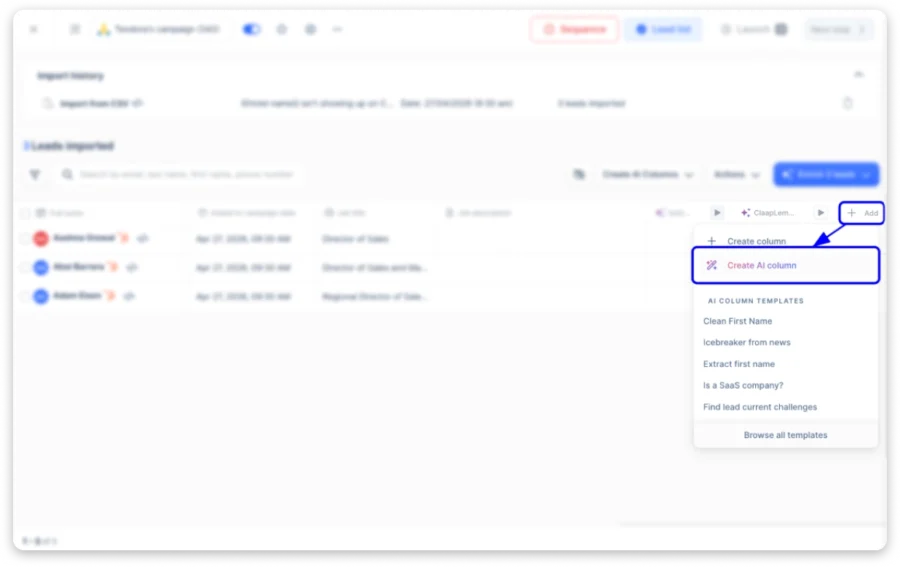
An autonomous AI agent that sources leads, researches prospects, and personalizes outreach with context. It’s still very new, so treat this as an early look rather than a settled review.
Intent Signal Agents
These track company web visits, hiring changes, fundraising events, and LinkedIn engagement. Signals cost 20-400 credits depending on the type, so I’d prioritize the higher-intent ones.
Data Enrichment Agents
AI-powered enrichment that quietly fills in missing prospect data for you, which cuts down the manual cleanup I usually dread.
Smart Messaging
The AI generates personalized email copy, LinkedIn messages, and follow-ups, and you can choose your model: Claude, GPT, or Perplexity.
In my review, the structural suggestions (step order, delays, channel mix) were more useful than the raw copy, which still needs a human edit before it’s ready to send.
lemlist from Claude (MCP Integration)
A Claude integration that lets you use Lemlist’s tools directly from Claude, handy if you’re already running your workflow through an AI assistant.
Lemlist Pricing Plans
So, how much does Lemlist actually cost?
Lemlist offers three main pricing plans, with different features and limits depending on how you run your outreach.
Email: $69/Month
You get unlimited users, unlimited email senders, and a 50,000 email/month cap.
The plan includes access to the 650M+ lead database, email finder and verifier, AI personalization, lemwarm warm-up, the Deliverability Hub, CRM integrations, and inbox rotation.
This plan works if your focus is strictly email outreach. You don’t get LinkedIn, calling, SMS, or WhatsApp.
Multichannel: $109/User/Month
This is Lemlist’s most popular plan. Unlike the Email tier, it’s billed per user, not per account.
You get 5 email senders per user, LinkedIn automation, in-app calling, SMS, unified inbox, and AI voice messages. WhatsApp is a paid add-on.
This is where the full multichannel experience lives.
But every new user you add multiplies your bill. A team of 3 pays $261/month on annual billing.
Enterprise: Custom Pricing
Built for teams of 5 or more. Requires contacting sales.
Includes 5+ email senders per user, custom user roles, SSO/SAML, a dedicated account manager, priority support, and 1:1 onboarding.
This plan is for teams that need tighter control and dedicated support.
Credits and Add-Ons
Lemlist uses credits for enrichment and intent data on top of your subscription plan. Here is what each action costs:
- Verified email: 5 credits ($0.05)
- Phone number: 20 credits ($0.20)
- Intent signals: 20–400 credits ($0.20–$4.00), depending on the signal type
The biggest downside is that unused credits expire every month. There is no rollover, so anything you do not use is lost.
Compared to tools that charge one credit per search, Lemlist’s credit system can become expensive quickly, especially when you are building large prospect lists.
You can reduce the cost with upfront billing. Lemlist offers 10% savings on quarterly plans and 20% savings on yearly plans.
Free Trial Limitations
Lemlist offers a 14-day free trial (No credit card required).
If you just want to test email outreach, you still get pushed into the full feature set.
However, worth noting is that access to LinkedIn automation and WhatsApp requires a paid plan.
The free trial lets you explore the interface, but real multichannel outreach starts after you pay.
What You Actually Pay (The Part Most Lemlist Reviews Skip)
Your plan price is not your final Lemlist bill. Several extra costs can add up quickly:
- Extra email senders: $9/month for each sender beyond the included five per user.
- WhatsApp: Paid add-on that is not included in any plan.
- Credit top-ups: Active prospecting teams may spend an extra $50–$200/month.
- No credit rollover: Unused credits expire every month, so you pay again.
For a team of five on the annual Multichannel plan, the listed price is $435/month.
But after adding extra senders, credits, and add-ons, the real cost can reach $700–$800/month.
Overall, Lemlist pricing makes sense if you actively use multichannel outreach, personalization, and deliverability features.
The Multichannel plan is the best fit for teams running email, LinkedIn, and calls together.
But if you mainly need email outreach or want predictable costs, cheaper alternatives may offer better value.
For a detailed cost breakdown with team-size scenarios, check out this Lemlist pricing guide.
Lemlist Pros and Cons
After spending 14 days inside the platform and reading through hundreds of user reviews, here’s where Lemlist lands for me.
✅ Lemlist Pros
- ✓Manage email, LinkedIn, calls, and WhatsApp from one unified outbound platform.
- ✓Create highly personalized campaigns with dynamic images, videos, and landing pages.
- ✓Get fast, helpful support from a team that actually solves problems.
- ✓Save money with built-in email warm-up included in every paid plan.
- ✓Use AI to build campaign sequences faster with minimal manual work.
- ✓Launch simple outbound campaigns quickly through a clean, intuitive interface.
❌ Lemlist Cons
- ✗Learning advanced workflows takes time, especially when managing multiple campaigns.
- ✗Per-seat pricing becomes expensive as your team size increases.
- ✗Monthly credits run out quickly and expire if left unused.
- ✗Contact database quality varies across several international markets.
- ✗LinkedIn automation requires your computer and Chrome extension to stay active.
- ✗Extra sender accounts increase your monthly costs significantly.
- ✗Deliverability monitoring lacks advanced domain health and reputation tracking.
This Lemlist review would be incomplete without covering the alternatives that may better fit your needs, especially where Lemlist has its limitations.
Button: Get Started Free →
Best Lemlist Alternatives Worth Considering
Lemlist has clear strengths, but it also has real limitations.
Before making a final decision, it’s worth seeing what else is out there.
Here are three alternatives that handle scaling and pricing differently.
1. Saleshandy
Best for: Teams scaling cold outreach across email, calling, and LinkedIn who want flat pricing instead of paying per seat.
If Lemlist’s per-seat pricing is what brought you to this review, Saleshandy is probably the first tool you should look at.
It is an all-in-one multichannel outreach platform that combines cold email, LinkedIn automation, calling, and lead generation.
The pricing difference became obvious when I compared both tools.
Saleshandy follows a flat-rate model, so your costs don’t increase as your team grows.

Lemlist’s Email plan costs $69/month ($55 annually), but it only covers email outreach.
If you need LinkedIn, calling, or SMS, you need the Multichannel plan at $87/user/month on annual billing.
Adding a second user doubles the cost.
When I tested both platforms side by side, Saleshandy handled the full outbound workflow in one place.
Lead sourcing, sequence creation, reply management, and deliverability tracking were all built into the platform.
Even after adding Lead Finder and the AI Dialer, my total cost came to $97/month for the entire team.
That’s less than Lemlist charges for one Multichannel user.
Key features include:
- 852M+ verified B2B contacts with 75+ search filters
- AI Prompt-to-List for instant prospect list generation
- Waterfall Enrichment across multiple data providers
- AI Sequence Copilot for building multi-step sequences
- A-Z Testing with up to 26 email variants
- AI Dialer with local presence dialing and voicemail drop
- Inbox Radar, Sender Rotation, Sequence Score for deliverability
- Unlimited email accounts and warm-up (TrulyInbox)
- Unified Inbox across all sending accounts
- Agency Portal with white-labeling and unlimited clients
- MCP access for AI-powered workflow integrations
Deliverability held steady even after scaling from 5 to 30 sending accounts, thanks to Inbox Radar, Sender Rotation, and AI Bounce Detection working together.
The main limitation is that Lead Finder and the Dialer are paid add-ons.
However, even with these extras, Saleshandy’s pricing stays more affordable for growing teams.
For a detailed side-by-side breakdown, check out Saleshandy vs Lemlist.
Pricing: Starts at $25/month | Trial: 7-day free trial
2. Instantly
Best for: Teams running high-volume email-only outreach who want unlimited inboxes and strong deliverability at a flat rate.
Instantly is built for teams that want strong email deliverability without paying per inbox.
If your main frustration with Lemlist is paying for additional inboxes and you only need email outreach, Instantly offers a more affordable option.
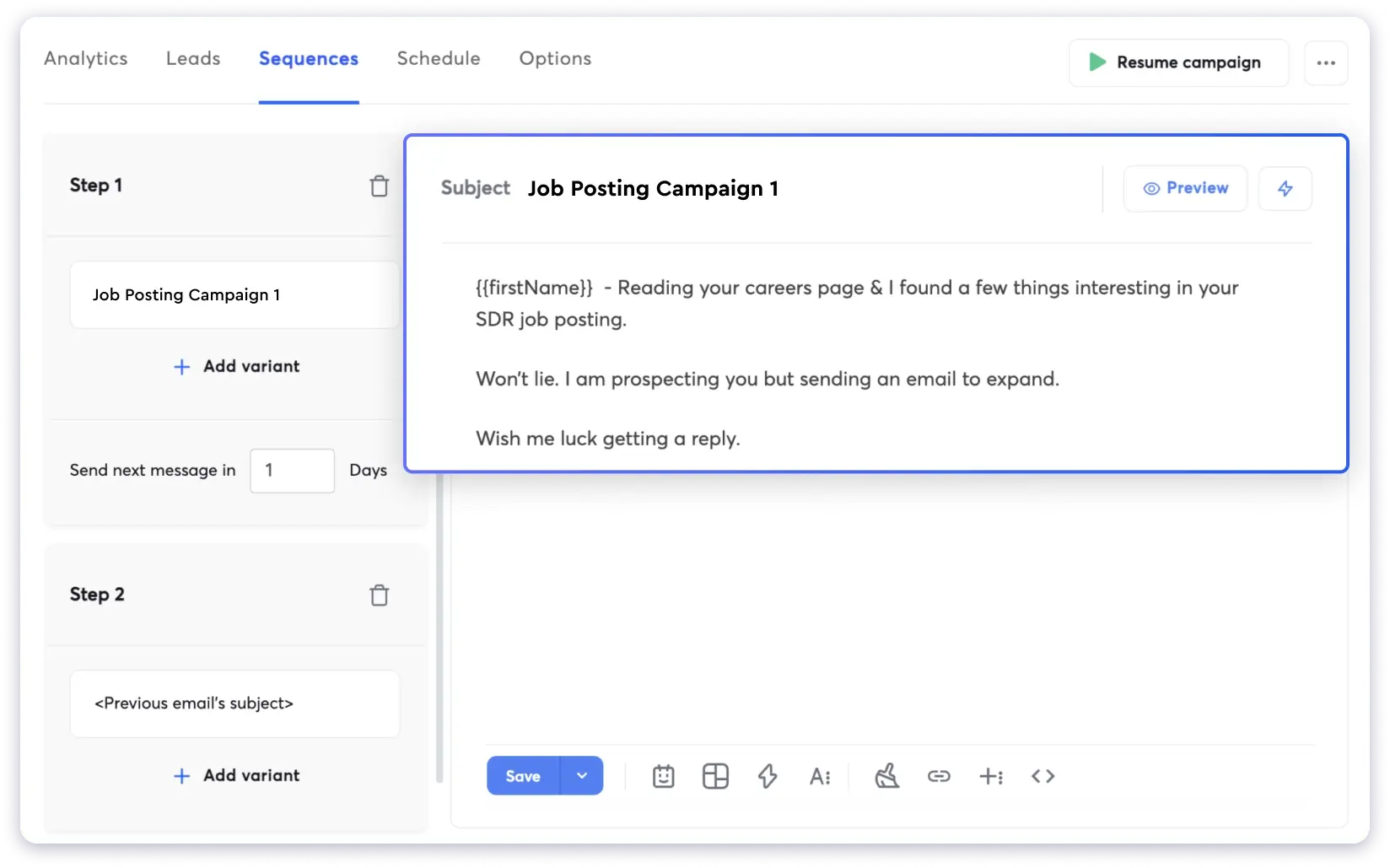
The Growth plan starts at $30/month and includes unlimited email accounts with built-in warm-up.
I had campaigns running within 15 minutes of signing up. The platform is easy to use, there’s no monthly email cap on the base plan, and the warm-up network is significantly larger than Lemwarm’s.
The downside is that the 450M+ lead database is sold separately, starting at $37.60/month.
It also doesn’t include built-in LinkedIn automation or calling, so you’ll need additional tools if you want multichannel outreach.
For a detailed comparison, see Lemlist vs Instantly.
Pricing: From $30/month | Trial: 14-day free trial
3. Reply.io
Best for: Teams that specifically need SMS and WhatsApp steps built into their outreach sequences alongside email.
Reply.io is an AI sales engagement platform that supports email, LinkedIn, calls, SMS, and WhatsApp.
It also includes a 1B+ B2B contact database, Jason AI for automated prospecting, meeting booking, and CRM integrations with Salesforce, HubSpot, and Pipedrive.
Compared to Lemlist, Reply.io offers more channels by adding SMS and WhatsApp to the same workflow.
It also has more advanced sequence automation with conditional steps.
The feature that stood out for me most during testing was Jason AI. It can find prospects, create personalized messages, manage replies, and automatically book meetings.
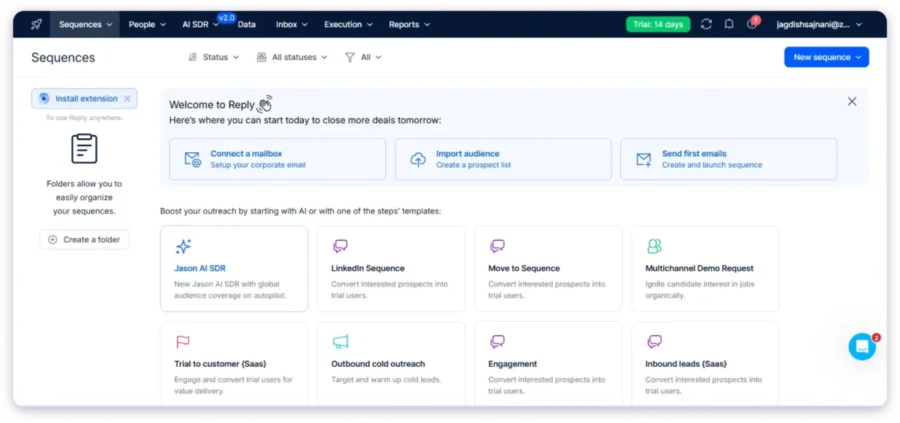
Where I face a limitation is per-user pricing. The Multichannel plan costs $89 per user per month, so a team of three will pay $267/month before any add-ons.
Reply.io also doesn’t include built-in email warm-up, so you’ll need a separate warm-up tool.
Pricing: From $49/user/month | Trial: 14-day free trial
My Key Takeaways: Is Lemlist Worth It?
After testing Lemlist, I can say it’s a good choice for teams that want multichannel outreach with email, LinkedIn, calls, and WhatsApp in one platform and are comfortable paying a premium for it.
However, there are a few things to consider. Enrichment costs can add up quickly, especially when finding phone numbers.
The database coverage also varies depending on your target audience and location.
LinkedIn automation runs through a Chrome extension instead of cloud infrastructure, which may affect reliability.
Plus, the per-seat pricing model means costs increase as you add more team members.
After comparing alternatives, I found Saleshandy offers strong deliverability features, a large verified database, and simpler pricing without per-user charges.
If you want a scalable cold outreach platform that keeps costs predictable, start with Saleshandy.
Frequently Asked Questions About Lemlist
1. Is Lemlist Worth It for B2B Outreach?
It depends on your outreach style. If you run multichannel campaigns using email, LinkedIn, and calls together, Lemlist is a solid fit. If your outreach is mainly cold email, you’ll get more value from a flat-rate tool like Saleshandy that doesn’t charge per user.
2. How Much Does Lemlist Cost per User?
The Email plan costs $69/month ($55 on annual billing) and includes unlimited users. The Multichannel plan is $109/user/month ($87 annually) and is billed per seat. Real costs run higher once you factor in extra senders, credit top-ups, and add-ons. For a full breakdown, read this Lemlist pricing guide.
3. Does Lemlist Have a Free Plan or Free Trial?
No free plan. Lemlist offers a 14-day free trial with full Multichannel access and no credit card required. The free Chrome extension lets you find up to 100 emails per month but cannot send outreach.
4. Is Lemlist the Right Tool for Agencies?
It can work for smaller agencies, but per-seat pricing makes it expensive as you scale. Each team member and client account needs a separate license. Platforms like Saleshandy include an Agency Portal with unlimited clients and no per-client fees, which is more practical for agencies managing 3+ clients.
5. Is Lemlist Better Than Instantly?
Lemlist is the better choice if you need multichannel outreach with LinkedIn, calls, and WhatsApp in one sequence. Instantly is the better choice if your outreach is email-only and you want unlimited inboxes at a flat rate starting at $30/month. Lemlist offers stronger personalization. Instantly offers simpler pricing and a larger warm-up network.
6. How Does the Lemlist Credit System Work?
Lemlist uses a credit system where 1 credit equals $0.01. Finding a verified email costs 5 credits ($0.05). Finding a phone number costs 20 credits ($0.20). Intent signals cost 20 to 400 credits, depending on the type. Credits come with your plan but do not roll over. Whatever you don’t use by month-end, you lose.
7. Is Lemlist Easy to Use?
For basic email campaigns, yes. Setup is quick, and the interface is clean. It gets more complex once you start building multichannel sequences with LinkedIn, calling, and AI tools. The Chrome extension for LinkedIn can also be unreliable at times. If ease of use is your top priority and you mainly send cold emails, simpler tools may be a better starting point.