


Okay, I’m going to settle this once and for all.
One question that comes up in almost every pricing conversation is:
“How much does Saleshandy actually cost, and which plan should I choose?“
And honestly, I understand why teams ask this.
When you’re building an outbound engine, the monthly subscription is only one part of the decision.
You want to know whether the plan can support your outreach volume, whether you have enough room to scale, and whether you’re paying for features that actually help your team generate pipeline.
Over the years, I’ve spoken with founders, sales leaders, and revenue teams evaluating Saleshandy, and the questions are usually the same:
- Should I start with a smaller plan or invest in a plan built for scale?
- How do Lead Finder credits affect my overall outreach cost?
- Do I need additional tools for finding leads, warming inboxes, and managing campaigns?
- Which features actually matter for my sales process?
That’s why I wanted to create this complete breakdown of Saleshandy pricing.
Instead of just listing plans and features, I’ll walk you through what each plan is designed for, how credits work, what you get at every level, and how to choose the right setup based on your outreach goals.
By the end, you’ll have a clear idea of which Saleshandy plan makes sense for your team and how to get started without overpaying for tools you don’t need.
TOC – Saleshandy Pricing 2026
TL;DR: Saleshandy Pricing at a Glance
The right Saleshandy plan depends on your outbound goals, team size, and how much you want to scale.
Whether you’re a founder starting outbound, a sales team building a repeatable pipeline, or an agency managing multiple campaigns, there’s a plan built around your workflow.
All plans include unlimited email accounts, email warm-up, multichannel sequences, and access to verified B2B data through Lead Finder.
You can also start with a 7-day free trial before choosing a paid plan.
How Much Does Saleshandy Cost?
Saleshandy has structured its pricing plans to offer stronger value at each stage of outbound growth.
Every plan includes the core capabilities needed to find prospects, run multichannel outreach, and maintain email deliverability, so you can choose a plan based on your required scale without paying for separate tools.
I’ll walk you through each Saleshandy pricing plan below, including who it is built for, where it reaches its limits, and when it makes sense to upgrade.
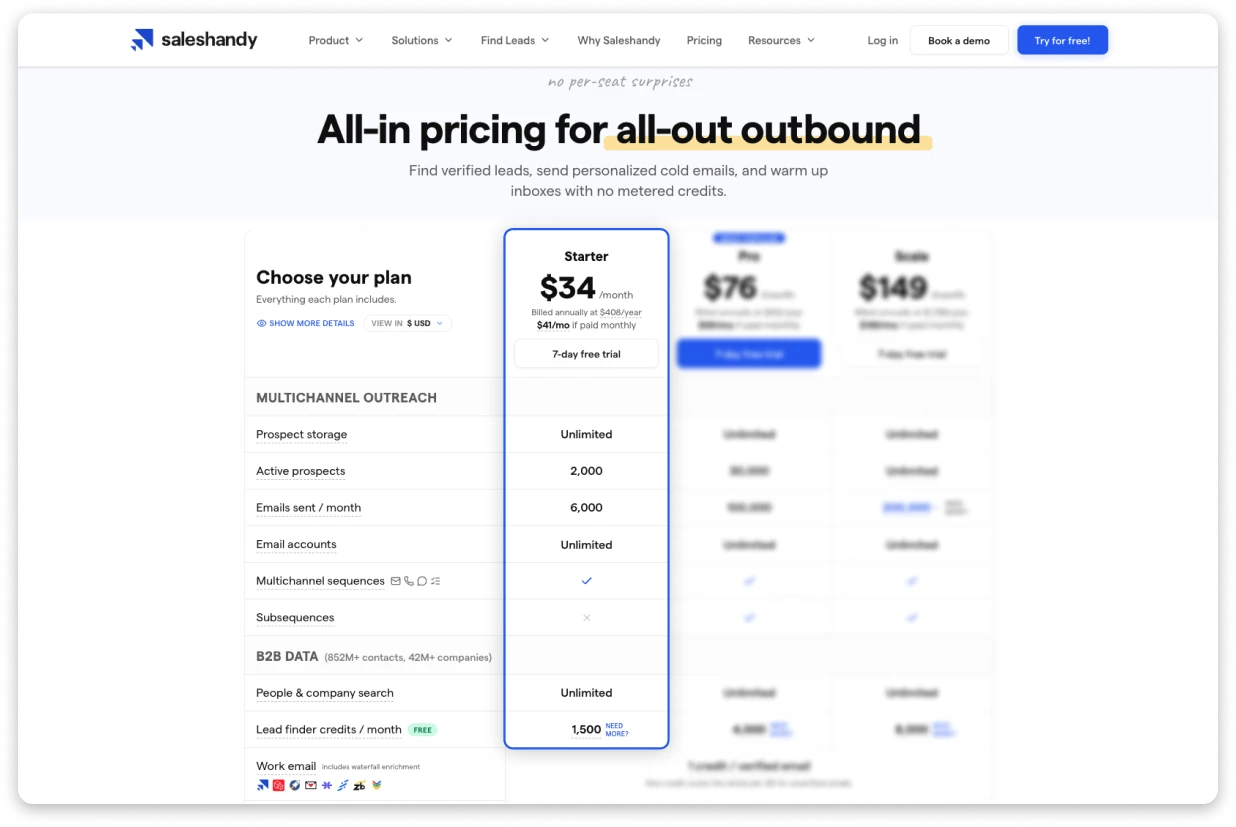
Starter: $34/month
Best for: Building your first outbound workflow
Starter gives individuals and small teams the essentials to find prospects, launch outreach campaigns, and validate their outbound process.
What you get:
- 2,000 active prospects
- 6,000 emails/month
- Unlimited email accounts and warm-up
- Sender rotation across 10 email accounts
- 1,500 Lead Finder credits/month
- 500 email verification credits and 100 AI credits (one-time)
- People and company search with 60+ filters
- 1 user with AI and email support
Who it is for:
Founders, solo operators, freelancers, and small teams starting outbound. Starter gives you everything needed to test your messaging, build prospect lists, and create your first repeatable outreach process.
Where it hits its ceiling:
Starter works best when one person owns outbound. As your team grows or you need collaboration, CRM integrations, advanced automation, and more active prospects, you will likely outgrow this plan and move to Pro.
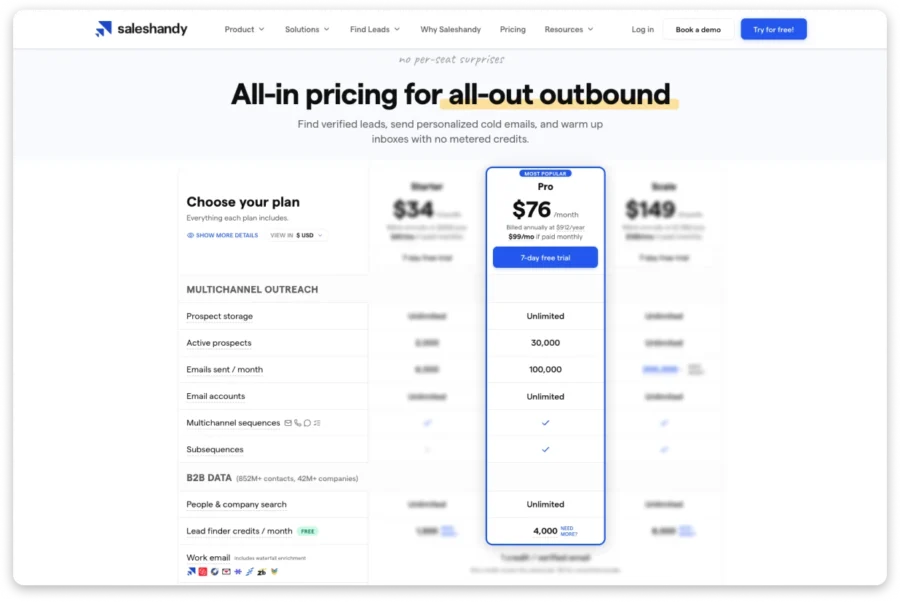
Pro: $76/month (Most Popular)
Best for: Growing teams making outbound a repeatable growth channel
Pro is designed for sales teams that need more collaboration, automation, and scale without adding complexity or paying per user.
What you get:
- 30,000 active prospects
- 100,000 emails/month
- Unlimited email accounts and warm-up
- Sender rotation across 100 email accounts
- 4,000 Lead Finder credits/month
- 1,000 email verification credits and 500 AI credits (one-time)
- 70+ search filters, including advanced company data
- Up to 10 users
- Subsequences and CRM integrations
- Priority support
Who it is for:
Growing sales teams that need a structured outbound process. Pro gives teams the ability to collaborate, automate follow-ups, manage larger prospect pools, and connect outreach with their existing sales workflow.
Where it hits its ceiling:
Pro is built for growing teams, but organizations with multiple sales teams, agency requirements, custom security needs, or unlimited user requirements will need Scale or Enterprise.
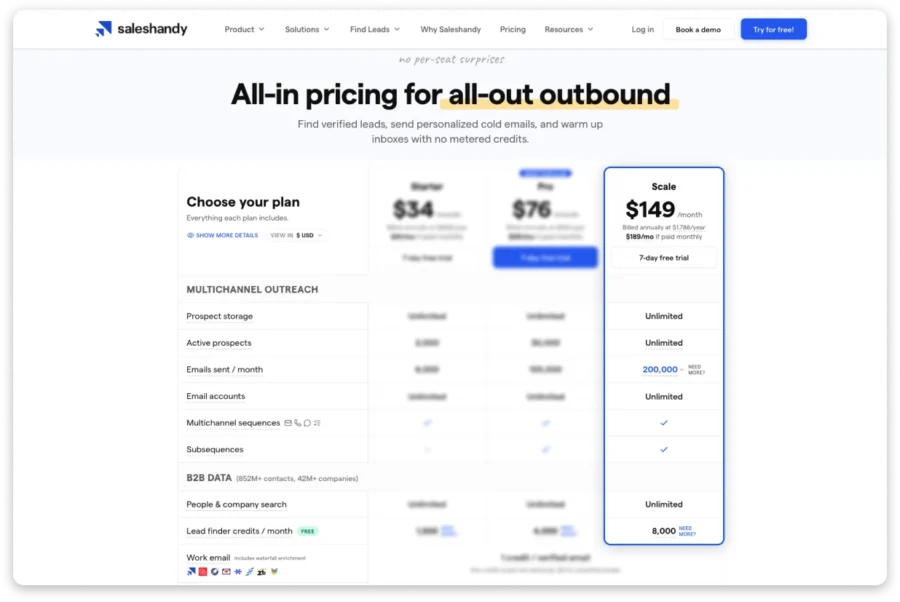
Scale: $149/month
Best for: Teams and agencies running outbound at scale
Scale is built for organizations where outbound is a core revenue channel and requires more flexibility, users, and operational control.
What you get:
- Unlimited active prospects
- 200,000 emails/month with higher volume options available
- Unlimited email accounts and warm-up
- Sender rotation across 1,000 email accounts
- 8,000 Lead Finder credits/month
- 5,000 email verification credits and 1,000 AI credits (one-time)
- Unlimited users and client workspaces
- Personalized onboarding
- Dedicated account manager
- Priority support
Who it is for:
Agencies, revenue teams, and companies running outbound programs across multiple users or workspaces. Scale removes many of the limitations teams face when outbound becomes a major acquisition channel.
Where it hits its ceiling:
Scale is designed for most high-volume outbound teams. Companies requiring custom security controls, enterprise compliance requirements, or completely customized volume and database terms should consider Enterprise.
Enterprise: Custom Pricing

Enterprise is designed for organizations that need additional control, security, and customization.
It includes everything in Scale, plus:
- Single sign-on (SSO)
- Agency white-label capabilities
- Custom sending limits
- Custom B2B database requirements
- Tailored volume plans
If your team needs enterprise security, custom infrastructure, or higher outbound requirements, an Enterprise plan can be tailored around your workflow.
Free Trial: 7 Days, No Credit Card Required
Not ready to choose a plan yet?
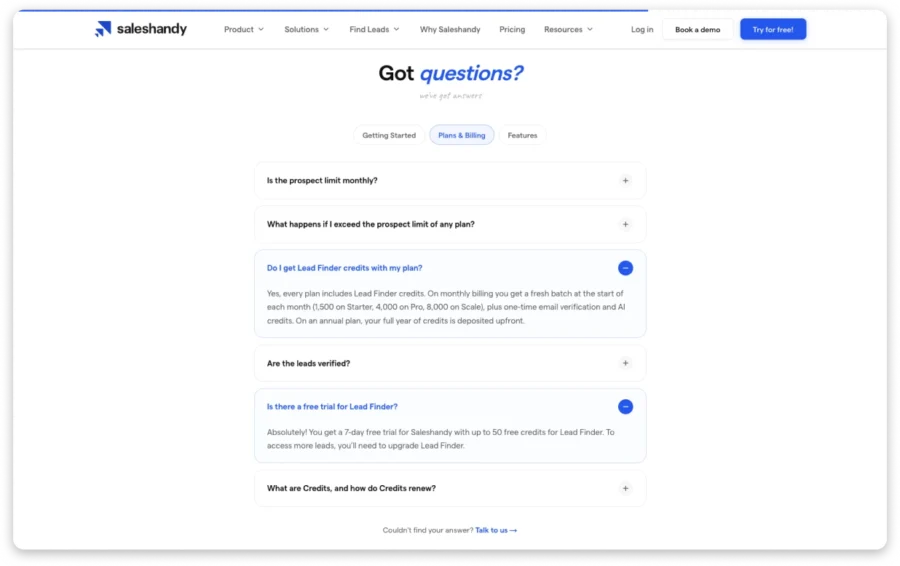
Start with a free trial and test Saleshandy before committing.
The trial includes:
- 100 emails to test your outreach campaigns
- 50 Lead Finder credits to discover verified prospects
- Unlimited email account connections
- Email warm-up
- AI-powered sequence creation
- Unified inbox for managing replies
- CRM integrations
- Inbox Placement Testing
The goal of the trial is simple: help you evaluate the data quality, outreach workflow, and deliverability before choosing a paid plan.
What Can You Spend Saleshandy Credits On?
When comparing outreach tools, the subscription price is only one part of the cost. The bigger question is: how much will it cost to find the right prospects, verify your lists, and personalize your outreach?
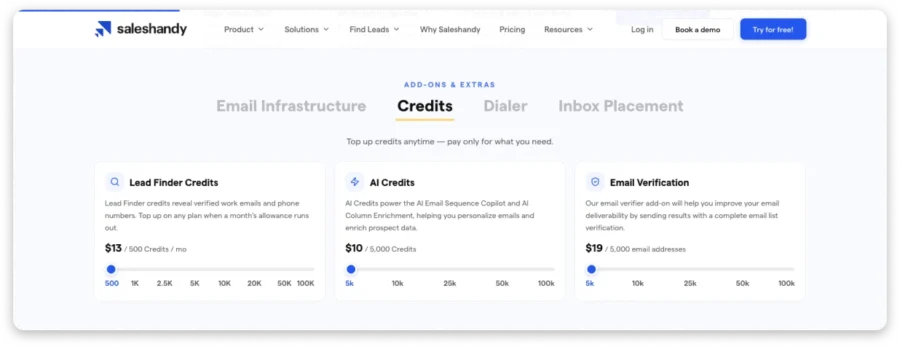
Saleshandy includes credits across every plan so you can manage these activities from one platform instead of paying separately for multiple tools.
There are three types of credits:
- Lead Finder credits: Find verified prospect data from Saleshandy’s B2B database.
- Email Verification credits: Clean existing email lists before launching campaigns.
- AI credits: Create personalized outreach and speed up campaign creation.
Lead Finder Credits(Find Verified Prospects)
Lead Finder is included with every Saleshandy plan, so you don’t need a separate subscription to access prospect data.
Each plan includes monthly Lead Finder credits:
| Plan | Lead Finder Credits |
|---|---|
| Starter | 1,500 credits/month |
| Pro | 4,000 credits/month |
| Scale | 8,000 credits/month |
With Lead Finder, you can search through 852M+ contacts and 42M+ companies using filters like job title, industry, company size, and other company attributes.
How Lead Finder credits work:
- 1 credit = 1 verified work email
- 6 credits = 1 verified phone number
- Phone reveals include the email address, so the total cost is 7 credits
You only use credits when verified information is found. This means you are paying for usable contact data, not searches that return incomplete results.
Email Verification Credits(Clean Your Lists Before Outreach)
If you already have a prospect list, Email Verification credits help you identify invalid addresses before sending campaigns.
This helps you:
- Reduce bounce rates
- Protect sender reputation
- Improve inbox placement
Each plan includes one-time verification credits:
| Plan | Email Verification Credits |
|---|---|
| Starter | 500 |
| Pro | 1,000 |
| Scale | 5,000 |
You can purchase additional verification credits if you need to validate larger lists.
AI Credits(Create Personalized Outreach Faster)
AI credits help you speed up the parts of outreach that usually take the most manual effort, such as writing sequences and adding personalization.
You can use AI credits for:
- AI Email Sequence Copilot: Create outreach sequences using simple prompts.
- AI Column Enrichment: Add relevant prospect or company details to personalize messages.
Each plan includes one-time AI credits:
| Plan | AI Credits |
|---|---|
| Starter | 100 |
| Pro | 500 |
| Scale | 1,000 |
*Additional AI credits are available if you need to run more AI-powered tasks.
Saleshandy Add-Ons and Extra Costs
Your Saleshandy plan includes everything you need to find prospects, launch outreach campaigns, and manage your outbound workflow.
As your campaigns grow, you can add extra capabilities like dedicated sending infrastructure, additional credits, phone outreach, and deliverability testing.
These add-ons are optional, so you only pay for the tools your team actually needs.
1. Email Infrastructure: $2.99-$3.99/mailbox/month
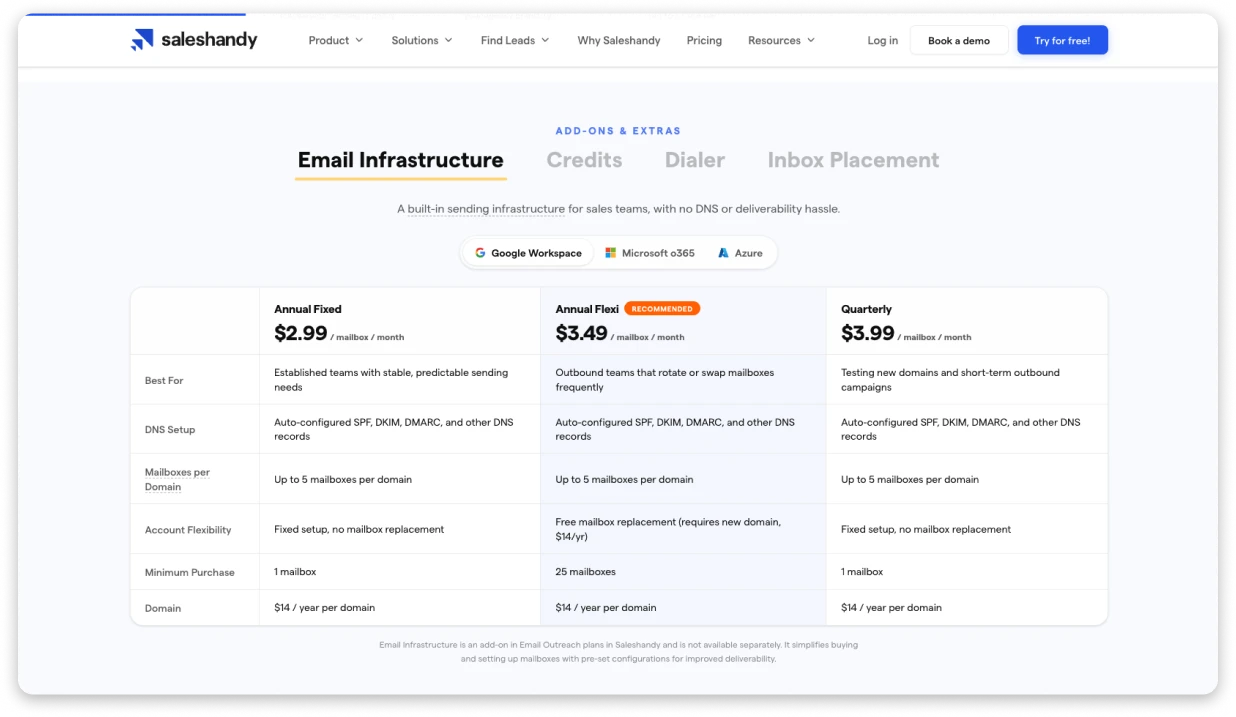
Best for: Teams that want ready-to-send inboxes without managing technical setup
Scaling outbound requires more than just an outreach platform. You need domains, mailboxes, and proper authentication settings like SPF, DKIM, and DMARC to maintain deliverability.
Saleshandy’s Email Infrastructure removes the technical setup by providing pre-configured domains and mailboxes that are ready for outreach.
You can choose from three options:
| Plan | Price | Best For |
|---|---|---|
| Annual Fixed | $2.99/mailbox/month | Teams with stable sending requirements |
| Annual Flexi | $3.49/mailbox/month | Teams that regularly rotate mailboxes |
| Quarterly | $3.99/mailbox/month | Short-term campaigns and testing |
Additional details:
- Domains: $14/year per domain
- Up to 5 mailboxes per domain
- Supports Google Workspace, Microsoft 365, and Azure
If you already have your own domains and properly configured inboxes, you can continue using your existing setup without adding Email Infrastructure.
2. Lead Finder Credits Top-Up
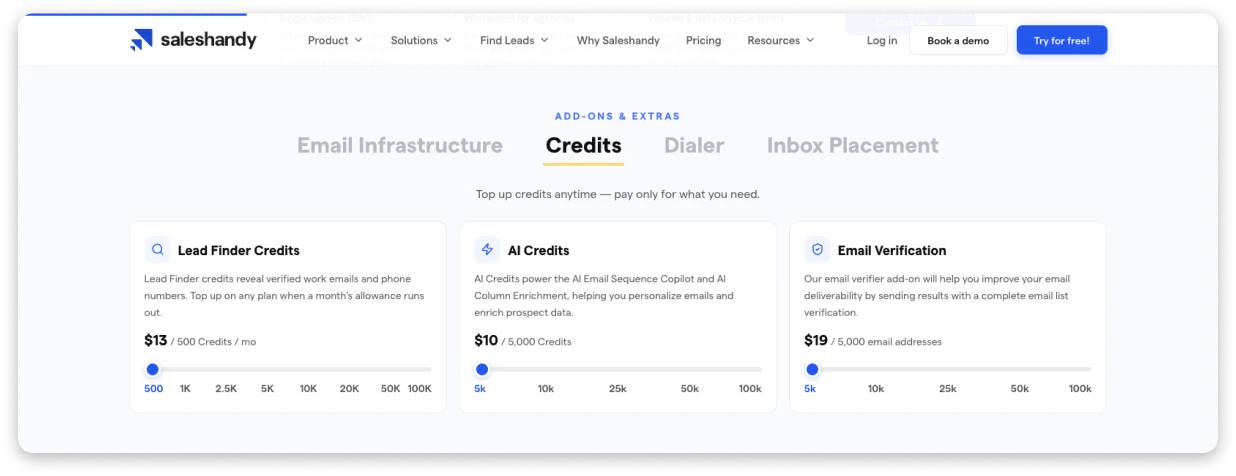
Best for: Teams that need more verified prospect data
Every Saleshandy plan includes Lead Finder credits to discover verified prospects. If you need additional prospecting capacity, you can purchase extra credits without upgrading your plan.
Lead Finder credits start at:
- $13 for 500 credits/month
Lead Finder uses a pay-for-verified-results model, meaning credits are only consumed when verified contact information is found.
You can use Lead Finder to search verified B2B contacts by job title, industry, company size, and other buying signals.
3. Email Verification Credits
Best for: Teams cleaning existing lists before outreach
If you already have a prospect list, Email Verification helps identify invalid addresses before you start sending campaigns.
This helps you:
- Reduce bounce rates
- Protect sender reputation
- Improve inbox placement
Top-up pricing starts at:
- $19 for 5,000 email verifications
Larger packages are available up to 100,000 email addresses.
4. AI Credits
Best for: Teams creating personalized outreach faster
AI credits help reduce the manual work involved in creating outreach campaigns. You can use them for:
- AI Email Sequence Copilot to generate outreach sequences
- AI Column Enrichment to add personalization details to prospects
Additional AI credits start at:
- $10 for 5,000 credits
You can review credit usage before running AI tasks, so you always know the expected cost.
5. Saleshandy Dialer: $23-$55/month
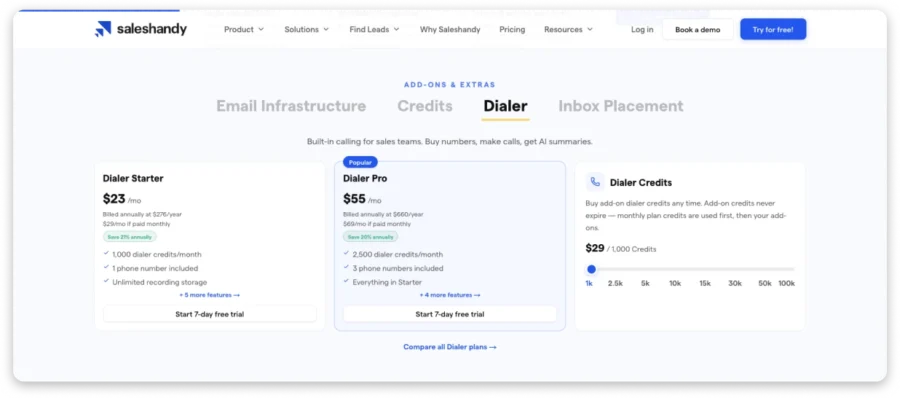
Best for: Teams adding phone outreach to their outbound workflow
Saleshandy Dialer helps teams combine calling with their existing outreach process. You can purchase phone numbers, call prospects, and access AI-powered call summaries from the same platform.
Plans include:
| Plan | Price | Includes |
|---|---|---|
| Dialer Starter | $23/month | 1,000 dialer credits and 1 phone number |
| Dialer Pro | $55/month | 2,500 dialer credits and 3 phone numbers |
Additional dialer credits cost $29 per 1,000 credits and never expire.
6. Inbox Placement Testing: Free to $139/month
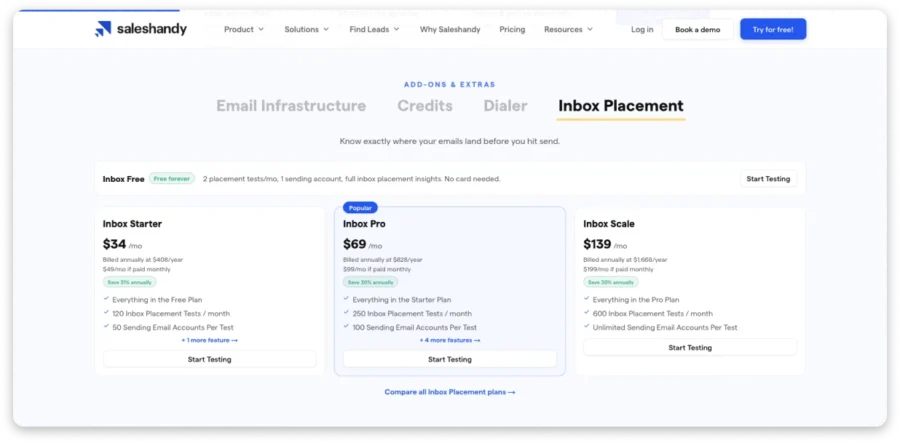
Best for: Teams that want to validate deliverability before launching campaigns
Even with properly configured inboxes, emails can land differently across providers. Inbox Placement Testing helps you understand where your emails are reaching before sending campaigns to real prospects.
You can test whether your emails are landing in:
- Primary inbox
- Promotions
- Spam
before launching your outreach.
The free plan includes:
- 2 inbox placement tests per month
- Deliverability checks before campaigns
Paid plans include:
- Inbox Starter: $34/month with 120 tests
- Inbox Scale: $139/month with 600 tests and unlimited sending accounts per test
How Much Does Saleshandy Cost Over 3 Years?
The subscription price is only one part of your outbound cost. As your team grows, you also need to account for prospecting data, inbox infrastructure, warm-up, verification, and other tools required to run campaigns successfully.
To show the real cost, here are three examples based on different outbound stages.
Scenario 1: Solo Founder Starting Out
Best for: Founders, freelancers, and small teams testing outbound with their existing email setup.
Setup:
- Saleshandy Starter plan
- Existing domains and mailboxes
- No additional infrastructure required
| Cost | Annual Cost |
|---|---|
| Saleshandy Starter | $408 |
| Email infrastructure | $0 (using existing setup) |
| Lead Finder credits | Included |
| Email warm-up | Included |
| Email verification | Included |
| Total | $408/year |
3-year cost: $1,224
Average monthly cost: ~$34/month
If you already have a sending setup, Starter gives you the core tools to find prospects, launch campaigns, and manage outreach without adding extra software costs.
Scenario 2: Growing Sales Team Using Pro
Best for: Sales teams running outbound consistently and adding more sending capacity.
Setup:
- Saleshandy Pro plan
- 25 mailboxes
- 10 domains
- Email Infrastructure (Annual Flexi)
| Cost | Annual Cost |
|---|---|
| Saleshandy Pro | $912 |
| 25 mailboxes | $1,047 |
| 10 domains | $140 |
| Lead Finder credits | Included |
| Email warm-up | Included |
| Email verification | Included |
| Total | $2,099/year |
3-year cost: $6,297
Average monthly cost: ~$175/month
For most growing sales teams, the biggest cost is not the outreach platform itself. It is building the infrastructure needed to send at scale.
With Saleshandy Pro, you get outreach automation, prospecting credits, warm-up, and verification included in one subscription.
Scenario 3: Agency Running Outbound at Scale
Best for: Agencies managing multiple clients or teams running high-volume outbound campaigns.
Setup:
- Saleshandy Scale plan
- 50 mailboxes
- 15 domains
- Dialer Pro
- Additional Lead Finder credits
| Cost | Annual Cost |
|---|---|
| Saleshandy Scale | $1,788 |
| 50 mailboxes | $2,094 |
| 15 domains | $210 |
| Dialer Pro | $660 |
| Additional Lead Finder credits | $624 |
| Additional email verification | $38 |
| Total | $5,414/year |
3-year cost: ~$16,166
Average monthly cost: ~$449/month
For agencies, the main advantage comes from scaling without adding separate tools for every client or workflow.
Saleshandy Scale gives you unlimited users, client workspaces, and the flexibility to manage larger outbound operations from one platform.
How to Get the Best Value From Saleshandy
One thing I have noticed while speaking with teams evaluating Saleshandy is that the biggest savings usually come from choosing the right plan early, using the included capabilities fully, and upgrading only when your outbound operation actually needs it.
Instead of paying for features you may not use yet, the goal is to build your outbound stack step by step and invest more as your pipeline requirements grow.
Here’s how I would approach it.
1. Choose Annual Billing If Outbound Is a Long-Term Channel
If outbound is already part of your growth strategy, annual billing gives you the lowest effective monthly cost.
Annual pricing reduces the monthly equivalent from:
- Starter: $41/month → $34/month
- Pro: $99/month → $76/month
- Scale: $189/month → $149/month
For teams committed to running outbound consistently, the annual plan helps keep your costs predictable while giving you access to the full platform.
2. Start With the Plan That Matches Your Current Stage
The best plan is not always the biggest one. It is the one that gives your team enough room to execute without paying for unused capacity.
For many growing sales teams, Pro becomes the point where Saleshandy starts unlocking its full value:
- 30,000 active prospects
- 100,000 emails/month
- Up to 10 users
- 4,000 Lead Finder credits/month
It gives teams the collaboration and scale they need without jumping to enterprise-level costs.
As your requirements grow, you can move to Scale for unlimited users, unlimited prospects, and larger outbound operations.
3. Use Your Included Credits Before Buying More
Every Saleshandy plan includes credits for Lead Finder, email verification, and AI features.
Before purchasing additional credits, make sure you are using your included allocation effectively.
For example:
- Use Lead Finder credits for high-value prospect searches
- Verify existing lists before launching campaigns
- Use AI credits where personalization can save your team manual effort
Many teams can run their initial outbound campaigns using the credits already included in their plan before needing additional top-ups.
4. Consolidate Your Outbound Stack
The biggest value of Saleshandy is not only the subscription price. It is reducing the number of tools needed to run outbound.
Instead of managing separate subscriptions for:
- Prospecting data
- Email warm-up
- Outreach automation
- Email verification
- Deliverability tools
Saleshandy brings these capabilities together in one platform.
This means your outbound costs stay easier to manage as your campaigns grow.
5. Use Lead Finder Credits Strategically
Lead Finder credits are most valuable when used for prospects that match your ideal customer profile.
To get more value from your credits:
- Prioritize high-fit accounts first
- Use filters to narrow searches before revealing contacts
- Enrich existing lists when you already have prospect information
- Track usage regularly so you can plan campaigns ahead
For agencies and teams managing multiple campaigns, allocating credits based on campaign value helps avoid unnecessary top-ups.
6. Upgrade When Your Growth Requires It
The right time to upgrade is when your current plan starts limiting your workflow.
Examples:
- Need more active prospects and users? Move from Starter to Pro.
- Need unlimited users, workspaces, or larger outbound capacity? Move to Scale.
- Need custom security, branding, or volume requirements? Consider Enterprise.
The goal is not to buy the largest plan upfront. It is to upgrade when your outbound operation has grown enough to justify the additional capabilities.
Is Saleshandy Worth the Price?
Saleshandy’s value comes down to what you compare it against.
If you are only looking at the monthly subscription, there may be cheaper tools. But once you factor in prospecting, outreach automation, warm-up, verification, and other tools needed to run outbound, the total cost of your stack can add up quickly.
Saleshandy brings these capabilities together in one platform, helping teams find prospects, launch campaigns, and scale outbound without managing multiple subscriptions.
For founders starting outbound, Starter provides the essentials. Growing teams will find Pro offers the right balance of scale and collaboration, while agencies and larger teams can move to Scale or Enterprise as their requirements grow.
If you want one platform to manage your outbound workflow while keeping costs predictable, Saleshandy is worth considering.
Start your free trial and see if Saleshandy fits your outreach goals.
Saleshandy Pricing FAQs
1. How much does Saleshandy cost?
Saleshandy pricing starts at $34/month for the Starter plan and goes up to $149/month for the Scale plan. Enterprise plans come with custom pricing based on your requirements. Annual billing helps you save compared to monthly plans.
2. What changed in Saleshandy pricing in 2026?
In 2026, Saleshandy moved to an all-in-one pricing model. Lead Finder credits are now included with every plan, so you don’t need a separate subscription for finding leads.
3. What is the difference between Saleshandy plans?
Starter is designed for individuals and small teams, with basic outreach limits. Pro supports growing teams with higher email volume, more prospects, and more users. Scale is built for larger teams with unlimited users, workspaces, and advanced support.
4. Are Lead Finder credits free with Saleshandy?
Yes. Every Saleshandy plan includes free Lead Finder credits. Starter includes 1,500 credits, Pro includes 4,000 credits, and Scale includes 8,000 credits. You only use credits when verified contact data is found.
5. Does Saleshandy have a free plan?
Saleshandy does not have a permanent free plan, but you can try it with a 7-day free trial. The trial includes access to core features so you can test outreach and lead generation before upgrading.
6. How does Saleshandy compare to Instantly, Smartlead, Apollo, and other tools?
Saleshandy combines cold email outreach, lead generation, and automation in one platform. Many competitors charge separately for users, inboxes, or lead data, while Saleshandy includes key features in one plan.
7. Does Saleshandy charge per user or per seat?
No. Saleshandy does not follow per-seat pricing. Starter includes 1 user, Pro supports up to 10 users, and Scale offers unlimited users, helping teams grow without increasing software costs.



 Dhruv Patel