

Not a single week goes by without someone asking me this…
“Anil, what do you really think about Saleshandy?”
I get this question all the time, in my LinkedIn DMs, emails, even on Slack groups we’re part of, like Maildoso, Clay, RevGenius, and more. (Mostly from people I’ve never spoken to.)
Of course, they know I work at Saleshandy, but that’s not why they’re asking.
They want the inside view. And since I use Saleshandy daily for my own cold outreach, and my team relies on it to build pipelines, I know what’s good, what needs work, and whether it actually helps book meetings.
So instead of replying one by one…I thought, why not write it all down?
If you’re exploring our multi-channel outbound platform or looking for an honest opinion, this Saleshandy review will help you make the right decision.
TOC – Saleshandy Review [2026]
- TL;DR: Quick Saleshandy Review in Under 30 Seconds
- Why Global B2B Teams Choose Saleshandy Over and Over
- What is Saleshandy?
- How Saleshandy Became an All-in-One Outbound Platform
- Who is Saleshandy Best For?
- Saleshandy Platform: Key Features Overview
- Saleshandy Integrations That Help You Save Time
- Saleshandy Pricing Plans: Is Pricing Worth It?
- How Saleshandy Works: A Quick Tutorial
- Saleshandy Alternatives and Competitors
- Final Verdict: Should You Use Saleshandy for Your Business?
- FAQs Teams Often Ask Me About Saleshandy
TL;DR: Quick Saleshandy Review in Under 30 Seconds
Here is a table that quickly describes Saleshandy and its important features. Let’s have a look at it.
Why Global B2B Teams Choose Saleshandy Over and Over
Check out the latest Saleshandy reviews on G2.
655+ 5-star G2 reviews describe it as a reliable multichannel outbound platform that delivers desired results, drives more replies and meetings, and offers great value for money.
“Saleshandy has streamlined our email outreach efforts. I love how easy it is to upload prospect lists, set up automated follow-ups, and track open and reply rates in real-time…”
– Richard M., Director
“I’ve been using Saleshandy recently, and honestly, it’s been a game-changer for my outreach. The email tracking is super helpful—I love being able to see exactly when someone opens my email…”
– Mirza A., Agency Founder
“Saleshandy works seamlessly with Outlook. It provides great support and videos for me to learn how to use it. I also felt like it was relatively easy to get a campaign started…”
– Joshua E., Business Development
What is Saleshandy?
Saleshandy is an AI-powered multichannel outbound platform built to run your entire outreach workflow in one place. It brings together an accurate B2B lead database, sequences across email, calls, LinkedIn and WhatsApp, and a full deliverability stack.
You can find verified leads from 852M+ contacts, build personalized sequences with AI, warm up your inboxes, and track who actually replies. From prospecting to booking meetings, it all happens in one workflow instead of 4-5 separate tools.
Whether you’re an agency, recruiter, founder, or SDR, if you’re running outbound and care about deliverability, performance, and results, Saleshandy is built for you.
How Saleshandy Became an All-in-One Outbound Platform
Saleshandy did not start as an all-in-one sales platform.
Back in 2017, it was a simple Chrome extension that helped people send personalized emails from their inbox. But something interesting happened: most users were not sending newsletters. They were founders, recruiters, agencies, and sales teams trying to start real conversations with potential customers.
That feedback shaped what Saleshandy became next.
2017 – The Chrome Extension Era:
It started with simple mail merges. Users use to send personalized emails, save time, and reach more people without copy-pasting every message.
2018 To 2020 – From Sending Emails To Building Conversations
One-off emails were not enough for sales teams. So Saleshandy introduced sequences, automated follow-ups, and campaign tracking to help teams build repeatable outreach systems.
2021 To 2022 – Built For Serious Outbound Teams
Cold email became the core focus.
Saleshandy V3 introduced unlimited email accounts, higher sending capacity, and deeper deliverability features.
Key changes introduced in this phase included →
- Purpose-built workflows for cold outreach
- Cold email friendly pricing, as you can add unlimited email accounts without any extra cost
- Support for high-volume sending
- Strong focus on deliverability and sender reputation
At that time, our goal was simple: help sales and outbound teams send more emails without damaging their sender reputation.
2024 – Prospecting Joins The Platform
Finding leads and reaching out to them were always connected, but most teams still used separate tools.
Saleshandy changed that with Lead Finder. Teams could now find real-time verified contacts, connect with prospects through the LinkedIn extension, and move directly into outreach without switching platforms.
2025 To 2026 – AI & Multichannel Outreach
Outbound was changing, so Saleshandy expanded beyond email. Plus, it began strengthening automation to reduce manual work across every step of outreach.
Key updates included →
- AI sequence copilot to generate multichannel sequences with textual prompts
- Sequences that include email, LinkedIn, calls, and WhatsApp
- AI prospect enrichment to personalize messages using fresh prospect and company data
- AI Lead Finder to discover and verify leads inside the platform
- AI variables to personalize emails dynamically at scale
- Inbox placement tests to check deliverability before launching the campaign
- A mobile app to manage replies and outreach on the go
So, What Saleshandy Offers Today
Today, Saleshandy has grown into a complete outbound sales platform.
Teams can find prospects from a database of 852M+ contacts across 42M+ companies, run multichannel campaigns, manage replies, make calls through the built-in Dialer, track deals in Saleshandy CRM, and set up email infrastructure with SPF, DKIM, and DMARC configured.
For teams building with AI, Saleshandy also connects with Claude, ChatGPT, and Gemini through MCP, along with CLI access for custom workflows.
Nine years later, the mission remains the same: help sales teams find the right people, start better conversations, and build predictable pipelines.
Who is Saleshandy Best For?
If you’re serious about outbound, Saleshandy is a solid pick.
It’s built for teams that want to find leads, reach prospects across email, calls, LinkedIn and WhatsApp, and protect deliverability without stitching together four separate tools.
Here’s who will get the most out of it:
- Cold Outreach Agencies
- Founders & Co-founders
- Lead Generation Teams
- Sales Teams in Startups & SMBs
- SDRs (Sales Development Representatives)
- BDRs (Business Development Representatives)
- Freelancers & Consultants doing outbound
- Growth Marketers
- Recruiters
- Solo Entrepreneurs running out on their own
- RevOps Professionals
Now, in the next section, I’ll break down the core features of Saleshandy.
Saleshandy Platform: Key Features Overview
Here is the section that provides a detailed look at Saleshandy features, including prospecting, setting up cold email sequences, and booking meetings.
Core Outreach Functionalities
In this section, I’ll review the features that do the heavy lifting in Saleshandy, from sequences to reply management.
1. AI-Powered Email Sequences
- Ease of Use – 5/5⭐
- Speed of Building Sequences – 5/5⭐
- Output Quality – 4.5/5⭐
When I started using Saleshandy, my first instinct was to build sequences manually, one step at a time.
You write the first cold email, follow it up with 3–5 additional steps, personalize each line, tweak subject lines, add merge tags, space them out properly, and make sure everything aligns with your ideal customer profile ICP and offer.
It works well when you know your audience and messaging, but let’s be honest, it takes time. And if you’re managing multiple clients, campaigns, or product launches, it can get overwhelming fast.
Too Much to Handle? Use the AI Sequence Copilot Instead (A Recent Launch)
Saleshandy’s AI Sequence Copilot makes the entire process frictionless.
If writing emails from scratch is eating into your time, the AI Sequence Copilot helps you go from an idea to a full multi-step sequence in a few clicks.

I’ve used this when I needed to launch sequences faster, and it gave me a solid starting point every time.
Here’s how it works (and yes, it’s genuinely useful):
- Click “Write with AI.”
- Add Your Company Info or Website
- Review and Customize Details
- Pick Your Sequence Goal
- Answer a Few Quick Questions
- Add Your Key Offerings
- Define Your ICP
- Choose the Number of Steps
- Review and Edit the Draft
Once the emails are generated, you can edit them manually or click “Edit with AI” to tweak messaging. Once finalized, click “Add to Sequence.” That’s it; you’re good to go now.
2. Automate Your Follow-Ups
- Ease of Use – 5/5⭐
- Follow-Ups Automation Accuracy – 5/5⭐
- Personalization Capabilities – 4.5/5⭐
Well, if you’re a cold email marketer, you’ve probably felt stuck and overwhelmed when it comes to following up with prospects.
(It’s the everyday story of salespeople and others in outbound — it is what it is.)
But Saleshandy understands this pain point. That’s why it helps automate the entire follow-up process, even allowing you to set conditional follow-ups based on prospect behavior.
(This feature, by the way, came directly from customer requests.)
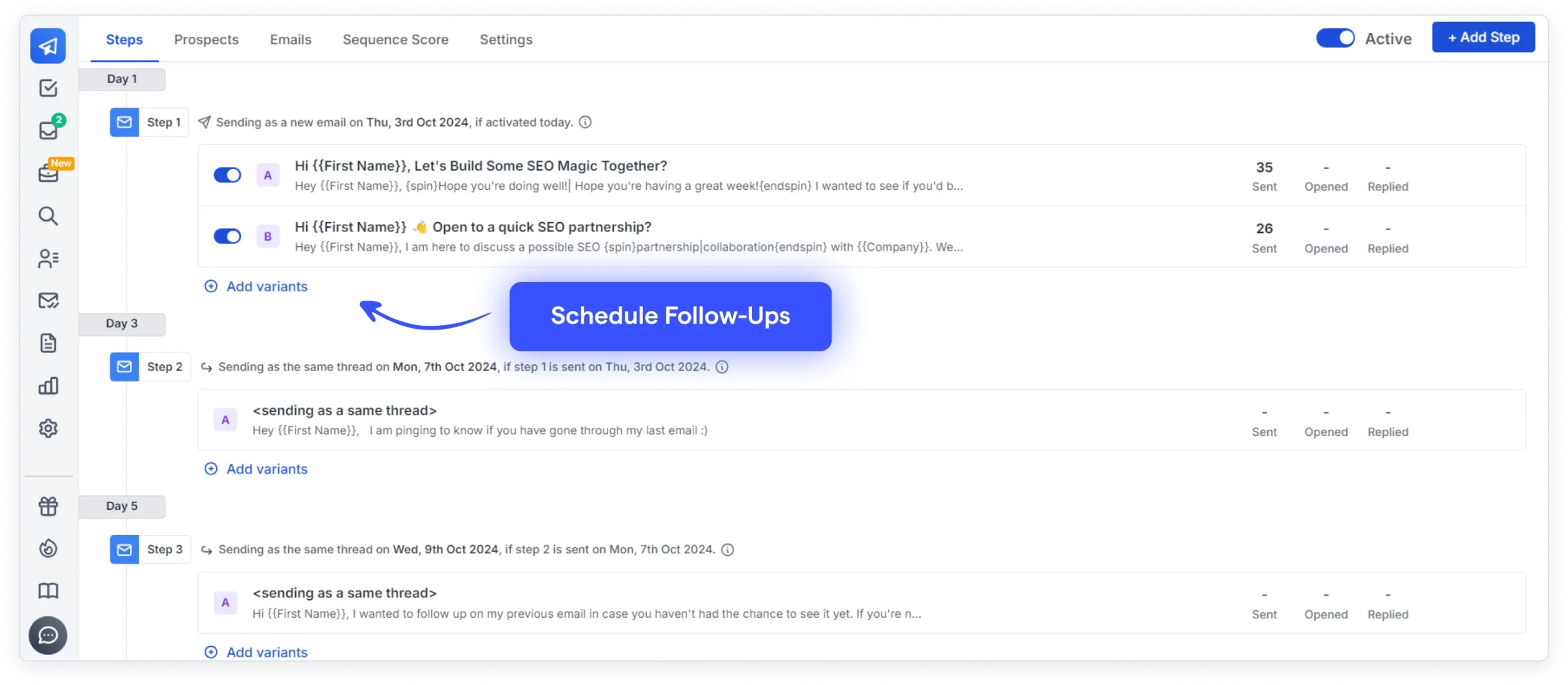
So, why does it make following up so easy and quick? Let me break it down.
- Completely automated: Once a sequence is live, Saleshandy automatically sends follow-ups at the right intervals.
- Personalization at scale: Merge tags, spintax, and variables make each message feel tailor-made for the recipient.
- Smart scheduling: Follow-ups are sent in the prospect’s local time zone — a small feature that made a big difference in open rates.
- Threaded conversations: Follow-ups continue within the same email thread, keeping the context intact.
- Reply detection: If someone replies, follow-ups stop, which means you won’t risk spamming someone who has already responded.
- Performance Insights: You get clear data on which follow-up emails are getting opened, clicked, or ignored.
What I appreciated most is that I didn’t have to sacrifice personalization for automation.
Saleshandy balances perfectly. It gave me back my time while still letting me maintain a high-quality experience for my prospects.
3. Email Personalization
- Merge Tags and Custom Variables – 5/5⭐
- Spintax Variation and Utility – 5/5⭐
- Subject Line Personalization – 4.5/5⭐
- AI Variant Generation – 5/5⭐
If you’re doing cold outreach, you already know this: generic emails don’t work anymore. (We all ignore those “Hi there, I hope this finds you well” types.)
That’s where Saleshandy’s personalization tools really come in handy. The platform lets you go beyond just inserting a first name.
It helps you craft emails that feel custom-made, even when you’re sending to hundreds of people.
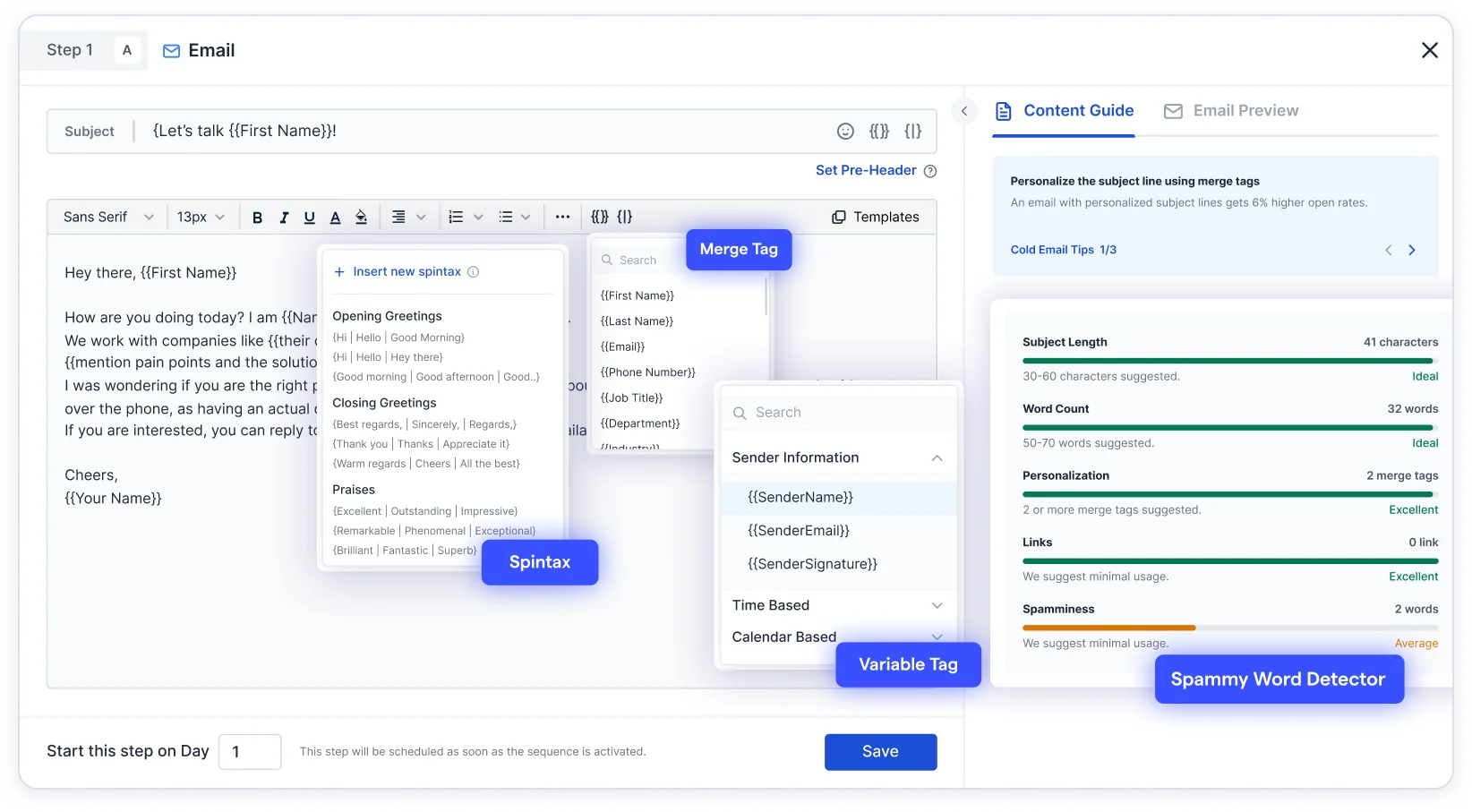
Here’s what makes the personalization experience worth it:
- Merge, Spintax, and Custom Tags: Saleshandy lets you personalize at scale using merge tags, spintax, and custom variables. You can dynamically insert key details like name, company, industry, or any custom field, going way beyond just. And with variable tags, you can tailor entire lines or sections based on available data, making each email feel like it was written just for that one person.
- Personalization Score: This feature helped me gauge how personalized my email really was before hitting send. It’s like a mini advisor that tells you: “Hey, you might want to tweak this.”
- Subject line personalization: You can personalize even your subject lines, which has made a noticeable difference in my open rates.
What I loved most? One-Click AI Variant. (It genuinely surprised me.)
You just write one base email, and with a single click, Saleshandy gives you multiple high-quality versions of it.
Each version feels slightly different in tone, flow, or phrasing, but still on point. It’s like having a mini copywriter sitting next to you.
It not only saves time but also makes your outreach feel more human and less robotic.
(And yes, the replies felt more natural too; people actually noticed.)
4. Unified Inbox
- Ease of Managing Multiple Accounts – 5/5⭐
- Inbox Emails Management – 4.5/5⭐
- Smart Filters and Search Functionality – 4.5/5⭐
- Smart Reply Categorization – 5/5⭐
If you’ve ever run multiple cold email campaigns at once, you’ll know the pain of checking different inboxes, missing follow-ups, or worse, replying from the wrong account. (Yep, I’ve done that. Not fun.)
What if you can check all your emails? Saleshandy’s Unified Inbox changed everything for me.
It consolidated all my conversations into one clean, simple dashboard, regardless of which email account I used.

This feature didn’t just save time; it saved me from missing out on replies that could have turned into meetings.
Here’s what works out for me:
- One inbox for all your ESPs: Whether I used Gmail, Outlook, Yahoo, Zoho, or even iCloud, everything came into one place. No need to open five tabs and jump around in different tabs.
- Smart filters and search: I could easily filter conversations based on the subject line, lead name, or even intent. (Searching across inboxes in just a few clicks.)
- Reply without switching: I didn’t have to think about which email ID I used for that prospect. I could reply directly, right from the Unified Inbox, clean, simple, and consistent.
- AI-powered intent filters: This part surprised me. The inbox actually helped me figure out which leads were hot, warm, or cold, so I could prioritize replies better. (And that gave my pipeline a huge lift.)
5. Whitelabel Solution
- Custom Branding (Logo, URL, Platform) – 5/5⭐
- Control Over Client Access and Permissions – 4.5/5⭐
- Ease of Sharing Reports and Campaign Results – 4.5/5⭐
- Scalability for Agencies – 5/5⭐
When offering cold email as a service, branding and client experience matter.
Clients shouldn’t feel like they’re using a third-party tool; they should see the agency’s tone, logo, and professionalism throughout.

Saleshandy’s Whitelabel Solution makes this possible. It allows complete platform branding, including custom URLs and logos, giving the experience of an entirely in-house tool.
Agencies can control client access, share live campaign results, and send reports with their branding, creating a more premium, trusted experience.
There are no limits on onboarding clients, adding team members, or managing email accounts. It’s built to scale with agencies that want flexibility, control, and growth.
6. Saleshandy’s MCP
You can connect Saleshandy to AI assistants like ChatGPT, Claude and Gemini through the MCP (Model Context Protocol), and there’s a full CLI if you’d rather work from the terminal.
Both are included on every plan.
With simple prompts, you can control and run sequences, verify leads, check deliverability, or pull campaign data.
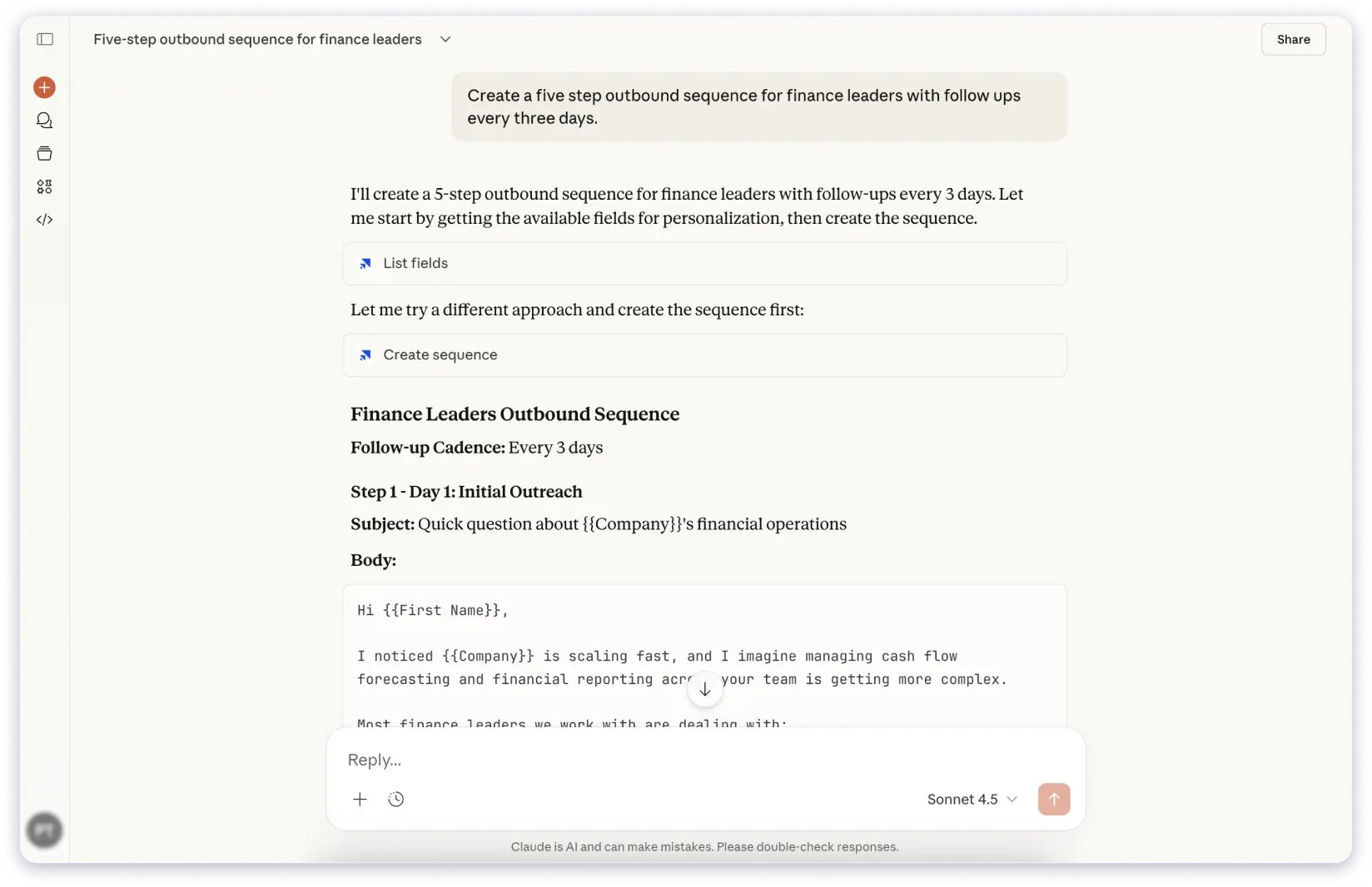
Once you give the prompt, Saleshandy executes the action directly inside your account, in real time.
This makes outreach faster since you can run Saleshandy from the AI tools you already use, instead of clicking through screens.
It’s the feature I’d point to first if you asked what separates Saleshandy from Instantly or Smartlead. Neither offers it currently.
How is the Email Deliverability Suite in Saleshandy?
An all-in-one toolkit to protect your campaigns from spam filters, build sender reputation, and give your emails the best possible shot at the primary inbox.
(Because a brilliant email that nobody sees is just a very well-written diary entry.)
1. Cold Email Infrastructure
- Ease of Use – 5/5⭐
- Setup Speed – 5/5⭐
- Deliverability Support – 5/5⭐
- Account Scalability – 5/5⭐
Setting up cold email infrastructure is a headache: SPF, DKIM, DMARC, tracking domains, and a DNS panel that looks like it was designed in 2003.
Saleshandy’s Email Infrastructure does that part for you. You pick a domain, pick your mailboxes, and it arrives configured.
Worth knowing upfront: this is a paid add-on that sits on top of your outreach plan. It isn’t bundled into Starter, Pro, or Scale, and it isn’t sold on its own either.

Here’s how it helps:
- SPF, DKIM, and DMARC are auto-set to protect and improve your email deliverability.
- Custom tracking domains so your links don’t trigger filters.
- Unlimited email warm-up is included for free on every plan, so new accounts build a sender history before you send anything that matters. I noticed most tools either charge extra for this or sell it as a separate product.
- Dynamic IP addresses are included on every plan, so your sending isn’t tied to a single fixed IP.
- Auto-reconnects and bulk setup options so you can launch fast without worrying.
(If you’ve ever spent hours figuring out DNS settings, this is a massive relief.)
2. Rotate Senders to Avoid Blacklisting
- Ease of Setup – 5/5⭐
- Sending Scalability – 5/5⭐
- Deliverability Protection – 5/5⭐
- Automation Accuracy – 4.5/5⭐
When scaling outreach, using a single email account is a risk. ESPs flag high-volume senders quickly. That’s why Saleshandy’s Sender Rotation is really helpful.
Here’s how it helps:
- Automatically rotates between multiple email accounts in a sequence.
- Mimics human sending patterns to avoid getting flagged.
- Allows you to send more emails per day without burning a single inbox.
- If one email gets flagged, your entire campaign still runs.
Bonus: You can even calculate exactly how many accounts you need using their volume calculator. (So helpful when planning a big campaign!)
3. Keep Your Emails Fresh with Spintax and AI Variants
- Ease of Use – 5/5⭐
- Spam Avoidance – 5/5⭐
- Performance Testing Support – 4.5/5⭐
When you’re sending emails at scale, it’s easy for them to feel repetitive. That’s where Saleshandy’s Spintax and AI Variants help.
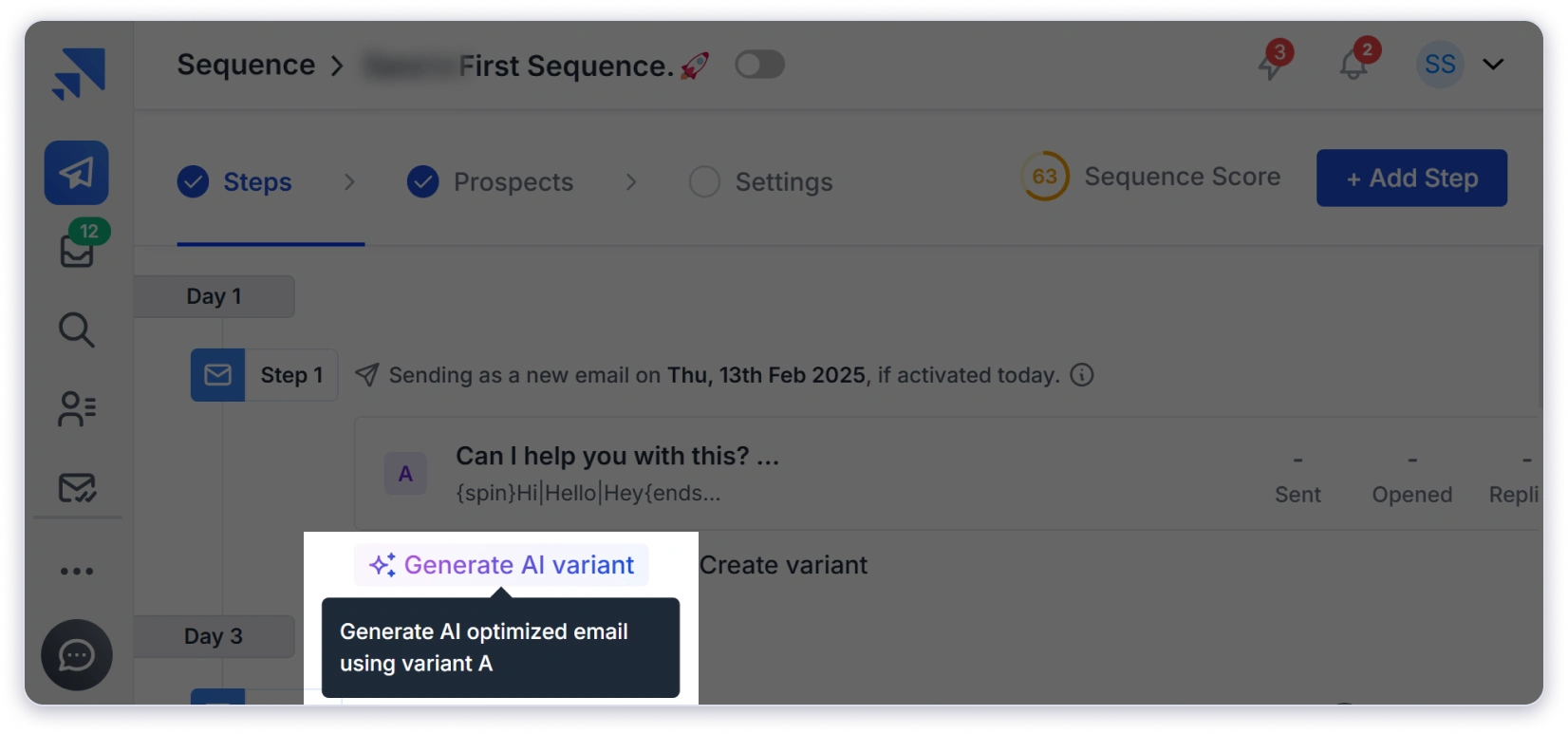
Here’s why I loved it:
- Spintax lets you write one email and send multiple variations (this kept my emails from sounding robotic).
- AI-powered variants give you fresh versions in one click, so a thousand near-identical emails don’t start looking like a template to filters.
- A–Z variant testing helps you identify which version performs best (yes, it literally lets you test 26 variants).
(This helped me land in inboxes while keeping my messaging fresh across large lists.)
4. Inbox Placement Test
Inbox Placement Testing shows you exactly where your emails land, primary, promotions, or spam, across providers like Gmail and Outlook.
It’s the difference between hoping your campaign worked and knowing before you launch it.
There’s a free forever tier with two tests a month on one sending account, which is enough to sanity-check a setup. Paid tiers start at $34 a month and scale up from there if you’re testing across a lot of accounts.
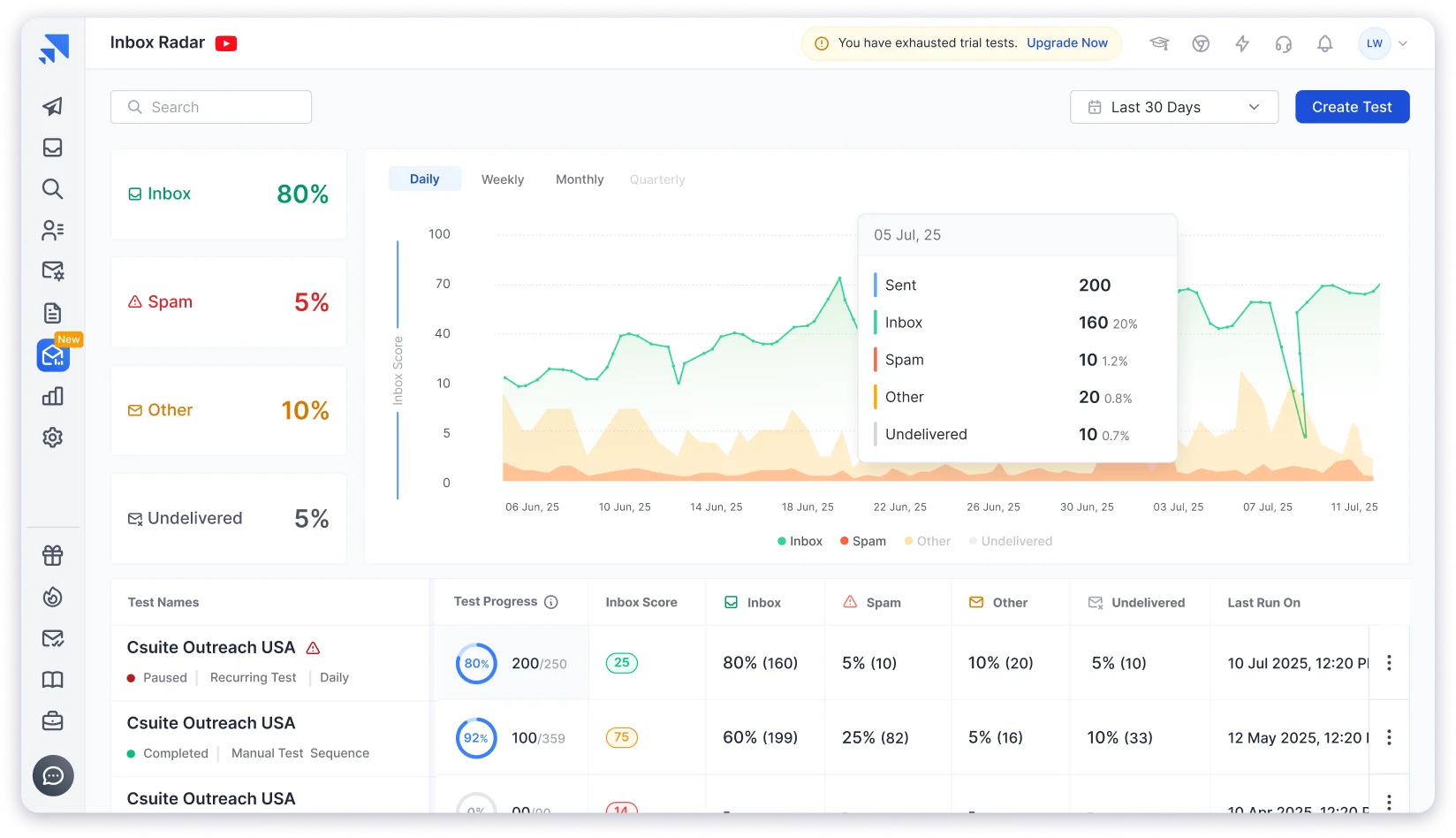
With this feature, you can →
- Analyze and identify spam triggers like email content, authentication setup like SPF, DKIM, and DMARC, and domain health that affect campaign performance
- Get clear and actionable insights after every test
- Share test reports using a public link with no login required
Here are the different types of inbox placement tests you can run using Saleshandy →
- Recurring tests: These run automatically on selected steps in your email sequence at set intervals.
- Manual tests: These are one-time tests that you run on a selected step from your Saleshandy sequence.
External tests: You can use your own template or emails sent from another system and still see how they perform across inboxes.
5. Remove Spammy Words Automatically
- Ease of Use – 5/5⭐
- Spam Risk Reduction – 5/5⭐
- Detection Accuracy – 4.5/5⭐
- Impact on Deliverability – 5/5⭐
Sometimes, a few wrong words can tank your entire email deliverability. Saleshandy’s Spam Word Detector scans your emails for high-risk words that trigger filters and helps you remove or tweak them.
- You get notified instantly
- Clean up your emails in seconds
- Reduce the chance of hitting spam
(One of my emails had “guaranteed” in the subject line — Saleshandy flagged it; I changed it, and boom: inbox placement improved.)
6. Ramp-Up of Your Email Volume
- Ease of Use – 5/5⭐
- Reputation Protection – 5/5⭐
- Volume Control Accuracy – 4.5/5⭐
- Automation Reliability – 4.5/5⭐
When starting a new campaign or domain, you can’t just start blasting thousands of emails. That’s a quick route to being flagged and affecting your email deliverability.
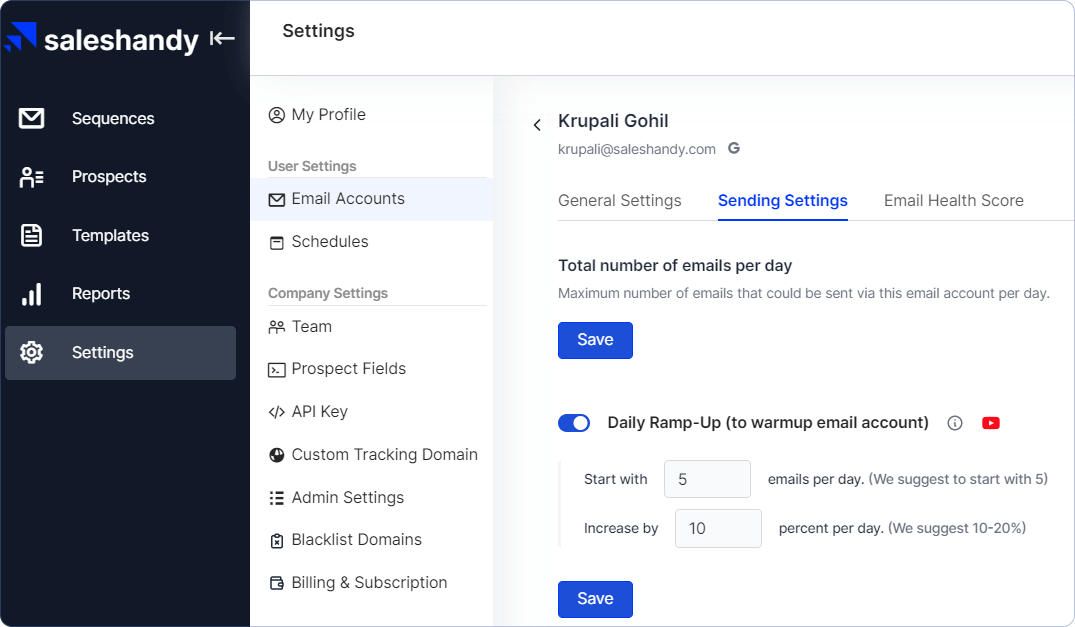
With Ramp-Up, Saleshandy gradually increases your email volume to build a trustworthy reputation.
- Start slow and scale naturally
- Keep sender reputation intact
- Automatically adjust based on ESP thresholds
(Gives me peace of mind, knowing the system won’t oversend or hurt my deliverability.)
7. Sequence Score
- Ease of Understanding – 5/5⭐
- Campaign Readiness Check – 5/5⭐
- Deliverability Insights – 4.5/5⭐
- Actionable Suggestions – 4.5/5⭐
Before launching a campaign, I always check my Sequence Score inside Saleshandy. It gives you a full view of your email quality and setup, like a deliverability health check.
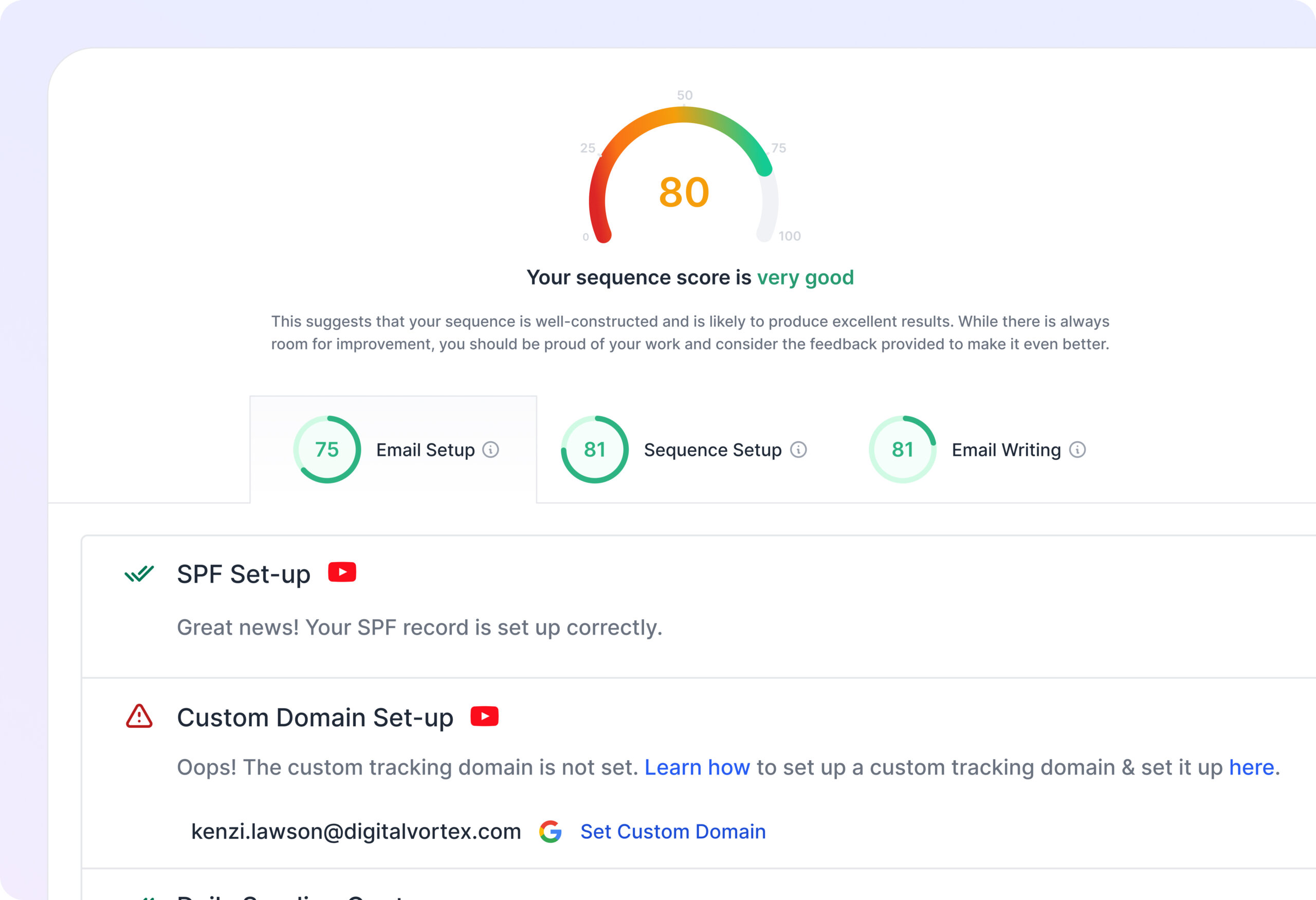
What it looks at:
- Technical setup
- Number of follow-ups
- Merge tags used
- Spammy content
- Sender accounts connected
(Think of it like a quick “grade” that tells you if your emails are ready to hit inboxes — super helpful when you’re running high-volume and targeted outreach.)
8. Real-Time Protection with Bounce Guard
- Real-Time Monitoring – 5/5⭐
- Reputation Protection – 5/5⭐
- Automation Response – 4.5/5⭐
- Error Recovery Support – 4.5/5⭐
No one likes high bounce rates. They kill your sender reputation. Saleshandy’s Bounce Guard monitors this for you in real-time.
- If it detects a bounce spike, it pauses the sequence.
- You can investigate, fix the issue, and resume when safe.
- Protects the rest of your sequence from damage.
(This alone saved me from major damage during one campaign. A typo-filled CSV file would’ve ruined my domain if Bounce Guard hadn’t been activated.)
9. Ready-to-Use Email Accounts
- Ease of Access – 5/5⭐
- Time Saved on Setup – 5/5⭐
- Deliverability Readiness – 5/5⭐
- Launch Speed – 5/5⭐
Saleshandy even lets you purchase ready-to-send email accounts directly from the platform. Therefore, no setup is required.
- Buy secondary domains and accounts easily.
- They come warmed up and deliverability-optimized.
- Just connect, create your sequence, and start sending.
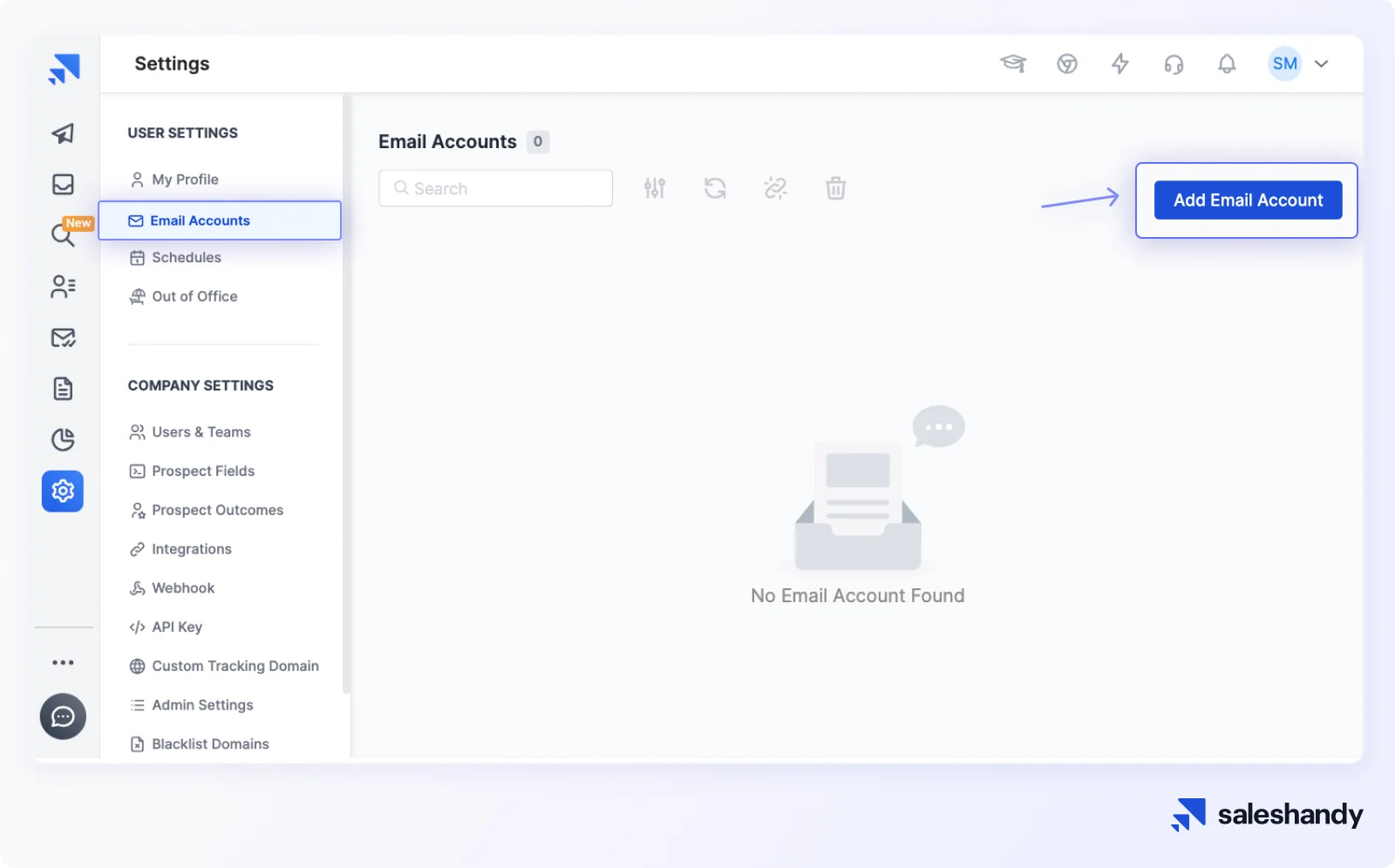
(For someone like me who doesn’t want to get into DNS records or server-side setup, this is gold.)
Lead Finder Functionality
Let’s now understand the key features that Saleshandy offers for finding leads.
1. Saleshandy Lead Finder
- Ease of Use – 5/5⭐
- Lead Quality – 5/5⭐
- Speed of Lead Retrieval – 5/5⭐
- ICP Targeting Precision – 4.5/5⭐
- Export & Integration Flow – 5/5⭐
If you’re anything like me, you’ve probably wasted hours switching between tools just to find leads, check if the emails work, and then manually import them into your outreach platform.
Saleshandy Lead Finder surprised me, in a good way.
Saleshandy’s Lead Finder is not like a basic B2B database tool. It actually understands the entire journey: from finding the right lead to sending that first cold email (all inside one platform).
Let me walk you through why I ended up liking this one so much.
Saleshandy gives you access to 852M+ verified contacts across 42M+ companies.
That’s huge.
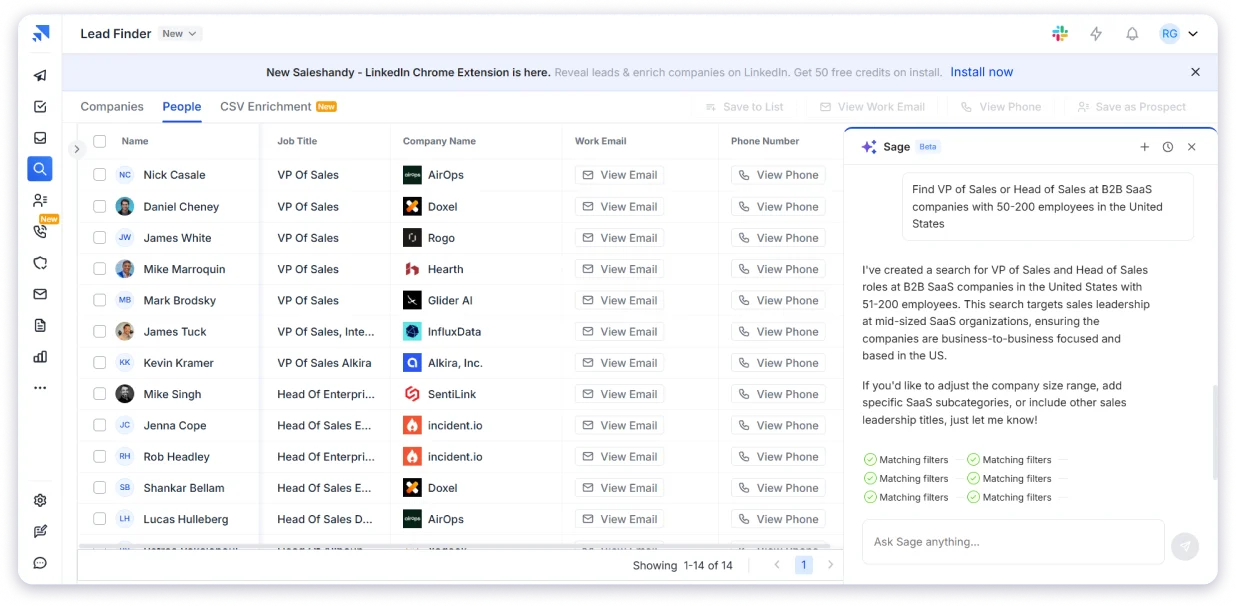
And the best part? The data isn’t outdated. It’s updated constantly, and before you gain access to any email, it’s double-verified. (So yeah, you’re not wasting credits on junk.)
Now, you don’t need to spend 10 minutes setting filters. Why?
Just describe who you want in plain English. Something like “marketing managers at US SaaS startups with under 200 employees.”
That’s AI Natural Language Search, and it’s on every plan, not gated behind a higher tier. You skip the filter-stacking entirely.
Honestly, I didn’t realize how useful this would be until I tried it. It’s like having a smart assistant who understands your ICP better than most SDRs.
You can search 100+ values at once (think job titles, company names, etc.) and get real-time results. It’s super fast, as I tested it with a big list and got leads in under 3 seconds.
(Yep, actually timed it.)
You can directly add the lead to a sequence without exporting or importing anything.
- Find the lead
- Reveal contact
- Push to outreach
You get it all in 30 seconds.
Things I Liked:
- You can tag and organize leads neatly
- Bulk reveal up to 10,000 leads (crazy useful)
- No cap on exporting saved leads
- Verified personal + business emails
- Direct phone numbers in many cases
- GDPR compliant, SOC 2 Type II and ISO 27001 certified
- Filters cover the things you’d expect and a few you might not: job title, seniority, department, industry, company size, revenue, location, tech stack and hiring signals.
- CSV enrichment: You can upload an existing list and enrich it, which matters a lot to anyone switching from another tool with data already in hand. Not mentioned anywhere.
2. AI Prospect Enrichment
AI Prospect Enrichment does the research you’d otherwise do manually before writing a cold email.
It looks up the prospect using LLMs and optional web search, then turns what it finds into personalization you can actually drop into an email.
Not “Hi {{first_name}}, I saw your company does {{industry}},” but a line that sounds like a person wrote it after ten minutes of digging.
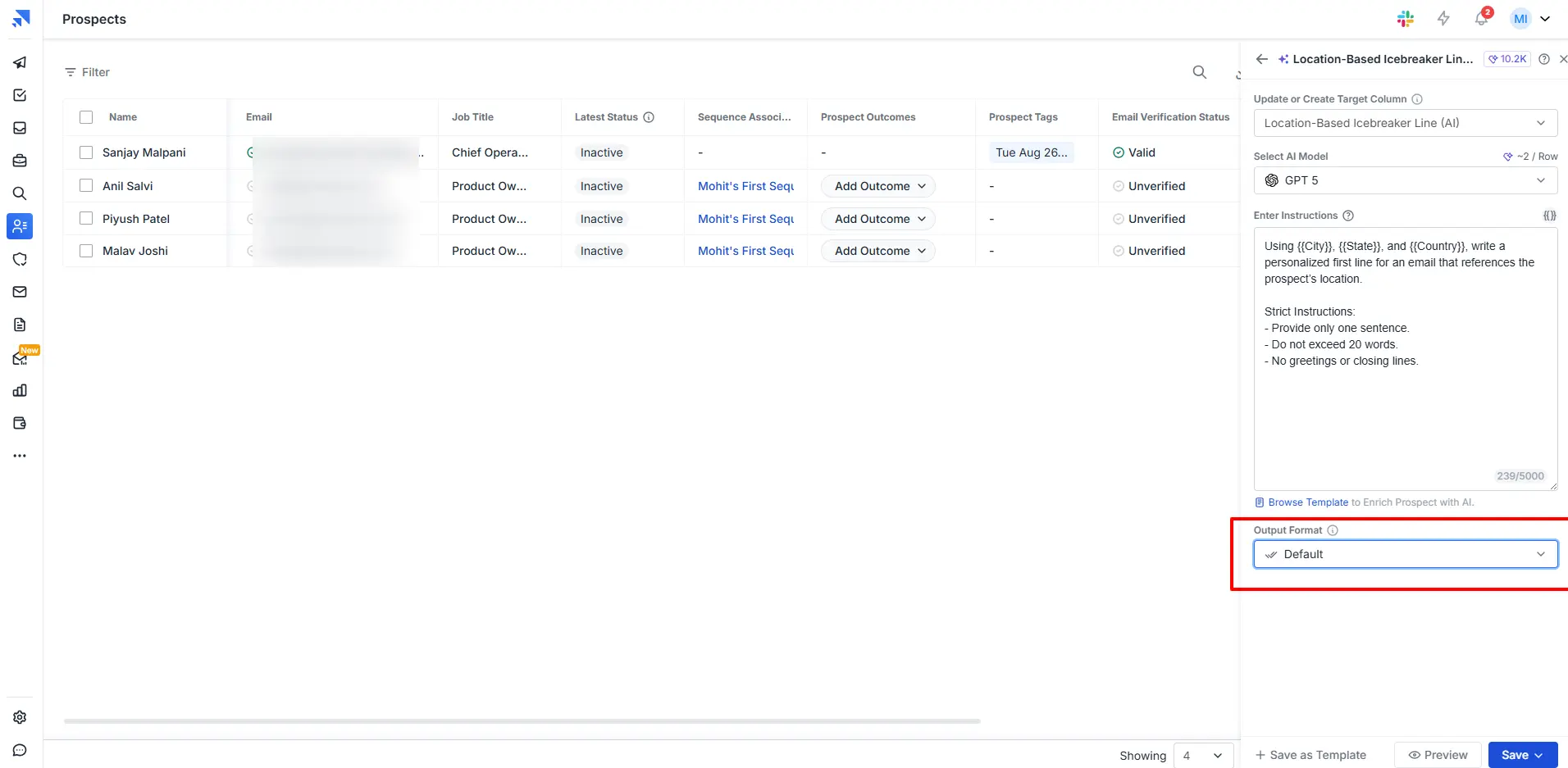
It analyzes more than 30+ context signals, like →
- Recent company updates
- Job roles and seniority
- Industry changes
- Public mentions and activity
All of this data is then converted into human-sounding personalization that you can directly use in your cold emails.
This goes far beyond basic merge tags like first name or company name. Instead of filling in blanks, you are sending emails that reflect real context about the person you are reaching out to.
Let’s now learn about the integration offered by Saleshandy.
Saleshandy Integrations That Help You Save Time
I know how frustrating it is to bounce between tools, fix data errors, or manually copy leads into your CRM. That’s exactly why this section exists: to help you connect Saleshandy with your workflow. Everything syncs up the way it should, without the usual mess.
Key Integrations Available in Saleshandy
Here’s what you can connect and how it helps:
AI Assistants via MCP: Connect Saleshandy directly to Claude, ChatGPT, Cursor, n8n, and other MCP-supported tools. You build sequences, manage prospects, check sender health, and pull campaign performance by typing what you want in plain English. The action runs inside your account in real time.
This is the one I’d point to if you asked what almost nobody else in this category has.
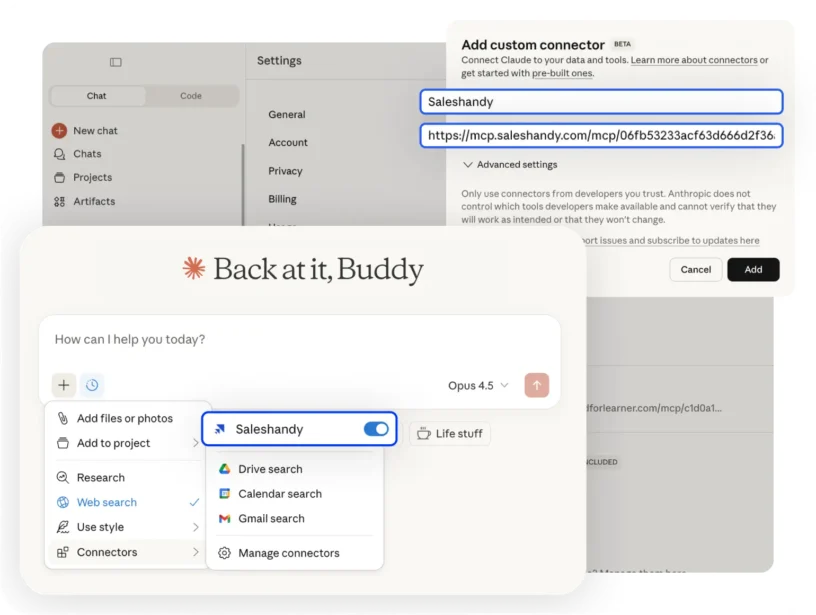
CLI (Command Line Access): There’s a full CLI if you’d rather drive Saleshandy from a terminal than a browser. Included on every plan.
API and webhooks: REST API access on every plan for pushing and pulling data programmatically, plus webhooks so your own systems get notified when something happens in a sequence. Developer docs are at developer.saleshandy.com.
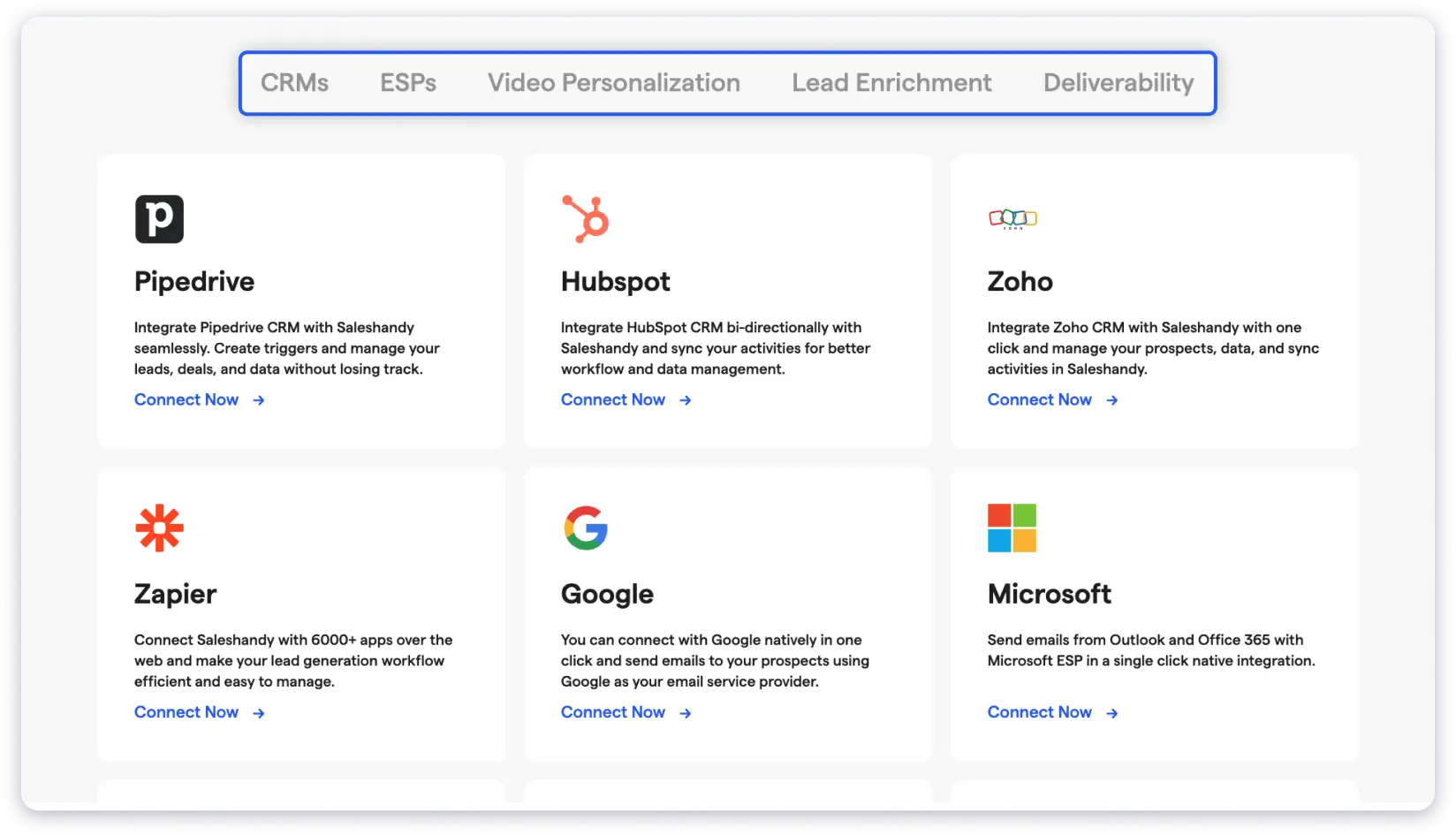
CRM integrations: Native syncs with Salesforce, HubSpot, Pipedrive and Zoho. Your lead activity, opens, clicks, and replies sync back to the CRM automatically, so your reps aren’t logging things by hand.
If you’d rather not add another CRM to the stack, Saleshandy has its own built-in CRM.
Email provider support: Use Gmail or Outlook? Saleshandy connects with both. You can send emails from your usual inbox and still get tracking, automation, and other features.
No-code automation: Zapier isn’t your only option. Saleshandy also connects through Make, n8n and Pabbly, so you can wire up flows in whichever tool your team already uses. Pull new leads in from Google Sheets, push replies out to Slack, whatever your process needs.
Video personalization tools: You can connect with tools like Weezly, Sendler, Sendspark, and Pitchlane. These help you add short videos to your emails to make them more personal.
Lead enrichment and warm-up tools: Use Persana AI to get more details about your leads and TrulyInbox to warm up your email account. This helps you improve accuracy and land in the inbox.
Custom setups: If you’re not using Gmail or Outlook, you can connect through SMTP or IMAP. You can also use Google Sheets or Airtable via webhooks to set up your own flows.
Now, let’s understand the pricing of Saleshandy.
Saleshandy Pricing Plans: Is Pricing Worth It?
If you’re wondering whether Saleshandy’s pricing delivers value, the short answer is yes (especially when you look at the features packed into each plan).
And the part that you like the most is this: Every plan includes the B2B database, unlimited email accounts, and unlimited warm-up.
Now, let’s break it down so you can decide what fits best for your outreach goals and budget.
Saleshandy Pricing & Plans
Before choosing a plan, two things matter:
- Whitelabel and SSO are Enterprise features, not included in Scale. If you need client-facing branding, contact sales.
- Starter is limited to one user and does not include CRM integrations or subsequences. If your team needs multiple users or advanced workflows, Pro is the practical upgrade.
How Lead Finder Credits Work
Every plan includes monthly Lead Finder credits. You do not need a separate database subscription.
The pricing model is straightforward:
- 1 credit reveals a verified work email
- 6 credits reveal a phone number
You only pay for verified results. If an email cannot be verified or a phone number is unavailable, no credits are charged.
Email Infrastructure Add-On
Need ready-to-send inboxes without handling DNS setup? Saleshandy can provide domains and mailboxes with SPF, DKIM, and DMARC configured.
Pricing:
- $2.99/mailbox/month on Annual Fixed, best for stable setups
- $3.49/mailbox/month on Annual Flexi, includes free mailbox replacement (25 mailbox minimum)
- $3.99/mailbox/month on Quarterly, useful for testing new setups
- Domains: $14/year, supporting up to 5 mailboxes per domain
Available for Google Workspace, Microsoft 365, and Azure. Email infrastructure is an add-on to an outreach plan.
Dialer starts at $23/month annually. Calling is not included in core plans.
Free Trial:
Get 7 days free with no credit card required and 50 Lead Finder credits to test the platform.
How Saleshandy Works: A Quick Tutorial
If you’d like a quick tutorial on how Saleshandy works, here’s the video. Play, pause, and get signed up on Saleshandy to try your hand at sending cold emails with ease.

If you want short videos of each step in setting up cold email campaigns, check out the video guides on Saleshandy, available on the page.
Saleshandy Alternatives and Competitors
Before you decide, here’s how Saleshandy stacks up against the three tools people compare it with most. I’ve tried to be fair about what each one genuinely does well.
Final Verdict: Should You Use Saleshandy for Your Business?
If you’re serious about outbound, Saleshandy is more than just another tool; it’s your growth engine. Now, you ACTUALLY don’t need multiple tools, get in the loop of technical setup, or figure out things.
You just need one platform that actually helps you:
- Find leads from 852M+ verified contacts, and only pay for the ones that verify
- Send AI-personalized emails
- Reach the same prospect over email, calls, LinkedIn, and WhatsApp
- Automate follow-ups based on behavior
- Book more meetings (without burning your domain)
And that’s what Saleshandy does, day in, day out. Start at $34 a month, add your whole team without the bill climbing per seat, and try it free for 7 days with 50 credits to see the results yourself.
FAQs Teams Often Ask Me About Saleshandy
1. What is Saleshandy, and how does it work?
Saleshandy is a cold email outreach and lead generation tool that helps you send personalized emails at scale, track performance, and automate follow-ups to book more meetings.
2. Is Saleshandy good for cold email outreach?
Yes, Saleshandy is purpose-built for cold emailing. It offers advanced deliverability tools, sender rotation, personalization, and campaign automation to improve outreach results.
3. How is the email deliverability with Saleshandy?
Saleshandy offers one of the best deliverability toolkits, including spam word detection, spintax, email warm-up, bounce guard, and sender rotation to help your emails land in inboxes.
4. How does Saleshandy compare to tools like Instantly, Lemlist, or Smartlead?
Unlike Instantly, which can be buggy and inconsistent, or Lemlist, which focuses more on visuals, Saleshandy strikes a balance between powerful automation, high deliverability, and simplicity.
5. Does Saleshandy help generate B2B leads, or do I need another tool?
Saleshandy includes a built-in B2B lead finder with verified contact data, allowing you to discover, verify, and reach leads all in one platform.
6. Can I send unlimited emails with Saleshandy?
Yes, you can send unlimited emails by connecting multiple email accounts and using sender rotation to scale outreach while protecting deliverability.
7. Is Saleshandy beginner-friendly and easy to use?
Yes, the platform is intuitive and designed for users of all experience levels, with simple onboarding and a clean interface.
8. What are the main features that make Saleshandy worth it?
Key features include advanced deliverability tools, AI-powered sequences, sender rotation, lead finder, custom tracking, and white-label options for agencies.
 Dhruv Patel