


Search “best cold email tool in 2026” on Reddit, and Smartlead appears everywhere.
Agencies recommend it. SDRs swear by it. Comparison posts place it alongside Instantly, Lemlist, and Reply.io.
After reading enough threads, you may start wondering whether Smartlead is genuinely that good—or whether its users are running outreach campaigns on Reddit too.
Because Reddit recommendations are always completely unbiased, right?
I wanted to see whether the product actually deserved the reputation.
So, instead of trusting another enthusiastic comment from an account created three weeks ago, I tested Smartlead for 30 days.
I connected 26 mailboxes, used SmartProspect to find leads matching my ICP, tested its personalization features on real prospects, built live sequences, and monitored mailbox warm-up throughout the month.
Some of the praise is justified. Smartlead performs well when it comes to email infrastructure, sender rotation, warm-up, and campaign testing.
But the experience was not as flawless as Reddit makes it sound.
Between the glowing recommendations and the polished pricing page, I found several limitations, hidden costs, and everyday usability issues that most Smartlead AI reviews barely mention.
Here is my honest breakdown of what Smartlead does well, where it falls short, and whether it is actually worth paying for in 2026.
Smartlead AI Review 2026 – TOC
- TL;DR: Smartlead Review at a Glance
- In-Depth Review of Smartlead’s Features
- Smartlead Pricing in 2026: Plans & Annual Pricing
- What Real Users Say About Smartlead in 2026
- Who Smartlead Is Built For (and Who Should Look Elsewhere)
- Better Alternatives to Smartlead: Saleshandy
- Final Verdict: Is Smartlead Worth It in 2026?
- Frequently Asked Questions
TL;DR: Smartlead Review at a Glance
In-Depth Review of Smartlead’s Features
In practice, Smartlead covers the core outbound workflow: prospecting, warm-up, sending, and reply management in one platform. It also integrates with other tools, so you can sync outreach workflows.
Now, let’s take a closer look at what this Smartlead AI review uncovered.
1. Outreach & Sequence Builder
Smartlead’s sequence builder is where it impressed me the most.
I built a 3-step cold email campaign targeting Sales Managers at Series B SaaS companies, and the setup felt simple from the start.

Smartlead walks you through Leads, Sequence, Accounts, SubSequences, Settings, and Launch. You are guided through the process instead of figuring everything out yourself.
The feature I kept coming back to was A/B testing. The Add A/B Variant button sits on every step, so testing subject lines takes seconds.
Inbox Preview helped me catch formatting issues, and auto-save saved every change.
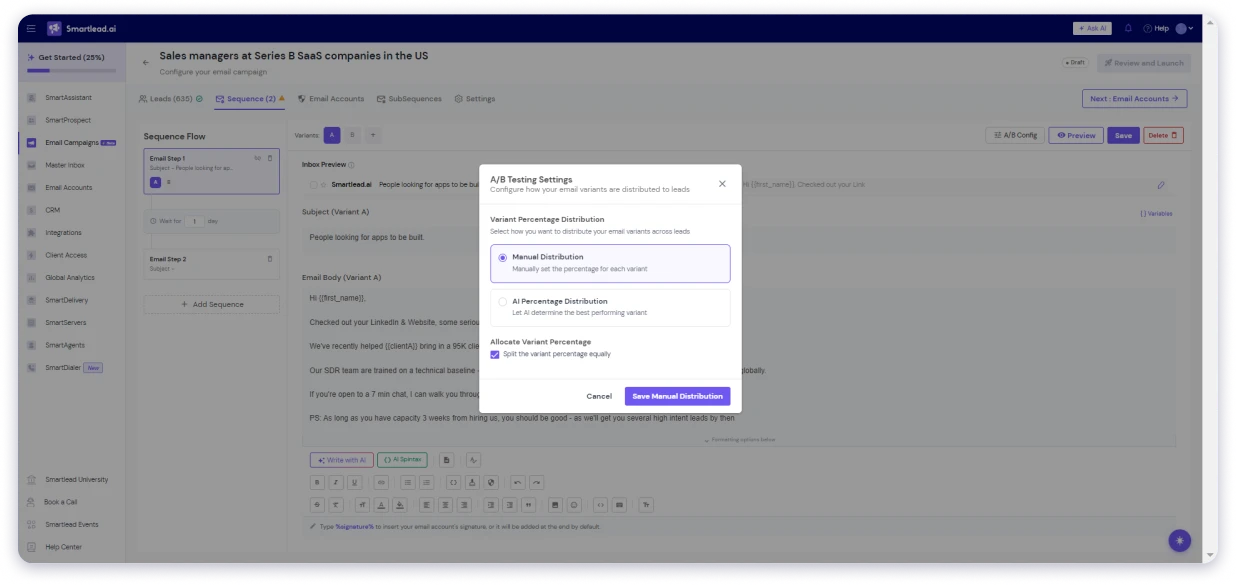
SubSequences get their own tab. I could branch follow-ups based on opens, replies, or specific phrases.
“Interested” leads go down a different path than “book a call” leads. That flexibility matters.

My Verdict: one of the better cold email builders I have tested. It is excellent for email teams, but not built for full multichannel outreach.
Reading through G2, I was not alone on this. One reviewer praised the sequencing and automated follow-ups but noted the OOO resume automation still needs work, which matches what I saw.
SmartDialer (Cold Calling)
SmartDialer is Smartlead’s built-in phone tool, so a rep can call the same leads they are emailing. In the app, it feels like a complete calling workspace, not a simple add-on.
I did not have live calls running during my walkthrough, so I reviewed the workflow and setup, not call quality.

A credit balance sits at the top of the dialer. Mine showed 0.00, which makes the pricing model clear: you pay through call credits instead of a flat fee.
The workspace is split into tabs:
- Call in Queue
- Call Logs
- Your Numbers
- Dialer Leads
- Sequence Leads
The lead table tracks Name, Phone, Company, List, Email, Local Time, Last Contacted, and Assigned SDR. That assigned SDR field shows this is designed for teams, not just solo callers.
You can add leads through CSV import or Direct Dial. Under Your Numbers, there is also a “Buy a Number” option to get a calling number through Smartlead. I did not purchase one during testing.
What I like to highlight is SmartDialer is a paid add-on through Voice Calling Plans, starting around $9/month of credits.
It is also the only non-email channel Smartlead supports natively. There is still no LinkedIn or SMS.
My Verdict: SmartDialer is a useful add-on for teams combining email and calling. Just remember, it is email plus calls, not full multichannel outreach.
Reading through Reddit, other users noted the same thing. Smartlead does not natively do multichannel and pairs with tools like HeyReach for LinkedIn instead.
The dialer was added only about a month before that discussion, which explains why it still feels early.
Campaign Dashboard
The campaign dashboard is the first screen you land on, and it earns its spot. Every campaign sits in one place, with the numbers that matter side by side: sent, opened, replied, bounced, and positive replies.
I lived on this screen during testing. What I liked:
- Every campaign row shows its own stats, so I could compare performance without opening each one.
- Quick filters by status, engagement, or date range got me to the right campaign in seconds.
- Updates land in real time. Replies and bounces appeared as they happened, no refresh needed.
- The left sidebar keeps campaigns, inboxes, integrations, analytics, and support one click away.
What I appreciated most was how uncluttered it is. I could spot a deliverability dip or scan reply sentiment across campaigns in a few seconds.
The honest limit: it’s a monitoring dashboard, not deep analytics. No revenue attribution, no cohort reporting. For board-level numbers, I still exported.
My Verdict: The dashboard is clean and fast for daily campaign monitoring, but it lacks deep analytics like revenue attribution or cohort reporting.
Bonus read: Cold Email Open Rate: What’s Actually Good in 2026
2. Prospecting (SmartProspect)
SmartProspect is Smartlead’s built-in prospecting tool with 270M+ verified profiles. I tested it against my own ICP to see how well it actually finds relevant leads.
Here is what stood out:
- Built-in search: Find leads by job role, industry, and company size directly inside Smartlead.
- Smart filters: Narrow results by job title, department, level, industry, headcount, revenue, and location.
- Include/exclude lists: Remove unwanted companies, roles, or domains from your search.
- Exclude previously fetched: Avoid spending credits on contacts you already pulled.
- Saved searches: Reuse your best filters without rebuilding campaigns.
- Lead credits: Track saved leads and email usage from one dashboard.
You can narrow leads by contact details like job title, department, and level, then layer company filters like industry, headcount, revenue, and location.
I also liked the include/exclude filters and the “Exclude previously fetched” option for saving credits.
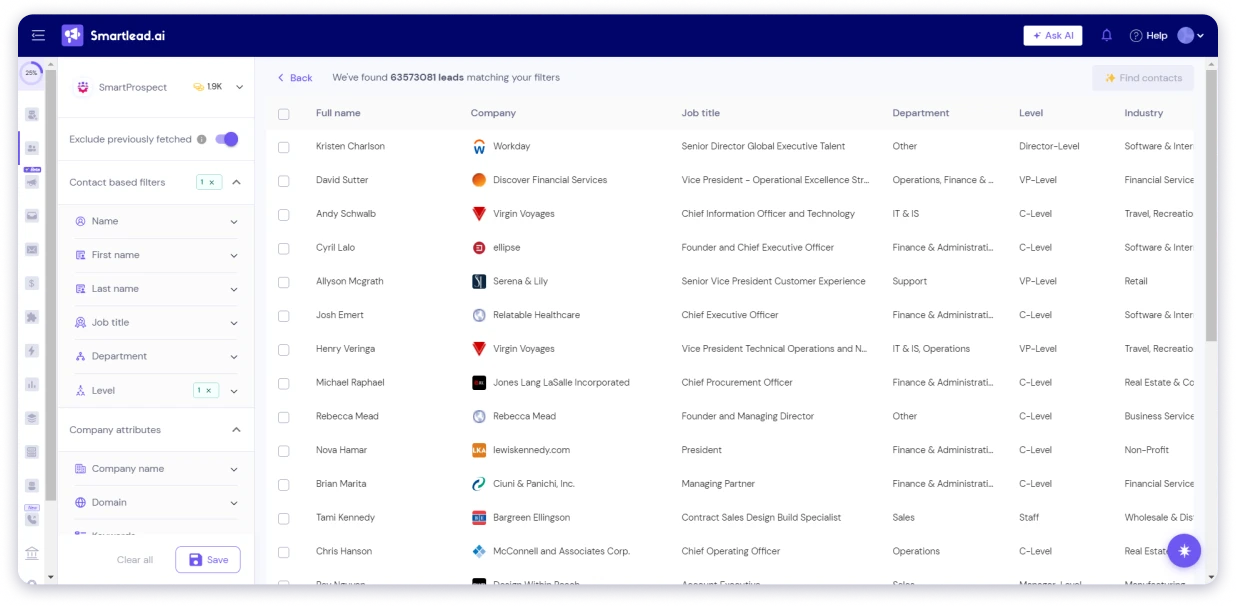
I ran a search and pulled 635+ contacts.
The results:
- Verified emails: 413 (65%)
- Catch-all emails: 38 (6%)
- Invalid emails: 108 (17%)
- Unavailable/unknown: 76 (12%)
- Phone numbers: 0
The biggest problem was lead relevance.
I ran the search without adding a job title filter. Out of 413 email contacts, only one was a Sales Manager. The rest included accountants, engineers, and unrelated roles.
SmartProspect does not automatically understand your ICP. You need precise filters, otherwise you will waste credits on leads that do not fit.

Another limitation is missing intent data. There are no buying signals, funding alerts, or tech-stack triggers. You only get basic contact and company information.
I was not the only one noticing this. One G2 reviewer flagged that SmartProspect-sourced leads bounce more than leads brought in from other databases. A Reddit thread made the same point: list quality, not the sending platform, is usually the real driver of bounce rates.
Another thing I faced was that credits also become a factor at scale. Plans include 2,000 credits on Base, 50,000 on Smart, and 170,000 on Prime.
If SmartProspect is your main prospecting source, you will likely need Smart ($174/month) or above.
My Verdict: SmartProspect works well for basic lead discovery, but it is not a replacement for a dedicated prospecting database.
3. Personalization
Smartlead keeps personalization simple with handlebar merge tags.
I tested custom variables by adding {{clientA}} directly into an email, and it worked without extra setup.
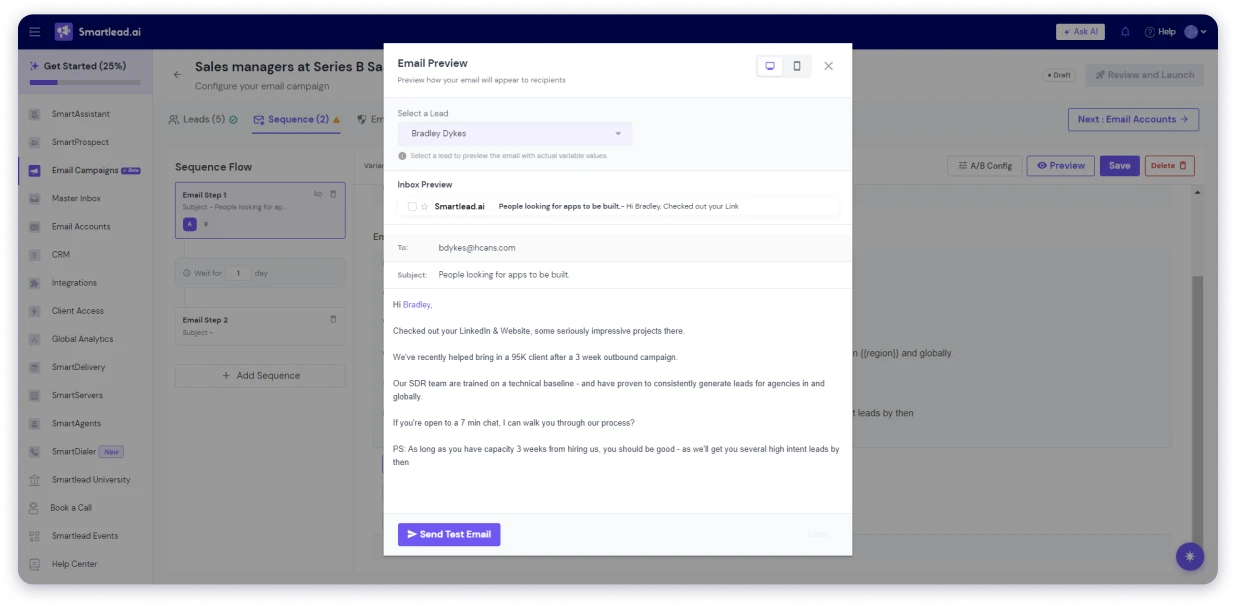
The best part is the Preview feature. I could switch between desktop and mobile, select a real lead, and see exactly how the email would appear before sending.
That preview also exposed a problem.
I previewed the email against several leads from my SmartProspect pull. The results were the same across all of them:
- {{first_name}} worked correctly and showed the lead’s actual name.
- {{clientA}} returned blank and broke the sentence.
- {{region}} also returned blank and created bad copy.
Every lead with missing custom fields had the same problem. Smartlead does not warn you when variables are missing. Empty fields simply disappear, which can leave broken sentences in live emails.
I also tested fallback formats like {{clientA|there}} and {{region|your area}}. They did not work.
The safest approach is simple: preview emails using real leads before launching and make sure every required field is filled.
4. Email Warm-Up & Deliverability
Deliverability was the main reason I tested Smartlead, so I paid close attention to it throughout my 30-day trial.
One thing Smartlead gets right is email warm-up. It is included on every plan with unlimited usage, which is uncommon. Most cold email tools either charge per mailbox or limit the number of accounts you can warm up.
I remember paying tools like Warm Up Inbox around $10 per mailbox every month just to protect deliverability.
With Smartlead, whether you warm up 10 mailboxes or 200, the price stays the same.
One thing to keep in mind is that the Premium Warm-up Pool is a paid add-on on the Base and Pro plans.
It costs $59/month and is only included with the Unlimited Smart plan. For most teams, though, the standard warm-up pool is more than enough.

The biggest issue I found was monitoring. During my testing, a few mailboxes paused warm-up without any notification. One account stayed paused for almost 36 hours before I noticed it.
Smartlead automatically pauses warm-up when a warm-up email bounces, but it does not alert you when this happens.
If you manage multiple mailboxes, you need to check the Email Accounts tab regularly to make sure everything is still running.
Beyond warm-up, Smartlead also offers additional deliverability tools.
- SmartDelivery helps test inbox placement, spam scores, and link health.
- SmartServers provides dedicated sending infrastructure with private IPs.
- SmartSenders offers pre-configured Google and Outlook mailboxes, so you can skip the domain setup process.
These are useful additions, but they are paid add-ons on the Base and Pro plans.
Reading through Reddit, I found I was not the only one watching this closely. One user reported their reputation score dropped from 100% to around 67% after the warm-up pool sent to invalid addresses.
Another thread flagged that Smartlead may log spam-folder deliveries as “opens,” which makes open-rate data unreliable.
My verdict: Unlimited email warm-up is one of Smartlead’s biggest advantages. Just don’t assume it runs on autopilot. Keep an eye on your mailboxes because Smartlead won’t always tell you when warm-up stops.
5. AI Features
Smartlead has three different features labeled as AI, and they serve very different purposes. I tested all three to see what is actually useful.
1. Write with AI and AI Spintax
These are the writing tools inside the email editor. The catch is that they require your own OpenAI API key.
I tested them, and they work, but they are not built-in AI writers. Smartlead is using your OpenAI account, which means the cost and setup are on you.
2. SmartAssistant
This is the AI helper inside your Smartlead account.
When I opened it, it greeted me by name and offered three modes: Navigate, Diagnose, and Support. Quick actions include finding leads, warming mailboxes, launching campaigns, and writing cold emails.
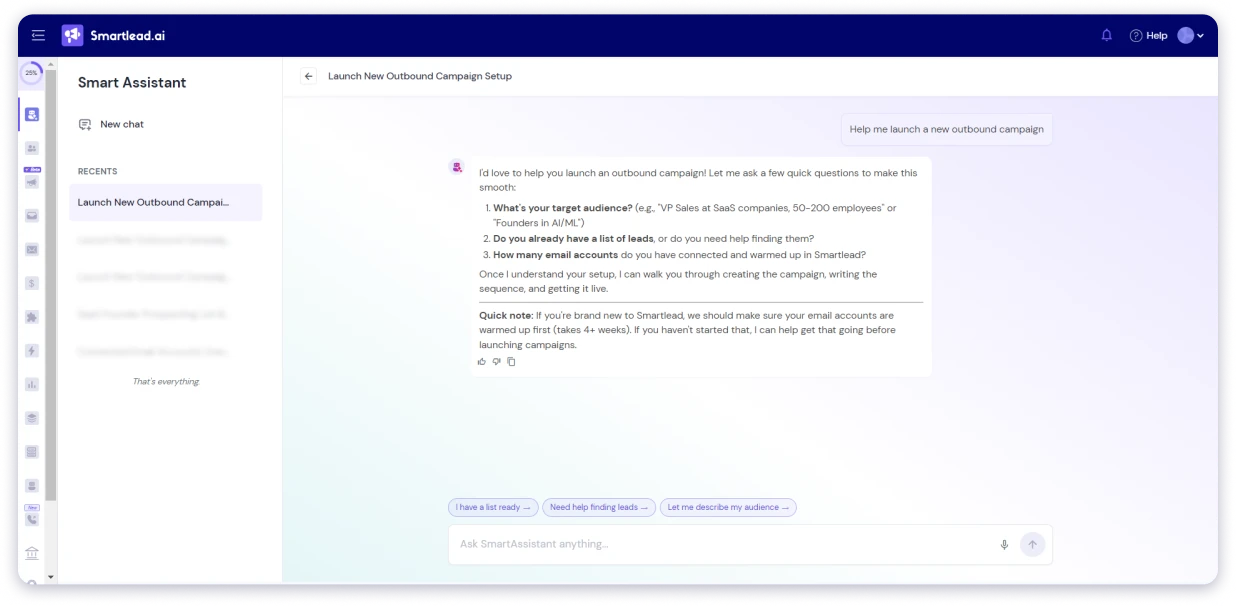
The useful part is that it can actually perform tasks. I used it to create sequences, add leads, and help set up campaigns instead of only answering questions.
The limitation is that it only works inside Smartlead. It cannot connect directly to external systems.
3. SmartAgents
This is the most interesting AI feature.
SmartAgents is a no-code automation builder. I typed: “When a lead replies Interested, Slack me.” Where I use pre-define template. It understood the workflow, mapped the reply category, and created the automation without extra setup.
The template library also connects with tools like Slack, HubSpot, Salesforce, and LinkedIn platforms.

My Verdict: Write with AI feels more like an add-on because it depends on your own OpenAI key. SmartAssistant is useful for daily tasks. SmartAgents is the standout feature because it feels closer to an AI teammate running workflows automatically.
6. Reply Management
The Master Inbox is one of the features I wanted to test because reply handling is where cold email tools usually break down.
I connected 5 mailboxes and reviewed how Smartlead organizes replies in one place. Instead of checking multiple inboxes, everything comes into a single view.
The AI categorization was useful. It sorted replies into buckets like Interested, Out of Office, Not Interested, and others, which reduced manual cleanup.
Drafts by Agent were also helpful because it created reply suggestions that I could review before sending.
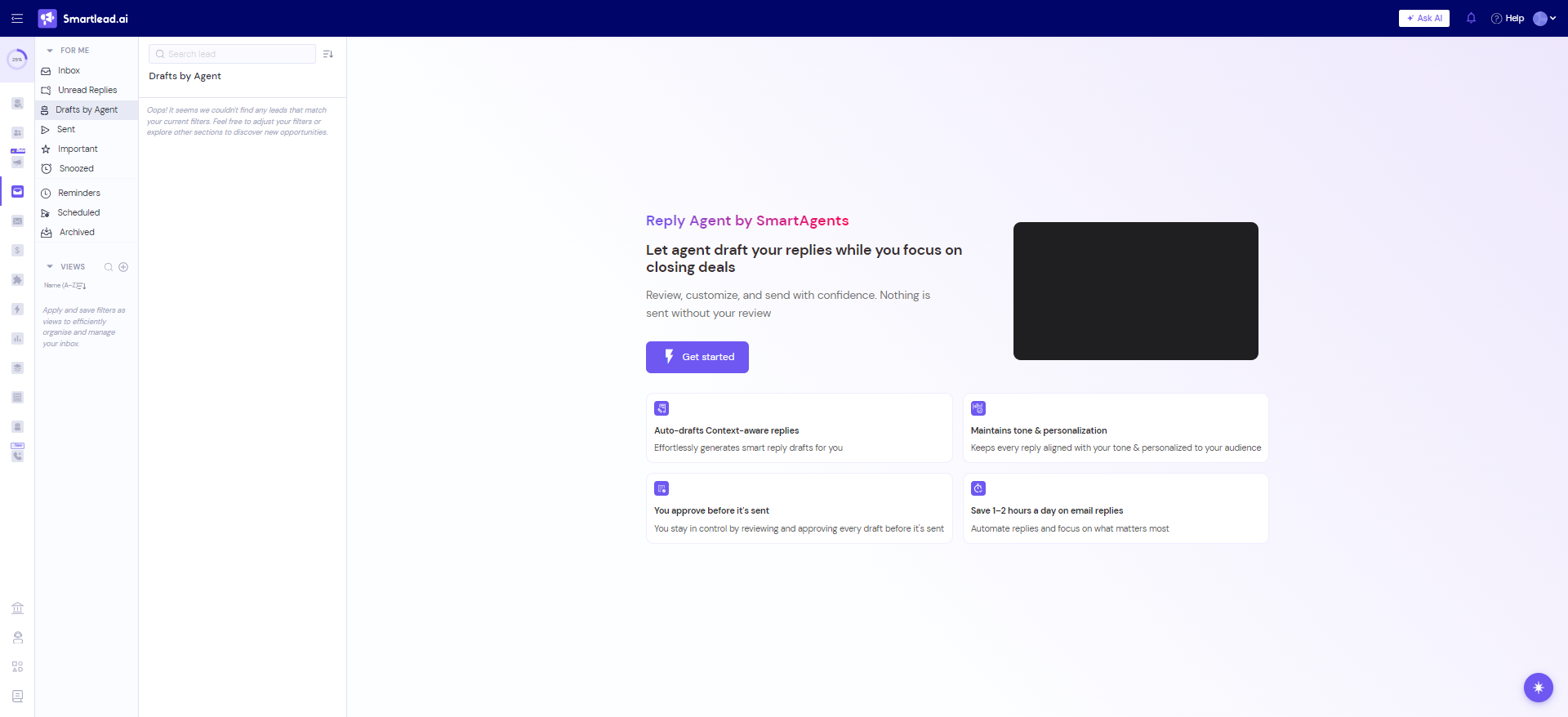
Saved Views were the feature I found most practical for teams. I could create filters by campaign, lead category, sender, team member, and date range, then share those views with others.
The limitation is scale. When reply volume gets high, the inbox can feel slower. It is also email-only, so teams running LinkedIn outreach still need another place to manage those conversations.
Reading through G2, other users feel the same way. Several called the Master Inbox a highlight for managing multiple mailboxes at once. One Trustpilot reviewer running 110+ client accounts credited it as core to scaling their entire agency.
My Verdict: The Master Inbox works well for email-focused teams that want one place to manage replies. It is useful, but it does not replace a full multichannel sales inbox.
CRM
Smartlead also ships a built-in CRM, and it’s more useful than I expected. It’s a visual board that follows every lead from first touch to reply.
How I used it:
- Leads move through stages on their own, New Lead, Email Sent, Reply Received, so the board reflects reality without me dragging cards.
- Updates are live. Every send, open, and reply showed up instantly.
- I added my own stages, like Demo Booked and Follow-Up Needed, to match how my team works.
- Each lead card shows the name, email, campaign, and assigned sender at a glance.
- I could click a lead to reply, reassign, or move it between stages by hand.
Here’s the honest framing: this is not a HubSpot replacement, and it is not trying to be.
It keeps cold outreach organized without bouncing between tools. For real pipeline and deal management, I would still sync to a proper CRM.
My Verdict: The built-in CRM is useful for organizing outreach, but it is not a replacement for a full pipeline management tool like HubSpot or Salesforce.
Global Analytics
Global Analytics gives you an account-wide view instead of stats from just one campaign. It is the dashboard a sales manager would check to understand overall outreach performance.
The top section shows key metrics like leads reached, emails sent, replies, positive replies, and bounces. You can also filter results by date and timezone.
The best feature is Sender Email Health Breakdown. It groups inboxes by health score, helping you spot accounts that may hurt deliverability before problems start.
The Campaign Activity table shows performance across campaigns, including sends, opens, replies, clicks, bounces, and unsubscribes.
The limitation is that analytics are email-focused. Other channels like calls are not included in the same view.
Smartlead AI review verdict: The sender health tracking is the strongest part. It goes beyond basic open and click reports, but it is mainly built for email outreach.
7. Integrations
Smartlead’s native integrations are limited. The main options are HubSpot (Beta), Clay, ListKit, LeadMagic, and OutboundSync.
The bigger ecosystem comes through SmartAgents. It connects with 35+ tools, including Salesforce, Pipedrive, Close, Zoho CRM, Calendly, Apollo, Airtable, Google Sheets, Slack, and LinkedIn tools like HeyReach and Waalaxy.
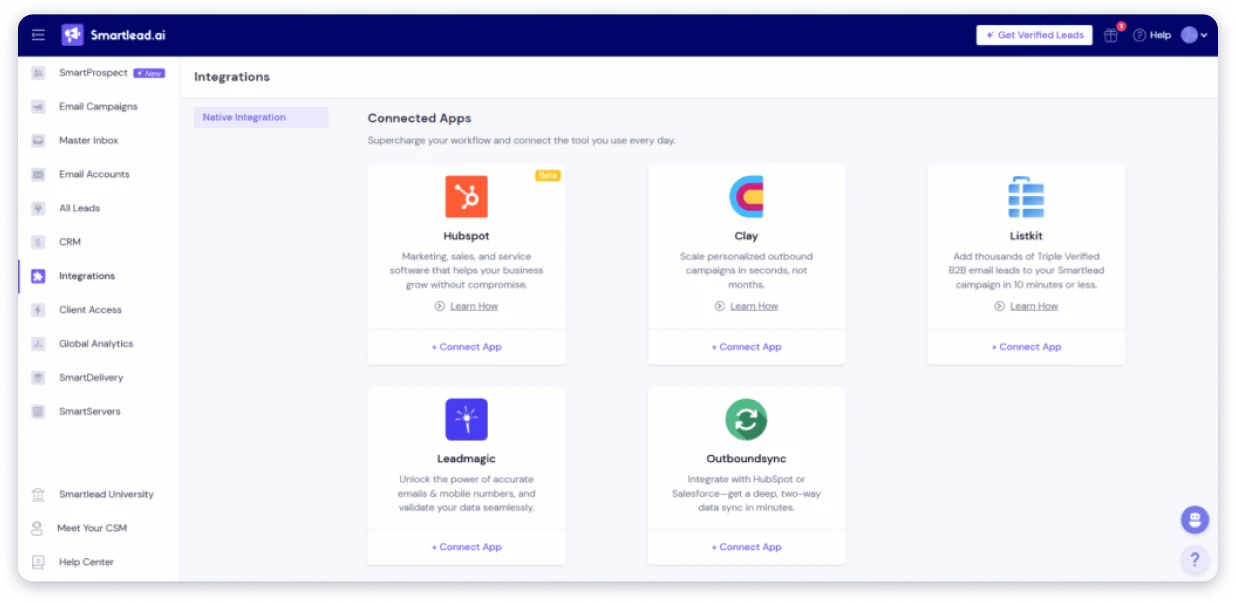
API and Webhooks are available on Pro plans and above. They are not available on Base, which can be limiting for teams building custom workflows.
Reading through G2, one reviewer praised the API/CLI and MCP support for connecting with AI tools. But another reviewer the same week called the MCP server broken and unreliable, which tells you it is still inconsistent.
My Verdict: a decent integration ecosystem, but it feels split between native integrations and SmartAgents. It works well for technical teams, but beginners may find the setup confusing.
8. MCP Server
Smartlead’s MCP Server is mainly for technical teams building AI workflows.
It allows AI assistants to interact with Smartlead, so agents can pull campaign data, add leads, and trigger actions without manually using the dashboard.
The benefit is clear for teams already using AI agents in sales operations. For most users, though, it is still a niche feature because it requires technical setup.
My Verdict: The MCP Server is a niche feature for technical teams, but it gives Smartlead a real edge for anyone building AI-driven outbound workflows.
9. Client Access (For Agencies)
Client Access is built for agencies managing outreach for multiple clients.
Each client gets a separate workspace and login, so campaigns, inboxes, and reporting stay isolated.
The feature works well for agency operations, but pricing is the main consideration. Client workspaces are an add-on on Pro, while Prime includes three. White-label branding costs $29 per client per month.
The cost can add up quickly. Ten clients would add $290/month just for white-label access.
My Verdict: A useful agency feature with clean client separation. Just factor the per-client cost into your margins.
This feature is designed to make Smartlead more than just a campaign sending tool by helping users find and reach the right prospects.
Of course, my testing is only one perspective, and results can vary based on your workflow and use case.
Smartlead Pricing in 2026: Plans & Annual Pricing
Here is the full Smartlead AI pricing breakdown for 2026.
Smartlead offers four pricing tiers with discounts on annual billing. The prices below show the monthly cost when billed yearly.

All plans include unlimited mailboxes and email warm-up.
The difference comes with scale. Higher plans add more contacts, more sending capacity, CRM features, API access, client workspaces, and premium warm-up.
One thing to watch: Base and Pro do not include the premium warm-up pool. That costs an extra $59/month, so the real price is higher.
Common Add-Ons
Smartlead also has extra costs depending on how you use it:
- SmartSenders mailboxes: $4 to $9 per mailbox/month
- SmartDelivery inbox testing: $49 to $599/month
- Email verification credits: $32 to $240 per batch
- SmartServers: $39 per server/month
- Client white-label: $29 per client/month
Two things buyers often miss: lead credits and email credits are separate limits. You need to track both because either one can become your bottleneck.
The bigger cost is usually infrastructure, not the plan itself. Each inbox needs a workspace license and domain setup.
A basic setup can cost around $56/month, five inboxes around $146/month, and 50+ inboxes can reach $700 to $970/month.
At scale, the software is only one part of your total outreach cost.
Bonus read: Smartlead pricing breakdown for a detailed plan comparison.
What Real Users Say About Smartlead in 2026
I went through hundreds of Smartlead reviews across G2, Trustpilot, and Reddit to understand what real users think about the platform.
Smartlead’s review profile is interesting because the experience varies depending on the user.
G2 reviews are generally positive, with users rating the software 4.6/5 and highlighting its strong API integrations and automated warmups. Trustpilot users give it a 3.4/5 rating, with complaints around occasional app bugs and frustrating customer service.
So, here is the real user sentiment:
Who Smartlead Is Built For (and Who Should Look Elsewhere)
Smartlead is a good fit for:
- Agencies running outbound campaigns for multiple clients.
- Sales teams send thousands of cold emails a month.
- Businesses that already have lead lists and just need better email automation.
- Teams juggling multiple inboxes, domains, and campaigns at once.
- Consultants and freelancers running outreach for different clients or offers.
- Anyone focused on scaling cold email operations.
Smartlead may not be the best choice for:
- Beginners who want a simple tool that works out of the box.
- Teams that need a large prospect database built into the platform.
- Companies want a full CRM with pipeline management and sales reporting.
- Users who want LinkedIn and other channels in the same workflow.
- Businesses need marketing automation beyond cold email.
If you are not seeing the results you expected, it may be worth comparing Smartlead alternatives that offer different approaches to cold email automation, lead generation, and campaign management.
Better Alternatives to Smartlead: Saleshandy
If those gaps are dealbreakers, Saleshandy is the alternative I would look at first. In a Saleshandy vs Smartlead comparison, Saleshandy is built for the exact things Smartlead is not: prospecting, multichannel, and agency pricing, in one platform.
It is the specific limitations Smartlead has, and how Saleshandy handles each one:
- Built-in lead database: SmartProspect is still new, and my test pull returned only 77% verified emails with zero phone numbers. Saleshandy’s Lead Finder gives you access to 852M+ verified B2B contacts with 75+ filters and Waterfall Enrichment, so you can find leads and launch sequences from the same platform.
- Multichannel sequences in one workflow: Smartlead only supports email inside its sequences. LinkedIn requires a separate Aimfox integration, and SmartDialer runs outside the sequence. Saleshandy lets you combine email, cold calls, local presence dialing, and LinkedIn steps in a single sequence.
- Inbox placement testing included: SmartDelivery costs $49 to $599 per month on top of your Smartlead plan. Saleshandy includes Inbox Radar in its outreach plans, so you can check where your emails land before sending without paying extra.
- Flat agency pricing: Smartlead charges $29 per client per month for workspaces on Pro and Smart plans. Five clients add $145 to your monthly bill. Saleshandy includes unlimited clients on every outreach plan at no extra cost.
- AI content check before sending: Smartlead’s Write with AI requires your own OpenAI API key and billing. Saleshandy’s Sequence Score reviews your email content, setup, and deliverability signals before launch and flags risky patterns automatically.
Here is how they line up:
Smartlead handles cold email well. But if multichannel, built-in data, or agency pricing are what sent you looking, Saleshandy is where I would start.
Its free trial lets you test the Lead Finder and the multichannel sequence side by side before you commit.
Final Verdict: Is Smartlead Worth It in 2026?
After 30 days of testing for this Smartlead AI review, my conclusion is clear.
Smartlead is a bet on two things: that your outreach stays mostly email, and that you are comfortable managing credits, add-ons, and warm-up monitoring without hand-holding.
For agencies and SDR teams willing to work within those boundaries, Smartlead delivers.
The sequence builder is clean, warm-up is strong, and SmartAgents adds real automation value.
But if you want prospecting, email, calls, and LinkedIn in one workflow, with inbox placement testing included and no per-client fees, Saleshandy is where I moved my outreach.
Plans start at $25/month with 852M+ contacts, multichannel sequences, and no per-seat pricing.
You can start a 7-day free trial without a credit card and test it against your current setup.
Frequently Asked Questions
1. Is Smartlead AI Worth It in 2026?
Smartlead AI is worth it if your outreach is primarily cold email and you need unlimited mailboxes with strong deliverability. The warm-up engine, sender rotation, and sub-sequence branching are best-in-class for high-volume email. It falls short if you need multichannel sequences, a large prospecting database, or bundled inbox placement testing without add-ons.
2. What Are the Smartlead Pricing Plans in 2026?
Smartlead pricing in 2026 has four tiers: Base $39/mo (2,000 contacts, 6,000 sends), Pro $94/mo (30,000 contacts, 90,000 sends), Unlimited Smart $174/mo (unlimited contacts, 150,000 sends), and Unlimited Prime $379/mo (unlimited contacts, 500,000 sends). Annual billing saves approximately 17%. Add-ons like SmartDelivery, client workspaces, and verified prospect credits are priced separately.
3. What Is the Difference Between a Lead Credit and an Email Credit in Smartlead?
A lead credit is a unique prospect stored in your account, counted toward your contacts limit. An email credit is each individual email sent across any campaign. These are separate counters with separate limits per plan. For example, the Base plan includes 2,000 contacts (lead credits) and 6,000 email sends (email credits) per month. Running out of one does not affect the other.
4. What Is Smartlead and What Is It Used For?
Smartlead is a cold email automation platform used for sending high-volume outreach across multiple mailboxes with built-in warm-up and deliverability features. Agencies, SDR teams, and B2B sales operations use it to scale cold email while protecting sender reputation. In 2026, the platform expanded with SmartProspect (lead finding), SmartDialer (cold calling), and SmartAgents (AI workflow automation).
5. What Are the Key Features of Smartlead for Sales Agencies?
The key Smartlead features for agencies include white-label client portal with client isolation, unlimited email accounts, Master Inbox for unified reply management across clients, warm-up on every plan, and team role management. Client workspaces cost $29/client/month on Pro and Smart plans and are included (3+) on Unlimited Prime.
6. How Accurate Is Smartlead AI in Categorizing Leads and Replies?
Smartlead uses AI to categorize replies into 9 buckets: Interested, Meeting Request, Information Request, Not Interested, Do Not Contact, Out Of Office, Wrong Person, Sender Originated Bounce, and Uncategorizable by AI. The categorization worked well during my testing, though the AI runs on GPT-4o Mini by default. More advanced classification needs your own OpenAI API key.
7. Does Smartlead Support A/B Testing for Email Sequences?
Yes. Smartlead offers A/Z variant testing with manual percentage distribution. You can test multiple subject lines and body variants per step and allocate send volume to each. The Add A/B Variant button sits at the top of every sequence step, so setting up a test takes seconds.
8. How Does Saleshandy Compare to Smartlead?
In a Saleshandy vs Smartlead comparison, the main differences are channels, prospecting, and agency pricing. Smartlead focuses on email-only sequences with strong deliverability. Saleshandy offers multichannel outreach (email + LinkedIn + calls), a built-in database of 852M+ contacts, inbox placement testing included in plans, and unlimited client accounts at no extra cost. Smartlead starts at $32.50/mo (annual), while Saleshandy starts at $25/mo (annual).