

Picking between Woodpecker and Saleshandy?
Woodpecker promises ease of use, better mailbox rotation, and deliverability.
But is it worth burning a hole in your pocket?
Saleshandy claims an even better deliverability, AI, and advanced features at the best price.
But do they fare well when it comes to actual cold email outreach?
And which one is the best for you and your team?
So, I ran both Woodpecker and Saleshandy against ten critical tests.
I weighed each one on their setup, campaigns, personalization, deliverability, and many more.
Keep reading to find out which cold email platform stands out for you in 2026!
Woodpecker vs Saleshandy – TOC
Woodpecker vs Saleshandy: Quick Feature Breakdown
In a hurry?
I put together what we concluded in this blog.
You can compare and choose the best for your team and cold outreach efforts!
| Feature | Woodpecker | Saleshandy | Who Wins? |
|---|---|---|---|
| Best For | Agencies/freelancers needing control, compliance-heavy workflows | Teams/agencies scaling fast with automation & AI | Woodpecker for control, Saleshandy for scale |
| Pricing | Starter $35/mo (500 prospects); add-ons for warm-up, integrations, and clients | Starter $36/mo (2k prospects); includes warm-up, integrations, unlimited clients | Saleshandy |
| Sequence Automation | Conditioned follow-ups; automated multichannel; yes/no logic; limited A/B (5 variations); basic AI | Multi-step, conditional, AI Copilot; 25+ AI variants; multichannel support | Saleshandy |
| Campaign Management | Unified dashboard; manual bulk actions; add-ons for integrations | Modern dashboard, bulk email operations, unlimited sending accounts | Saleshandy |
| Scalability | Handles multiple accounts; interface slows past 20+ accounts; manual scaling | Handles unlimited accounts; automated scaling; minor lag at enterprise | Saleshandy |
| Deliverability & Warm-Up | SPF/DKIM, spam tests; warm-up add-on; manual recovery | SPF/DKIM, spam checks, sequence scoring; built-in automated warm-up | Saleshandy |
| Integrations | HubSpot, Salesforce, Pipedrive; Zapier; hourly sync; add-on $20/mo | MCP, HubSpot, Salesforce, Zoho, Pipedrive, Slack; real-time triggers; no extra cost | Saleshandy |
| B2B Lead Database | 1B+ emails; 60+ filters; free email verification; manual ICP setup | 800M+ contacts & 60M+ companies; AI Lead Search; 75+ filters; waterfall enrichment & buying signals | Saleshandy |
| Agency/Team Features | Shared inbox; Agency Panel add-on $27/client; dashboard slows past 25 clients | Unlimited clients & mailboxes; AI inbox; white-label; auto-sender rotation | Woodpecker, but $27 per client |
| Reply Management | Auto-stops sequences; tag replies manually; shared inbox, manual next actions | AI-driven sentiment tagging; auto-stop & OOO; team inboxes; mobile access | Tie |
| Reporting & Analytics | Opens, clicks, replies, bounces; CSV/PDF export; basic charts | Funnels, Sequence Score, AI grading, ROI forecasts, white-label exports | Saleshandy |
Want a quick comparison between Saleshandy and Woodpecker? Watch this short video.

Woodpecker vs Saleshandy: Full Side-By-Side Comparison of Features
Had a quick glance at what Woodpecker and Saleshandy are best at?
Now, let us have a deeper look at how they stack up against each other.
Below are the ten tests I have run Woodpecker and Saleshandy against:
- Woodpecker vs Saleshandy: Pricing and Cost Efficiency
- Woodpecker vs Saleshandy: Outreach Campaign Management
- Woodpecker vs Saleshandy: Outreach Sequence Automation
- Woodpecker vs Saleshandy: Scalability, Deliverability, and Warm-Up
- Woodpecker vs Saleshandy: Personalization Capabilities for Emails
- Woodpecker vs Saleshandy: Built-In Platform Integrations
- Woodpecker vs Saleshandy: B2B Lead Database
- Woodpecker vs Saleshandy: Agency and Team Collaboration Tools
- Woodpecker vs Saleshandy: Prospect Management & Reply Management
- Woodpecker vs Saleshandy: Reporting and Analytics
1. Woodpecker vs Saleshandy: Pricing and Cost Efficiency
First, let us weigh both Woodpecker & Saleshandy’s pricing.
Top five aspects you might want to evaluate:
• What is the base annual and monthly price?
• Are there any hidden costs and charges?
• Does the pricing justify the features I can use?
• Am I paying more than the other tool?
• And, am I losing money in the long run?
Woodpecker: Pricing & Cost Efficiency
While Woodpecker says you can try all its features for free,
you will need to subscribe to even try their LinkedIn automation.
Coming to its monthly pricing:
- Base monthly price: Woodpecker’s Starter pack is $35 per month (offering only limited features)
- Discounted annual price: Starter pack comes down to $24 per month
I was surprised to see Woodpecker charging high for basic features,
which usually come included in most Starter plans.
So, is Woodpecker affordable for you?
Let me show you with some quick pros and cons so you can decide:
Pros
- Affordable for 500 prospect outreach at $24
- Free inbox rotation, bounce protection, and condition-based campaigns
- Multi-channel automation available
- Free email verification
Cons
- $20 higher than Saleshandy to contact 2,000 prospects
- Price jumps to $600 plus/year for 1,500 to 2,000 prospects
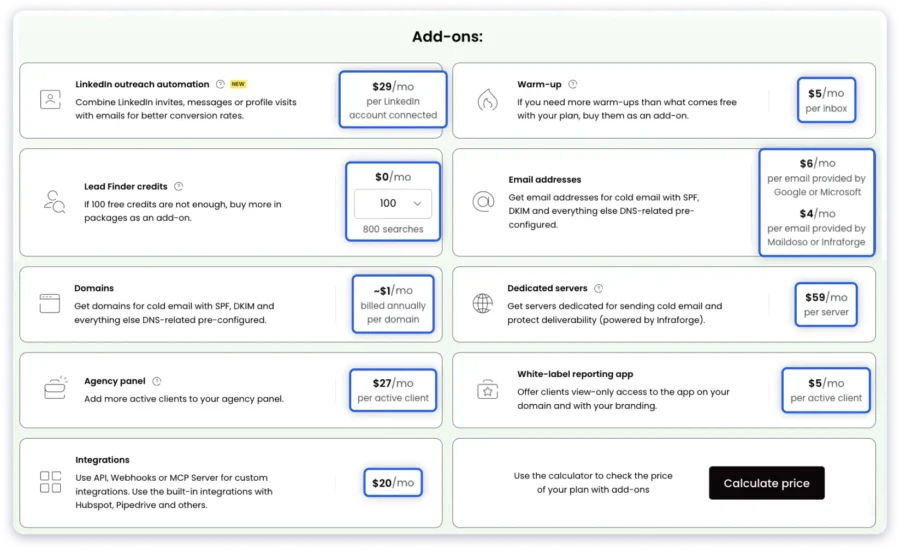
- Add-ons for basic features:
- Warm-up add-on; $5 per email account
- High agency add-on can be $384/year per client seat
- $27/month per active client
- $5/month for white label
- $20/month for native or custom integrations
There are no “hidden” costs in Woodpecker.
But make sure to use their calculator with the add-on cost for a clear figure.
My take:
For non-agencies, Woodpecker’s pricing works best for freelancers & small businesses.
Costs 3x higher to contact more than 2,000 prospects a month.
It can cost $300/year, higher than Saleshandy for basic features, even for non-agencies!
Saleshandy: Pricing & Cost Efficiency
You can get a 7-day free trial on any of Saleshandy’s plans, with zero limitations.

- Base monthly price: The Outreach Starter pack stands at $36
- Base annual price: Starter pack comes down to $25
Pros
- Costs $20/mo lower than Woodpecker Starter (for the same 2,000 active prospects)
- Unlimited prospects & unlimited email warm-up at no extra cost
- No charge per client; add unlimited
- Free phone number + email verification credits
Cons
- Advanced agency features are available in the Outreach Scale pack
- Lead finder credits cost $6 more for 1k credits, compared to Woodpecker
While the lead finder credits cost slightly higher,
what I liked is that these credits do not expire.
And I can still use them if my subscription ends!
I also do not have to pay per-client seat, for warm-up, or for native integrations.
| Aspect | Woodpecker | Saleshandy | Which is Better? |
| Base Monthly Price | $35 for 500 prospects | $36 for 2k prospects | Woodpecker |
| 2,000 Prospect Outreach | $45/month (annual plan) | $25/month (included in Starter) | Saleshandy |
| Extra Costs | Yes – warm-up, integrations, client seats, white label, etc. | No – warm-up, integrations, etc., come included with a plan | Saleshandy |
| Feature-Value Ratio | Pay extra for basic features | More cost-efficient for scale (1,000-2,000+ prospects) | Saleshandy |
| Overall Cost Efficiency | Cheaper only for <500 prospects | More cost-efficient for 2,000+ prospects | Tie |
| Long-Term Value | Very expensive with add-ons & scale | Better ROI – saves $300+/year for growing teams | Saleshandy |
2. Woodpecker vs Saleshandy: Outreach Campaign Management
For the second test, once I began using both tools,
I realized how differently they approach campaign management.
I evaluated Woodpecker and Saleshandy on these fronts:
• How easy is it to set up, organize, and manage multiple campaigns?
• Does it allow multi-account or multi-client management?
• What level of visibility do I have over campaign performance?
• Are there built-in deliverability & compliance safeguards?
• Can I perform bulk actions & automate campaign operations?
Woodpecker: Outreach Campaign Management
When I first logged into Woodpecker, it took a little while to get used to its layout.
The interface is minimalistic but a bit outdated for those looking for modern tools.
It took a few extra seconds for things to load,
And the navigation between sections was not as intuitive.
Once I got past that, the campaign management setup was surprisingly capable.
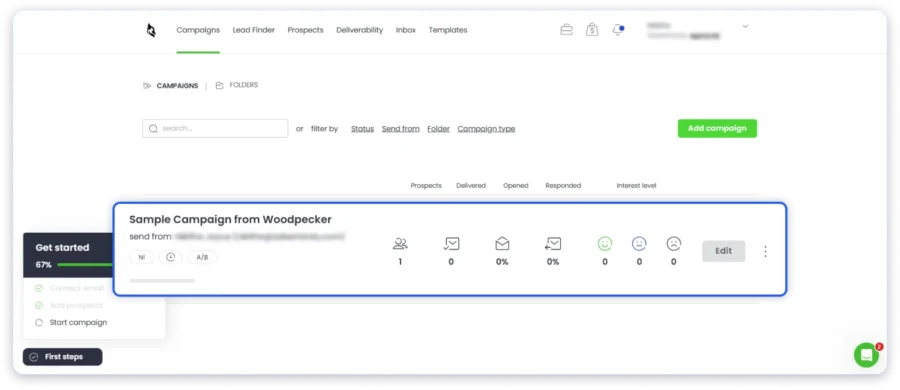
The tool lets you:
- Manage campaign schedules
- Set up conditioned follow-ups
- Add prospects
…all from one unified view!
It also shows a campaign summary once you have built your setup.
Best-suited plan for the above features: Growth plan for 30,000 prospects at $306/month or $459/month.
Add-ons:
- $27/month per active client (Agency add-on)
- $5/month per active client for white label reporting
- $20/month for integrations
Warm-up is free for up to 30 inboxes.
For 30,000 prospects (5 clients, white label, & integrations): $486/month
This is twice as costly as Saleshandy’s most premium plan (100k prospects)!
Pros
- Unified dashboards for campaigns and prospects
- Strong agency/client management tools
- Bulk campaign actions & domain audits at scale
- Centralized monitoring
Cons
- Almost 2 times as expensive as Saleshandy for similar features
- The interface feels a bit dated and slow
- Navigation can be unintuitive for first-time users
- Some basic features and integrations are paid add-ons
My take:
Woodpecker can be ideal if you need deep client control, but it gets very expensive.
For teams looking for advanced features at a reasonable fixed price, I recommend Saleshandy.
Saleshandy: Outreach Campaign Management
Saleshandy felt modern and intuitive. It was also extremely fast to set up!
Creating my first campaign took just a few minutes.
I uploaded prospects, connected my email, and set up follow-ups in one clean flow.
In the time it took me to understand Woodpecker,
I had already begun setting up my first campaign in Saleshandy!
Similar to Woodpecker, everything, from prospect tracking to analytics, is presented in a single, clean dashboard.

Yes, even on a campaign level.
I can check deliverability, open/reply rates, and campaign progress without switching tabs.
The best part is that Saleshandy’s base plan supports unlimited sender accounts.
Saleshandy’s bulk email operations also impressed me!
I could select multiple accounts at once to:
- Edit sending settings
- Hyper-personalize with AI
- Update signatures, associate clients
- Refresh setup scores
- Disconnect/delete accounts
Pros
- 2 times more affordable than Woodpecker for similar features
- Fast, intuitive, and modern dashboard
- Bulk email operations across multiple accounts
- Unlimited sending accounts even on the Starter plan
- Real-time campaign performance & insights
Cons
- Advanced agency setup requires the Outreach Scale plan
- Client-level view is limited on the base plan
Recommended plan: Outreach Scale ($139/mo) for 30,000 prospects.
Add-ons:
- $79 to verify 25,000 emails
- $57 for 1,000 credits to reveal extra email & phone numbers
- $23 for 15 inbox placement tests (or) $79 for unlimited inbox placement tests
The Outreach Scale plan also unlocks:
- Dedicated client management panel
- Bulk campaign actions
- Client-level analytics
- White-label branding
For 30,000 prospects (5 clients, white label, integrations, AND inbox placement):
Just $298 to $354 per month (unlimited inbox tests)
| Aspect | Woodpecker | Saleshandy | Who Wins? strong> |
|---|---|---|---|
| Ease of Setup & Campaign Management | Minimalistic; slightly outdated; slower setup; unified view | Modern, fast; start a campaign in minutes | Saleshandy |
| Multi-Account/Multi-client | Strong agency panel; bulk actions; separate prospect dashboard | Advanced client panel in Outreach Scale, smart dashboards | Woodpecker |
| Campaign Visibility | Centralized dashboard; campaign summary; domain audits | Real-time analytics, open/replies, campaign progress | Tie |
| Deliverability & Compliance | Free warm-up per plan; SPF/DKIM; spam checks | SPF/DKIM; spam checks; unlimited inbox warm-up; real-time monitoring | Saleshandy |
| Bulk Actions & Automation | Bulk campaign actions, conditioned follow-ups, and add-ons for integrations | Bulk email operations; conditioned follow-ups; hyper-personalization | Tie |
3. Woodpecker vs Saleshandy: Outreach Sequence Automation
For the third test on email sequence automation,
this is what I looked at:
• How easy is it to set up, organize, and manage multiple campaigns?
• Does it allow multi-account or multi-client management?
• What level of visibility do I have over campaign performance?
• Are there built-in deliverability & compliance safeguards?
• Can I perform bulk actions & automate campaign operations?
Woodpecker: Outreach Sequence Automation
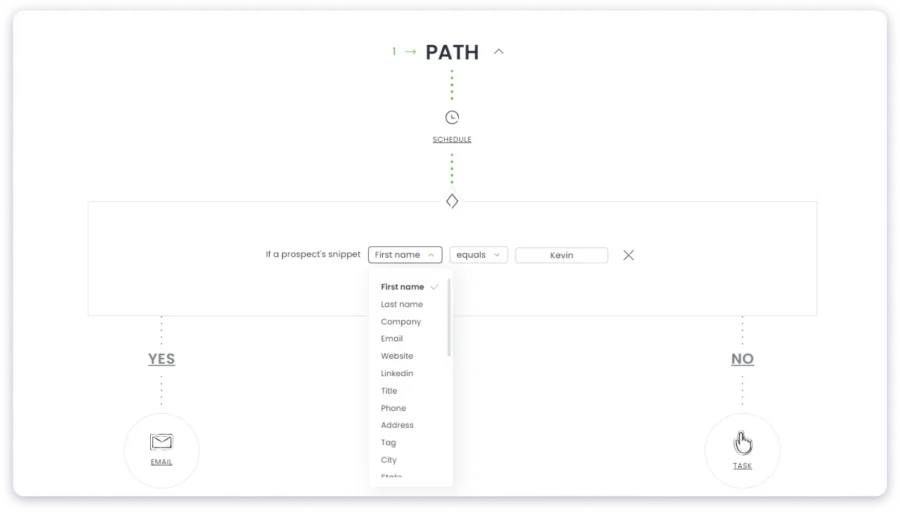
For sequence creation, Woodpecker supports:
- Conditioned follow-ups
- Yes/no logic across email, LinkedIn, calls, or SMS
Woodpecker’s AI also analyzes replies for interest levels.
But overall, the workflow for triggers and snippets took time to understand.
Also, it supports only five email variations.
I also have to give an AI prompt for each variation manually.
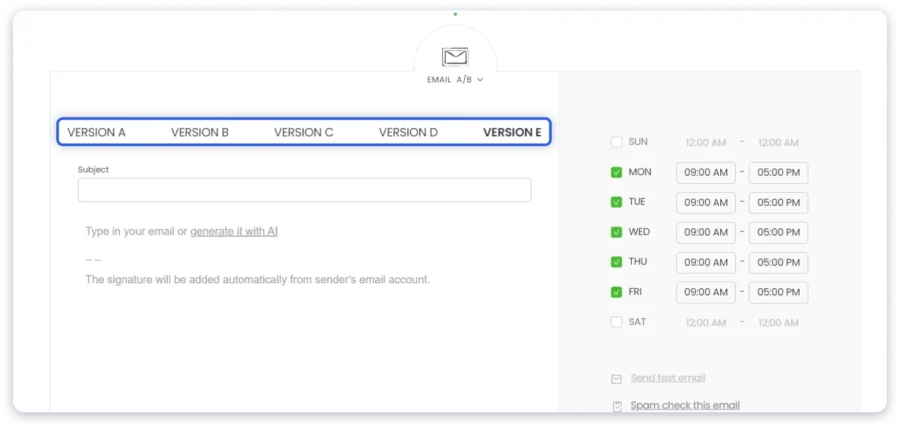
The AI-assist is very basic, and I was not satisfied with its email copy.
This is because Woodpecker’s AI does not analyze my:
business, product, offer, ICP, and goals – like Saleshandy does.
Pros
- Condition-based follow-ups across multiple channels
- Centralized inbox and deliverability monitoring
- Different tags for personalization
Cons
- Limited A/B testing with five variations; repetitive and manual
- No pre-built cold email templates
- Inadequate AI-assisted email copy
Saleshandy: Outreach Sequence Automation
Creating email sequences on Saleshandy was easier.
I can create three types of sequences on Saleshandy:
- Multi-step: Unlimited automatic follow-ups
- AI Copilot: Generate ready-to-launch sequences from ICP & offer inputs
- Conditional sequence: Triggered by opens, clicks, or replies

The AI Sequence Copilot genuinely impressed me with the quality of campaigns it generated.
Hyper-personalization is also easy:
It has merge tags, spintax, etc., and they are very easy to use!
Saleshandy has added a native dialer directly inside the platform.
I can add call steps in my sequences alongside email and LinkedIn. When I make a call, it runs right in the browser. No app downloads, no plugins.
Every call is automatically logged to the prospect’s CRM timeline, right next to emails and LinkedIn activity. Calls are recorded, transcribed, and summarized by AI.
So if I need to pick up a conversation days later, the full context is already there.
This matters for the comparison. One of the most common criticisms of Saleshandy was that it was email-only. That is no longer true.
Woodpecker supports LinkedIn steps (at $29/account/month as an add-on) and manual call tasks, but it does not have a built-in dialer. You still need a separate calling tool.
Dialer pricing: Starter at $23/month (annual), Pro at $55/month (annual). The first US phone number comes free with any plan.
With email, LinkedIn, calls, and WhatsApp all trackable in one CRM, Saleshandy is now a proper multichannel outreach platform.
Pros
- Condition-based follow-ups across multiple channels
- Centralized inbox and deliverability monitoring
- Different tags for personalization
Cons
- Unlimited AI variants & A/Z testing available from the Outreach Pro plan at $139/month
Use this quick table to instantly spot which platform performs better for your specific priorities.
| Aspect | Woodpecker | Saleshandy | Who Wins |
|---|---|---|---|
| Ease of Sequence Creation & Management | Supports conditioned follow-ups and yes/no logic; workflow for triggers and snippets is not very clear; basic AI assistance | Supports multi-step, AI Copilot, and conditional sequences; quick setup; minimal learning curve | Saleshandy |
| Hyper-Personalization & A/B Testing | Limited A/B testing (up to 5 variations); AI requires manual prompts; personalization tags available | Hyper-personalization via merge tags, spintax; 25+ AI variants at once; easy A/Z testing | Saleshandy |
| Automated Follow-ups (replies, opens, clicks) | Condition-based follow-ups supported; AI analysis limited; manual intervention needed | Automatic follow-ups triggered by opens, clicks, and replies; AI copilot assists | Saleshandy |
| Multichannel Steps | Supports email, LinkedIn, calls, SMS; workflow not very intuitive | Browser-based dialer with recording, transcription, AI call summary;WhatsApp and LinkedIn steps | Saleshandy |
| AI-Assisted Email Generation & Personalization | Very basic; does not analyze ICP, product, or offer; repetitive manual work | Generates sequences and personalized emails from ICP & offer; scale-friendly | Saleshandy |
4. Woodpecker vs Saleshandy: Scalability, Deliverability, and Warm-Up
For the fourth test, I analyzed how well they handle large-scale outreach.
This is without hurting the sender’s reputation or inbox placement rates.
Keep these five questions in mind when evaluating:
• Can the tool handle multiple domains, inboxes, and a daily high send?
• Does it actively monitor & protect my sender reputation?
• Is email warm-up automated, continuous, and domain-based (not just inbox-based)?
• Can I track sending health & deliverability scores for all accounts?
Woodpecker: Scalability, Deliverability, and Warm-Up
Woodpecker offers a lot of technical control but little automation beyond the basics.
It is functional, but I had to stay hands-on to keep things running.
Scalability
Woodpecker is designed to handle multiple accounts and campaigns.
But scaling can feel clunky after a point.
There is a loading issue that becomes constant once you reach 20+ accounts.
Real-time syncing also lags during large uploads.
A/B testing is also capped at five variants per campaign.
And there’s no API for true bulk cold emailing.
You will need Zapier or webhooks.
Deliverability also dips if you push volume aggressively.
This is because there is no auto throttling or account failover.
Deliverability
- SPF/DKIM checks
- Spam testing
- Bounce monitoring
- Adaptive sending
Woodpecker includes useful tools like:
But most of these only flag if there is a problem, and will not fix them automatically.
During my test, inbox rates dropped when I switched between domains.
The recovery required manual SPF/DKIM edits.
Bounce handling also needs manual review for soft bounces, and this slowed my campaign.
Small teams can benefit from randomized send times & custom tracking domains.
But for larger campaigns, you would need someone to monitor metrics manually.
Warm-Up
The warm-up tool is an add-on at $5 per inbox. But I found it quite manual.
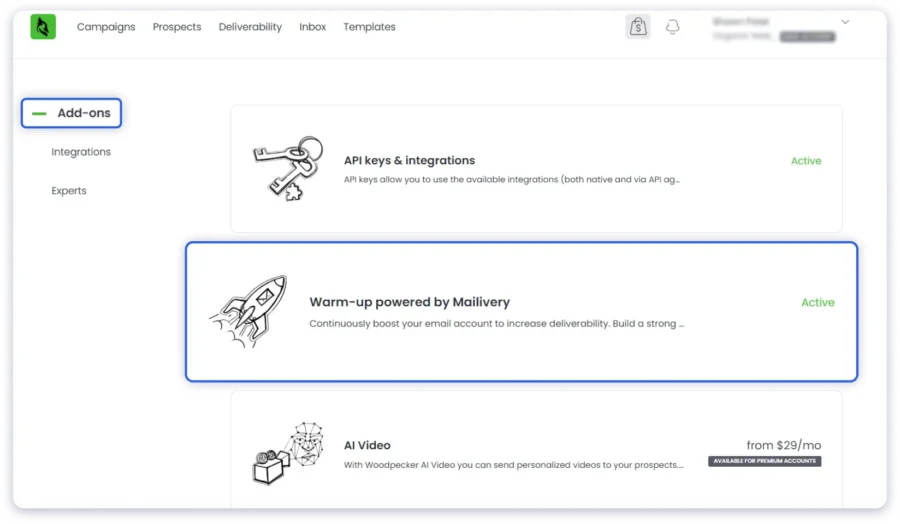
It does not auto-generate warm content or simulate natural replies beyond basics.
There is also no real-time scoring or reputation insights. You just have to wait and observe metrics.
Pros
- Granular control over each campaign
- Separate domain & sender management
- Basic deliverability checks are built in
Cons
- Manual fixes for issues (SPF/DKIM, bounces, etc.)
- Add-on costs for warm-up
- Slower interface with 20+ accounts
- No automated scaling/deliverability safeguards
Saleshandy: Scalability, Deliverability, and Warm-Up
Saleshandy’s features to protect email deliverability and simplify warm-up impressed me.
Scalability
From a scaling perspective, Saleshandy is excellently designed.
It supports:
- Unlimited sending accounts (even in the base plan)
- Strong sender rotation
- Tiered higher volumes for agencies/larger teams
In my testing, managing multiple accounts and scaling to large lists,
Felt more fluid compared to Woodpecker.
But you may notice some interface slowdowns when scaling at an enterprise level.
Deliverability
Saleshandy has built-in deliverability tools:
- Automatic sender rotation
- Spam-word detection
- Sequence scoring (domain auth, list health, content)
The detailed deliverability metrics really stood out, compared to Woodpecker!

Their Inbox Radar allows me to test how my emails land across providers before I go live.
This is an important, smart safety net for cold emails.
That said, the tool still depends on your infrastructure (domains, ESPs) & best practices.
Warm-Up
I found that Saleshandy made warm-up easier than Woodpecker.
You can ramp volume slowly, automatically manage sending schedules,
And even warm multiple accounts in parallel.

In practice, I found this very smooth.
I do not have to build everything from scratch.
Still, it is not an entirely “set and forget” warm-up.
You can monitor engagement and adjust if replies are low or volumes jump too fast.
Pros
- Built-in advanced warm-up & deliverability testing
- Automated sender rotation & sequence scoring
- Handles multiple domains/inboxes easily
- Modern interface
Cons
- Full agency-level reporting only on higher plans
- Occasional UI lag with enterprise-level volume
This table helps you quickly compare both tools side by side:
| Aspect | Woodpecker | Saleshandy | Winner |
|---|---|---|---|
| Multi-domain, multi-inbox handling | Yes, but it can slow down after 20+ accounts | Yes, offers advanced warm-up, email deliverability, and inbox radar | Saleshandy |
| Active deliverability monitoring | Yes - Flags issues only; manual fixes needed | Yes - Auto-rotation, scoring & inbox testing | Saleshandy |
| Email warm-up automation | No manual; an add-on cost | Yes - built-in, automated, domain & inbox based | Saleshandy |
| Deliverability protection & recovery | Reactive (you fix issues) | Preventive (detects & mitigates early) | Saleshandy |
| Sending health tracking | Basic bounce/spam tests only | Centralized performance dashboard with scores | Saleshandy |
5. Woodpecker vs Saleshandy: Personalization Capabilities for Emails
For the fifth test in our evaluation, I tested personalization capabilities.
I prioritized how well each tool lets you go beyond basic features:
• How deep can I personalize beyond {{First Name}} and {{Company Name}}?
• Can I preview or test personalization before sending?
• Does it allow personalization across sequences, not just the first email?
• Can I use data from custom fields or external sources (CSV, CRM, LinkedIn) to personalize?
• Does it help me automate email personalization while sounding human?
Woodpecker: Personalization Capabilities for Emails
When I explored Woodpecker’s personalization setup, I found it surprisingly detailed.
The editor gives you 20+ dynamic variables.
This has all the basics {{First Name}} and {{Company}} to {{LinkedIn URL}}.
To personalize further, you can set up your own variable (or “Snippet”).
You do not have to switch tools or add code.
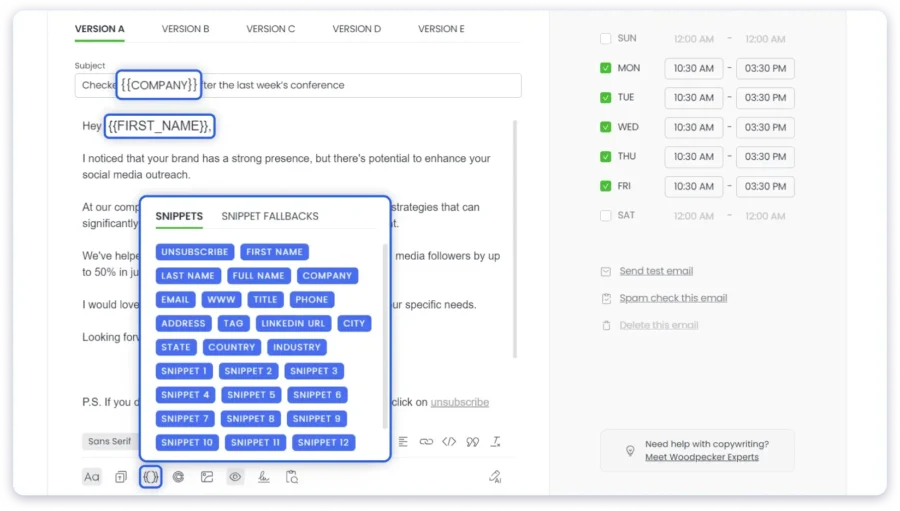
What stood out most was its conditional logic (if/else) system.
For example, you can build your own rules like:
“If {{Industry}} = ‘SaaS,’ mention {{Snippet}}”
But you have to set your own Snippets individually. You can scale easily once done.
You get a live personalization preview only before sending.
So you can miss variables or formatting errors, especially when sending in bulk.
But I was disappointed with their basic AI content suggestion.
I have to manually enter my ICP, context, and product offering for the AI in every email.
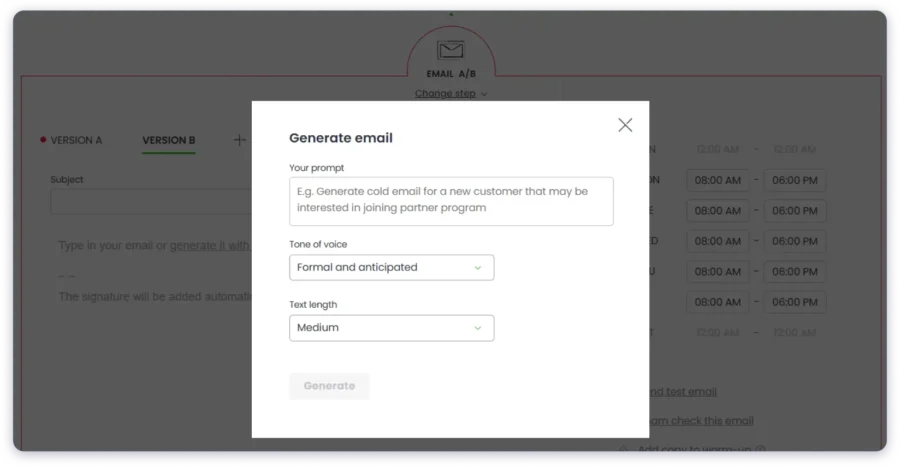
This is also why:
If a prospect clicks or replies, my email copy cannot adapt mid-sequence without manual updates.
Lastly, it integrates well with external data.
You can upload CSVs with custom fields or sync CRM data from HubSpot or Salesforce.
Pros
- Good personalization with 20+ dynamic variables and conditional logic
- Easy A/B testing of personalized variants
Cons
- No behavioral or AI-driven personalization
- Mobile preview and sync delays
- AI content suggestion is very basic
My take?
Woodpecker does nail the structured side of personalization.
But it lacks the creative intelligence of newer cold email platforms these days.
Saleshandy: Personalization Capabilities for Emails
Comparatively, Saleshandy’s email personalization features felt more like an intelligent system.
With its AI, you can make every cold email sound like you wrote it yourself.
You just have to enter the inputs once.
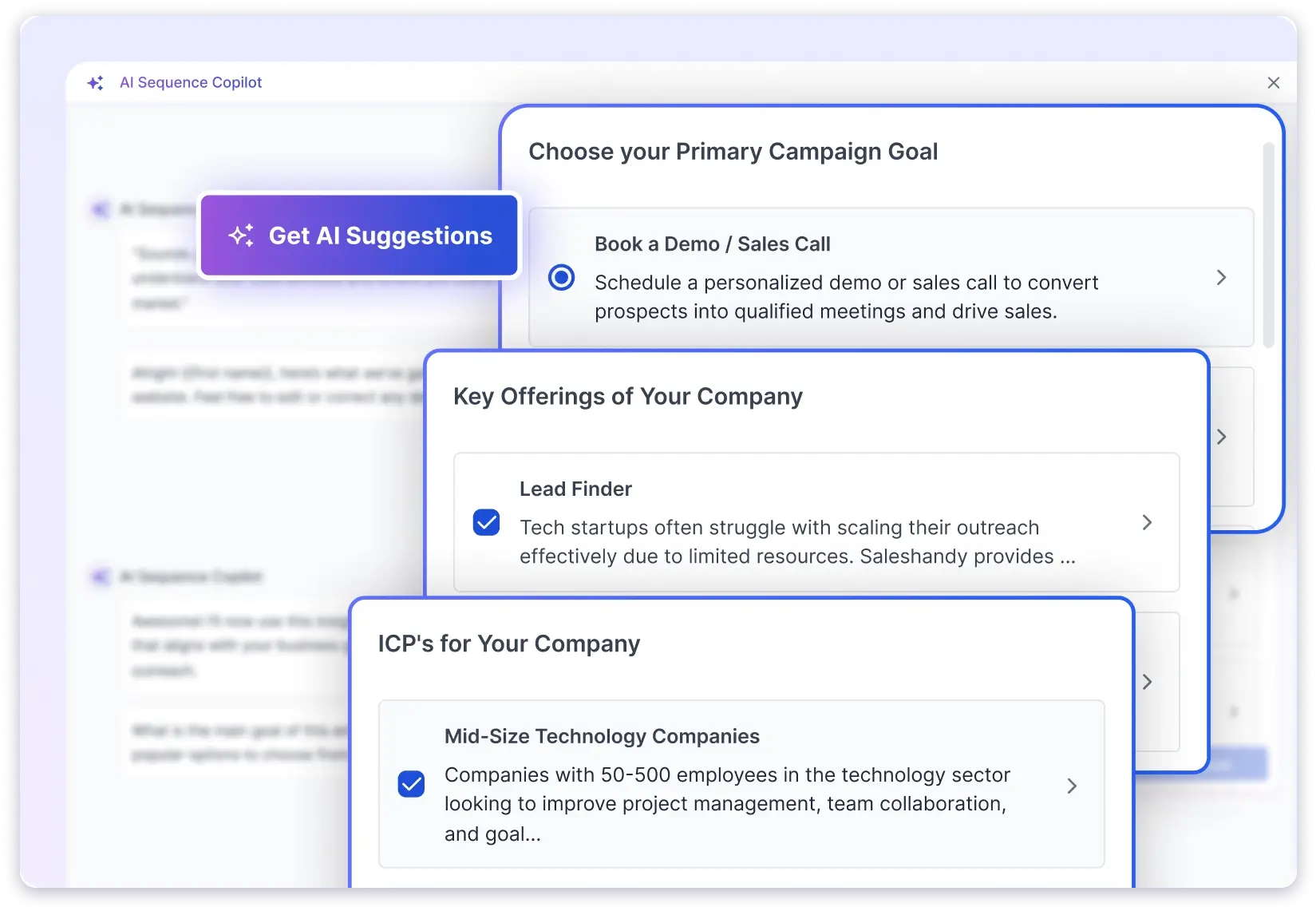
I could use 30+ merge tags and dynamic fields.
With basics, it also has advanced tags:
- {{Prospect Overview}}, {{Company Revenue}}, etc.
- Sender tags like {{SenderFirstName}}, etc.
- Time-based tags such as {{CurrentDate + N}}, {{Current Date}}, etc.
- Calendar-based tags for {{NextWorkingDate}}, {{NextQuarter}}, etc.
I can randomize greetings and sign-offs to improve my reply rates and inbox placement.
One can save hours of manual personalization!

I loved their ‘Spin Syntax,’ where it automatically creates variations of sentences or words!
I can generate up to 26 unique email variations from a single template.
Saleshandy’s conditional personalization, or Subsequence, is a lifesaver.
It automatically adapts a sequence based on each prospect’s behavior/attributes.
Think of it like:
- If replied = interested -> Wait ‘n’ days -> move to value subsequence
- If open count > 5 AND if they are tagged ICP -> trigger follow-up subsequence
- If tag = French -> move to French language subsequence
It is a smart audit in the Content guide that grades personalization.
It also flags repetitive phrases and spammy words.
To boot, I can add a pre-header or an email preview text.
Pros
- 30+ merge tags, including advanced contextual and time-based fields
- AI variant generator reduces repetitive phrasing across large sends
- Deep conditional logic for role, company, and different triggers
- Randomized greetings, sign-offs, and Spin Syntax for 50+ email variations
- Real-time previews and content scoring
- Pre-built templates library
Cons
- Needs good ICP, product, and offer input before personalizing
- Setting up conditional flows may take time for first-time users
Quickly scan this table to see which platform truly delivers more value for your specific use case.
| Aspect | Woodpecker | Saleshandy | Who Wins? |
|---|---|---|---|
| Deep Personalization | 20+ dynamic variables; custom snippets to define | 30+ merge tags and variables; advanced contextual tags; randomization; 50+ email variations | Saleshandy |
| Email Preview & Test Personalization | Yes – but no real-time preview | Yes – real-time preview with Content Guide scoring | Saleshandy |
| Personalization Across Sequences | No – it cannot auto-adapt based on opens or replies; requires manual tweaks | Yes – subsequence logic adapts sequences automatically | Saleshandy |
| Extract Data From Custom Fields or External Sources | Yes | Yes | Tie |
| Automate Email Personalization | Partially – Manual setup required; basic AI suggestions | Yes – AI + Spin Syntax; 100s of human email variations | Saleshandy |
6. Woodpecker vs Saleshandy: Built-In Platform Integrations
In the sixth test, I evaluated both tools’ platform integrations.
Some important questions I looked at:
• Does it integrate directly with my CRM or lead source?
• Can it sync data both ways (not just import)?
• Does it enrich or verify data during import?
• Can integrations trigger automated actions?
• Are integrations stable and scalable for team workflows?
Woodpecker: Built-In Platform Integrations
Woodpecker’s integrations are selective, but deep.
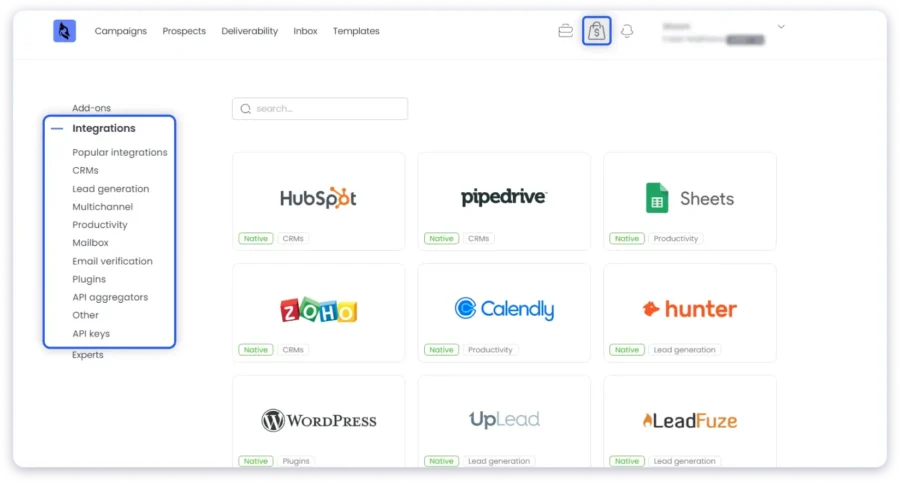
I can connect my HubSpot and Pipedrive accounts in just a few clicks.
Replies automatically update deal stages. That is a big win.
Their lead integration syncs also felt native and quick for lead imports.
Unfortunately, syncing happens hourly, not instantly.
For pipelines that move fast, this lag stands out.
Pros
- Strong, two-way CRM syncs (HubSpot, Salesforce, Pipedrive)
- Simple setup; GDPR safe shared inboxes
- Zapier/webhooks open 1,000+ app connections
Cons
- Integrations are a separate add-on, at $20/month
- Syncs hourly; no real-time
- Scaling beyond 50 users may need a custom setup
Saleshandy: Built-In Platform Integrations
Saleshandy also integrates well and automates across systems.
Its native links to HubSpot, Salesforce, Zoho, Pipedrive, Persana, etc.
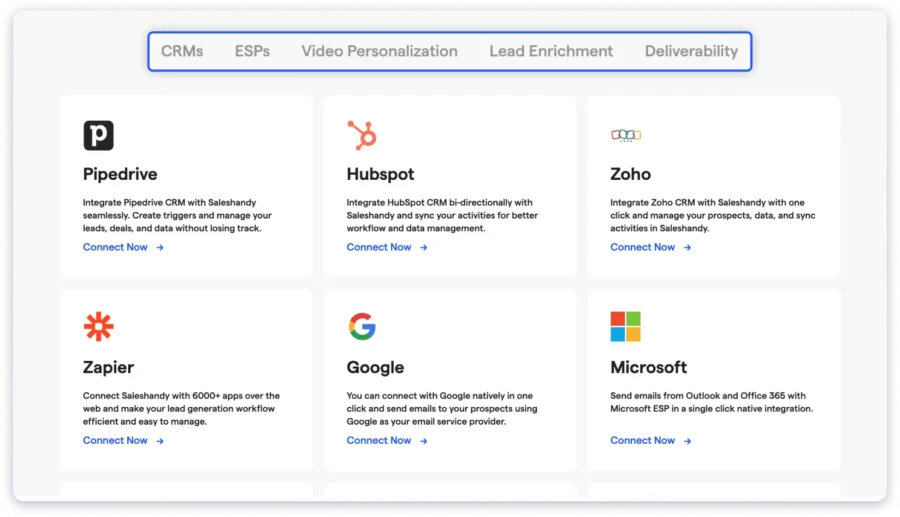
Once I integrated Slack and Close via Zapier, I could build logic-based actions.
For example:
If a reply comes in → Auto update Salesforce deal → Ping Slack → Start subsequence
It also features built-in lead sourcing with Lead Finder, so I did not have to rely on external imports.
Saleshandy’s AI also recognized data from enrichment tools and triggered next steps automatically.
MCP (Model Context Protocol) lets you control your Saleshandy account from AI tools like Claude, ChatGPT, or n8n using natural language prompts.
You can create sequences, pull reports, or manage prospects without opening the Saleshandy dashboard.
For teams that already work inside AI assistants, this removes a layer of context-switching.
Woodpecker does not currently offer either of these.
Pros
- Wider integration coverage
- Real-time, event-based automations
- Built-in Lead Finder + enrichment on import with integrations
- No add-on or plan restrictions to use integrations
Cons
- Shared inbox permissions need a higher plan
This table makes it easy to identify which tool performs better — feature by feature.
| Aspect | Woodpecker | Saleshandy | Who Wins? |
|---|---|---|---|
| Built-in CRM | None; prospect data lives in campaign lists; needs external CRM + $20/mo integration | Native outbound CRM with Kanban pipeline, activity timeline, 1:1 emails, tasks, notes | Saleshandy |
| Prospect Activity View | Limited to campaign-level stats | Full chronological timeline per prospect (emails, calls, LinkedIn, notes, tasks) | Saleshandy |
| Custom Fields & Views | Not available natively | Custom fields (date, number, text, currency) + saved views per role | Saleshandy |
| CRM Cost | $20/mo integration add-on + external CRM subscription | Included free with all plans | Saleshandy |
7. Woodpecker vs Saleshandy: B2B Lead Database
The seventh test was focused on Woodpecker and Saleshandy’s B2B lead database.
What did I look at?
• How accurate and fresh is the data?
• How well can I segment and target my Ideal Customer Profile (ICP)?
• Does the tool integrate smoothly with my CRM, email system, and workflows?
• Are there verification/enrichment features built in?
• What are the pricing and usage limits for growth?
Woodpecker: B2B Lead Database
Woodpecker’s Lead Finder add-on gives access to over 1 billion B2B emails.
They are aggregated from trusted providers like People Data Labs, Prospeo, Datagma, etc.
The accuracy is also impressive; users report 92% to 95% valid emails in core markets (US/EU).
I liked that its data is refreshed every 30 to 45 days with job change signals via Datagma.
I could apply 8-10 filters to define my ICP.
Since there is no AI-based auto-suggestion for ICPs, I found it a bit manual.
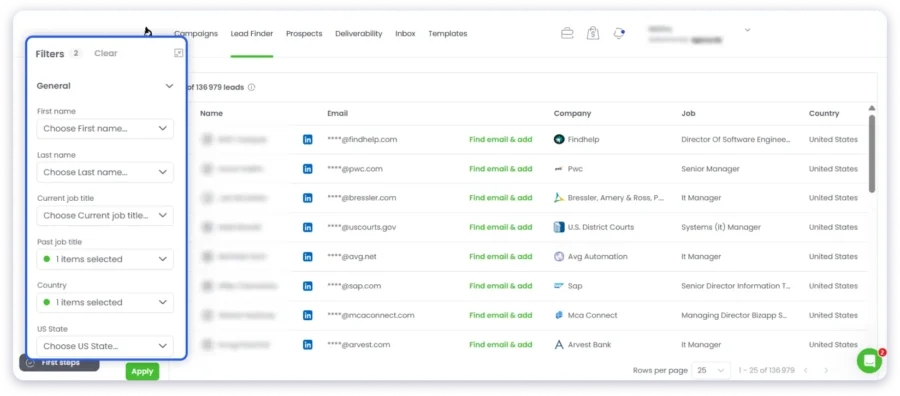
Since email verification is completely free, all emails are validated before a campaign.
While titles and firmographics are enriched,
phone data is not supported unless using third-party tools.
For pricing, you get 100 free credits/month, with paid tiers at $49 per 1,000 leads.
This is pretty affordable for SMBs doing small to mid-scale prospecting.
Pros
- Massive 1 billion+ email contact pool
- Free email verification
- CRM integrations available with HubSpot/Pipedrive
Cons
- Manual filtering; lacks AI-driven ICP suggestions
- No native phone number verification
- Hourly syncs (not real-time)
Saleshandy: B2B Lead Finder Database
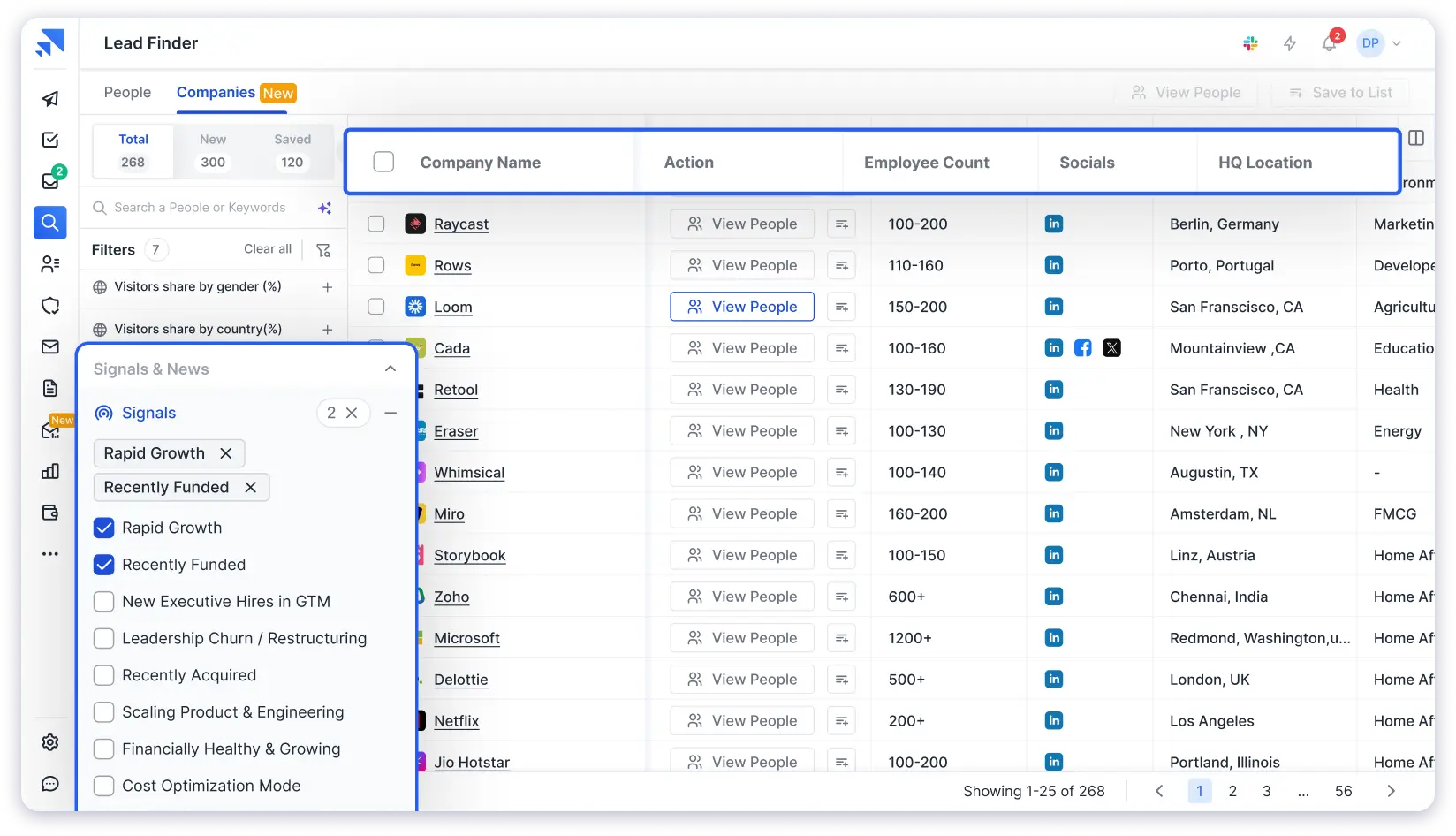
Saleshandy’s Lead Finder gives you access to an 800M+ contact database with 60M+ companies.
What stood out to me was the AI Lead Search.
I typed a plain-English description of my ideal prospect, and it generated a filtered, verified lead list without me touching a single filter manually.
That said, the 75+ advanced filters are still there if you want granular control.
You can filter by company name, location, company size, role and seniority, revenue, funding stage, tech stack, and even buying signals and news data.
The other thing Woodpecker does not offer is waterfall enrichment. Saleshandy cross-references multiple data providers to surface the most accurate email and phone number for each contact.
Instead of getting one data source’s best guess, you get a layered verification process that catches what a single provider would miss.
Credits do not expire, even if your subscription ends.
Moreover, AI Prospect Enrichment uses LLM models and live web search to pull context about each prospect before outreach.
Think recent company news, role changes, or LinkedIn activity. This data feeds into personalization, so cold emails reference something specific about the prospect instead of relying on generic merge tags alone.
You also get 50 free credits when you sign up to test data quality before committing to a paid plan.
My take:
Woodpecker has a larger raw database. But Saleshandy’s data quality layer with waterfall enrichment and buying signals gave me more usable contacts per search.
When I compared 500 leads from each tool, Saleshandy’s bounce rate was noticeably lower.
Pros
- 800M+ contacts with real-time verification
- AI Lead Search for plain-English prospecting
- Waterfall enrichment across multiple data providers
- Buying signals and news filters for intent-based targeting
- 50 free credits on signup; credits never expire
Cons
- Per-credit cost is slightly higher than Woodpecker ($57 vs $49 per 1k reveals)
- Database size is smaller than Woodpecker’s claimed 1B+
For anyone deciding between the two, this table summarizes the key takeaways at a glance.
| Aspect | Woodpecker | Saleshandy | Winner |
|---|---|---|---|
| Database Size | 1B+ emails | 800M+ contacts, 60M+ companies | Woodpecker |
| Search & Filtering | 60+ filters; manual ICP setup | 75+ filters + AI Lead Search (plain-English queries) | Saleshandy |
| Data Enrichment | Free email verification; single-source | Waterfall enrichment across multiple providers; buying signals & news data | Saleshandy |
| Free Credits | Not specified | 50 free credits on signup | Saleshandy |
| Credit Expiry | Credits tied to active plan | Credits never expire | Saleshandy |
8. Woodpecker vs Saleshandy: Agency and Team Collaboration Tools
In the eighth test on agency/team handling, I asked five important questions:
• How well can I manage multiple clients or projects without data overlap?
• Can different team members collaborate on the same campaign?
• Does the shared inbox centralize communication?
• Does it scale cleanly when my agency doubles its clients/adds new team members?
Woodpecker: Agency & Team Collaboration Tools
Woodpecker is designed to keep outreach organized,
with shared inboxes, role permissions, and notifications.
For large agencies, Woodpecker has a slight edge.
Its Agency Panel add-on ($27/month per active client) gives full control.
It provides features like:
- Bulk campaign actions
- Separate prospect databases
- Domain audits
- Global blacklist
- Centralized billing
Its multi-client dashboard stores all client campaigns, replies, bounces, and metrics in one place.
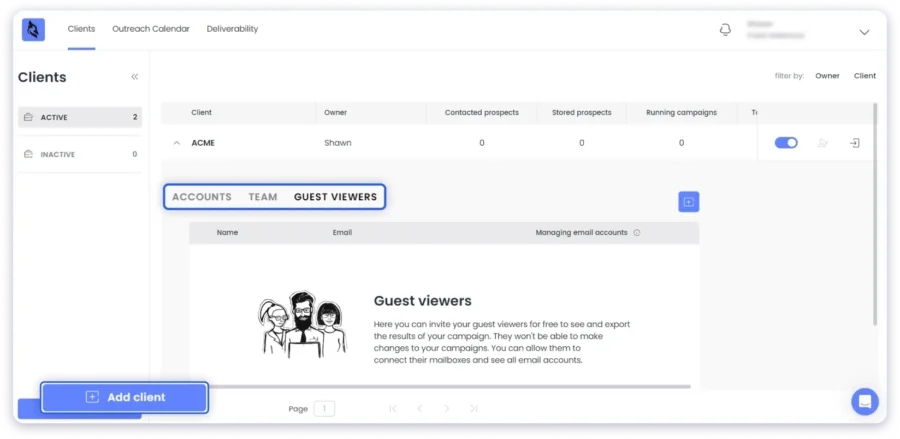
Each account is isolated to prevent data leaks.
And admins can assign access per role.
Clients can also get view-only dashboards to track their performance.
You can also toggle between client campaigns instantly, and sequence sharing across teams is easy.
In practice, I found this setup ideal for small to mid-sized agencies (5-25 clients).
But once you cross 25+ clients, dashboard load times increase. Filters also feel limited.
Let me walk you through some quick pros and cons:
Pros
- Centralized dashboard
- Unlimited team members for free
- White-label reporting for client transparency
- Shared inbox for follow-up management
Cons
- Dashboard slows down beyond 25-30 clients
- Heavy Zapier reliance for full workflow automation
- Add-ons (white label, per client) increase to $35 per active client
Saleshandy: Agency & Team Collaboration Tools
Saleshandy is built for agencies and scaling outreach teams that
manage multiple clients and email accounts.
I could manage unlimited workspaces and clients under one account.
No per-seat cost like Woodpecker.
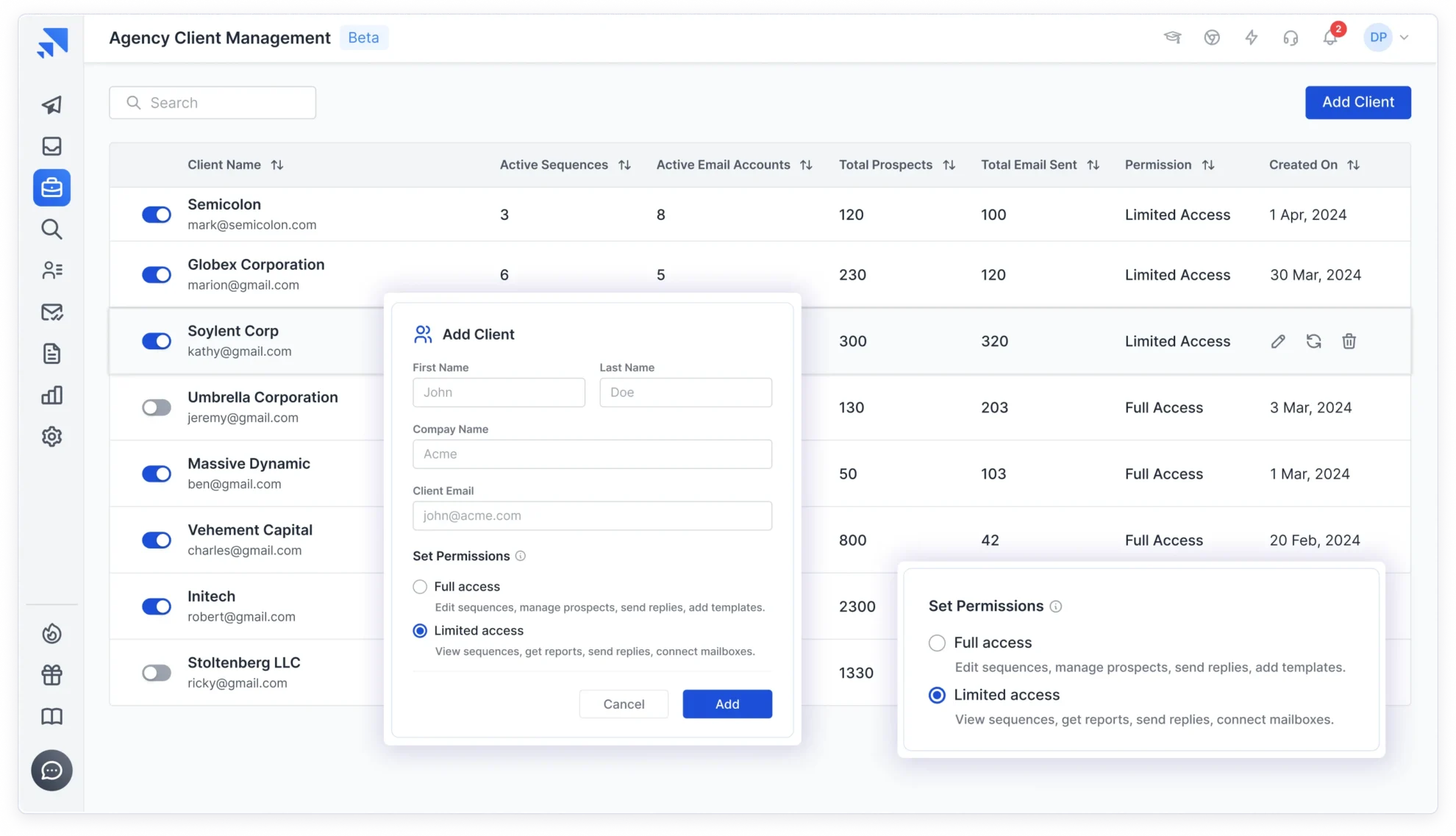
Its shared inbox centralizes replies from all mailboxes,
and automatically detects intent (positive/negative/OOO).
White labeling lets agencies brand their portals, reports, & sending domains.
PS: Saleshandy also has a mobile app! You can manage client conversations on the go.
Pros
- Connect unlimited mailboxes, clients, and team members
- Hyper spintax generator for unique personalization
- Smart sequence score to monitor
- White-label setup at no extra cost
- Native integrations with no recurring add-on cost
Cons
- White label setup requires the Pro plan
- Webhook/API syncs may lag slightly
Compare the two tools in one place. A quick way to find which one truly aligns with your priorities.
| Aspect | Woodpecker | Saleshandy | Who Wins? |
|---|---|---|---|
| Client & Project Management | Agency Panel add-on ($27/client); isolated databases; global blacklist; centralized billing | Unlimited clients; built-in data isolation | Woodpecker for deeper control, Saleshandy for scale |
| Team Collaboration & Roles | Role permissions: shared sequences, view-only dashboards for clients | Unlimited team members; shared inbox; visibility for scaling teams | Tie |
| Inbox & Communication Handling | Shared inbox for manual intervention; lacks automation | Unified Inbox powered by AI; detects sentiment; auto-sorts replies | Saleshandy |
| Scalability & Performance | Stable performance for small/mid teams; dashboard lags reported for 25+ clients | Large-scale setup; occasional slow UI at very high volumes | Saleshandy |
9. Woodpecker vs Saleshandy: Prospect Management & Reply Management
For the ninth test, I realized this is where most teams either save hours or lose them.
• What types of data can I track?
• How easy is it to interpret reports?
• Does the platform use AI for reporting?
• How flexible are the reports in terms of exports and team usage?
• How do the systems handle multiple campaigns and large data sets?
Woodpecker: Prospect Reply Management
When I explored Woodpecker’s reply management,
It felt built for teams who prioritize control.
The Inbox brings together all replies, bounces, and OOO emails.

Once a reply lands, the sequence immediately stops.
That is huge if you want to avoid sending follow-ups after someone responds.
Replies are tagged based on interest level. You can even filter by campaign level or sender.
For agency teams, shared inboxes and comment access were handy.
Each teammate can easily view or respond.
Pros
- Auto-stops sequences instantly after a reply
- Unified inbox across all mailboxes and clients
- Shared inbox for team collaboration
- Works smoothly with HubSpot, Pipedrive, and Salesforce
Cons
- Needs manual updates and monitoring
- No AI sorting or sentiment detection
- Slight delay in Zapier-based notifications
Saleshandy: Prospect Reply Management
Saleshandy’s reply management felt like the next step up.
The Unified Inbox pulled replies from all connected mailboxes.
It also categorizes them instantly with built-in AI detection.

It auto-pauses sequences, detects out-of-office messages, and flags follow-up opportunities.
Beyond reply handling, Saleshandy now includes a built-in outbound CRM that replaced the old Prospects tab.
This was the upgrade I did not expect when I reopened the platform. Instead of rows in a table, prospects are now organized in a Kanban-style pipeline.
I can create custom stages like Not Contacted, Replied, Interested, Follow-up Needed, or Closed, and drag prospects between stages as conversations progress.
Each prospect card opens into a full activity timeline. Every email sent, reply received, open, click, note, task, and sequence activity shows up in one chronological view.
Before I follow up with anyone, I already know exactly what happened last and what needs to happen next.
I can also send 1:1 emails directly from the CRM, outside of any sequence.
If a prospect replies to a cold email and needs a custom response, I handle it right there.
Tasks and notes round it out. I can create follow-up tasks for calls, LinkedIn messages, or WhatsApp. I can tag team members, and pin important fields like deal value, demo date, or funding stage.
Woodpecker does not have anything like this built in. Prospect data in Woodpecker lives inside campaign lists.
If you want CRM-level tracking, you need HubSpot, Salesforce, or Pipedrive on top of it, plus the $20/month integration add-on.
With Saleshandy, the CRM is native. No extra cost. No sync delays. Every touchpoint across email, calls, and LinkedIn lives in one place.
Pros
- Kanban pipeline with custom stages (drag-and-drop)
- Full prospect activity timeline (emails, replies, opens, clicks, notes, tasks, calls)
- 1:1 emails from inside the CRM
- Custom fields and multiple saved views per role (SDR, AE, manager)
- No extra cost; included with all plans
Cons
- Not a full-fledged sales CRM (no deal revenue forecasting or pipeline reporting yet)
- Works best when you are already running sequences inside Saleshandy
This breakdown helps you instantly recognize each tool’s strengths and trade-offs.
| Aspect | Woodpecker | Saleshandy | Who Wins |
|---|---|---|---|
| Built-in CRM | None; prospect data lives in campaign lists; needs external CRM + $20/mo integration | Native outbound CRM with Kanban pipeline, activity timeline, 1:1 emails, tasks, notes | Saleshandy |
| Prospect Activity View | Limited to campaign-level stats | Full chronological timeline per prospect (emails, calls, LinkedIn, notes, tasks) | Saleshandy |
| Custom Fields & Views | Not available natively | Custom fields (date, number, text, currency) + saved views per role | Saleshandy |
| CRM Cost | $20/mo integration add-on + external CRM subscription | Included free with all plans | Saleshandy |
10. Woodpecker vs Saleshandy: Analytics and Performance Reporting
Finally, for the last test, I looked at each tool’s reporting capabilities.
• What types of data can I track?
• How easy is it to interpret reports?
• Does the platform use AI for reporting?
• How flexible are the reports in terms of exports and team usage?
• How do the systems handle multiple campaigns and large data sets?
Woodpecker: Analytics & Performance Reporting
When I explored Woodpecker’s reporting, it felt like a clean control room.
Every metric, from opens to unsubscribes, is all lined up with a campaign-level breakdown.

You can track:
- Open rates (clicked, opt-out)
- Invalids, bounces, delivered, and sent
- Response rates (positive, neutral, or negative sentiment)
For agencies, shared dashboards and permission-based access were helpful.
Each client’s results can be viewed separately.
The CSV and PDF formats were great for client summaries.
But you have to generate them manually.
Pros
- Tracks opens, clicks, bounces, replies, and unsubscribes in real time
- Delivers advanced deliverability metrics (spam rates, domain health)
- A/B test reporting helps isolate winning variants
- CRM integration with HubSpot and Salesforce for unified insights
- Easy exports and filters for agencies
Cons
- Basic visualizations
- No AI or predictive analytics
- Manual export setup for trend analysis
Saleshandy: Analytics & Performance Reporting
Saleshandy’s analytics feel far more modern.
Right from the dashboard, I saw performance snapshots in colorful, visual blocks.
Yes, along with funnel-style breakdowns and reply trends.

You can track:
- Bounces and emails sent
- Contacted prospects
- Open rates
- Reply rates
- Unsubscribe rates
- Positive sentiment and negative sentiment
I can filter my campaign analytics based on the above filters.
I could also view reports by prospect and by emails sent.
Pros
- Tracks opens, clicks, bounces, replies, and unsubscribes in real time
- Sentiment tracking shows prospect intent for smarter follow-ups
- Sequence-level and email-level insights with visual dashboards
- AI highlights best-performing templates and sequences
Cons
- Occasional delays in email tracking updates
A quick side-by-side view to help you spot the stronger tool without reading every detail.
| Aspect | Woodpecker | Saleshandy | Who Wins |
|---|---|---|---|
| Depth of Metrics | Opens, clicks, replies, bounces, deliverability, ROI estimates | Opens, clicks, replies, conversions, sentiment analysis, ROI forecasts | Tie |
| Visualization & Usability | Standard charts & tables; functional but basic | Funnels, Sequence Score, visually intuitive dashboards | Saleshandy |
| AI & Predictive Insights | Limited predictive bounce insights, no AI grading | Predictive trends, AI performance grading | Saleshandy |
| Export & Integration | CSV/PDF, CRM sync, detailed filters | CSV/PDF/Excel, CRM sync, white-label | Tie |
| Scalability & Reliability | Handles campaigns reliably; slower exports for very large datasets | Handles multiple campaigns well; Pro+ for full AI; minor sync lag | Saleshandy |
Verdict? Scale Faster With Saleshandy, Control Manually With Woodpecker
Both Woodpecker and Saleshandy are great cold email platforms.
But when you compare them across:
Deep personalization, prospect reply management, and overall workflow, Saleshandy pulls ahead.
It stands out especially in:
- AI-driven personalization
- Intelligent prospect reply management
- Advanced analytics, filters, and performance dashboards
- Smooth client and team management at no extra cost
Woodpecker is a good choice for agencies that prioritize manual control.
It works well for those with compliance-heavy workflows.
But since my original comparison, Saleshandy has closed the gaps that used to hold it back.
It now has a native outbound CRM with Kanban pipeline and prospect timelines.
A built-in browser dialer with AI call summaries. And a significantly upgraded Lead Finder with 800M+ contacts, AI search, and waterfall enrichment.
For teams that want one platform for finding leads, reaching them across email, calls, and LinkedIn, and managing every conversation in a single view, Saleshandy is the more complete option today.
Woodpecker still works well if you need a lightweight, email-focused tool with strong agency panel controls.
But the feature and pricing gap has widened considerably since my last review.
Woodpecker Vs Saleshandy: FAQs
1. Is Saleshandy a good alternative to Woodpecker in 2026?
Saleshandy is the best alternative to Woodpecker. It allows unlimited mailboxes and clients across many plans, whereas Woodpecker limits or charges extra for them.
2. Which is better for cold email outreach: Woodpecker or Saleshandy?
Woodpecker is better for detailed control and more conservative growth. Saleshandy is better for scalability, ease of use, and multiple account management.
3. How does Woodpecker compare to Saleshandy for agencies?
Saleshandy allows unlimited clients/mailboxes, white-label options, more automation for reply tracking, and AI prioritization. It is best for agencies scaling fast. Woodpecker is more focused on controlling deliverability. It fits agencies that want to keep compliance tight, perhaps fewer clients, but more control per account.
4. What are the key differences in pricing between Saleshandy and Woodpecker?
Saleshandy starts around $25/month on an annual plan, for 2,000 contacted prospects. Woodpecker is slightly expensive, at $45/mo on a yearly plan. Saleshandy offers better value for money, while Woodpecker costs more and requires add-ons to achieve a similar scale.
5. What is the best affordable Woodpecker alternative for cold email?
Saleshandy is the best affordable alternative to Woodpecker for many users. Its combination of unlimited mailboxes/clients, AI, automation, and decent pricing makes it reliable. If you have the budget and want a platform that can replace and improve on Woodpecker’s offerings, Saleshandy is the best option.